Meet The Author

Main Uddin is one of the pioneer blogger cum e-marketer from North East India(Assam).He is also a Skilled web Developer and regular columnist for various news portals around the globe.Read More

author

25 Best Blogging Platform For Personal & professional Blogging in 2020

Leave a Comment
Choosing the best platform is important if you want to build a successful blog. How do you know which blogging platform is best? What should one search for?
If you want to create your own blog, but don't know how to choose the best blogging platform of 2020 to fit you and your needs, please continue reading. I will do my best to help you and I hope you'll get some guidance picking the best blogging platform by taking a look at some of the platforms I believe to be the most popular ones. Choosing the best platform is important if you want to achieve a successful blog. How do you know which blogging platform is best? What should one search for? When you are at the beginning, it is essential to look for a blogging platform that doesn't need much experience and is comfortable to work with. With time, your blog will have its growth and at that moment there are some essential steps you need to do in order to grow your audience. In addition, these steps include updating the look of your site and adding more features. Therefore, it's crucial that you opt for a pliable platform with space for its ongoing growth. Moreover, opting for the best platform is important because if you depart with an inappropriate platform you will have a hard time switching to a different one. Here are some of the best blogging platforms of 2019 to use and make money for both beginners and advanced bloggers:


1. Wordpress

WordPress is actually one of the top blogging platforms that's generally used by most people, both beginners and experienced. It has two versions available, one of those versions is WordPress.com and the other is WordPress.org, which is a self hosted option. One of the best things about them is that they are both free with open-source content management systems (CMS) based on PHP and MySQL. In order to function, it requires installation on a web server which is either part of an International hosting service or a network host in its own right.

Wordpress now "powers" over a fifth of the internet. The reason it is so successful is because, on WordPress.com you can easily create new blogs, free of charge at any time, which also includes a lot of customization.From my perspective, WordPress is one of the best free options for those who are eager to get power, customization and usability.

How famous and important is WordPress?


Well, 60% of the world's websites are based on it, which actually makes it the most famous blogging platform. Not only that it is a great free publishing tool and an easy content management system (CMS), it is also good for everyone from unskilled bloggers to successful ones because it offers a wide range of paid and free custom themes and plugins.Furthermore, as a user you can opt to build a blog at WordPress.com or you can create a self-hosted blog using your own server and domain at WordPress.org (which is highly recommended).

WordPress.org or WordPress.com?

If your goal is to make money blogging, offering freelance services, or turning your blog into a business, then you should be paying for web hosting. With a self-hosted WordPress blog, you can make money by setting up banner ads, selling products, creating online courses, or how ever you want to monetize your blog. Moreover, if you wish to become a successful blogger and have opportunity to earn a solid income blogging, the best way to do that is to start a self-hosted blog, only it needs some investment in hosting. The good news is that you may be able to get a special discount and a free domain. Pros
  • It is flexible, allowing you to run anything on it, from a make-up or fashion blog to an e-commerce store selling all kinds of products
  • Has a vast range of customization tools, which means it is perfect for creating plugins and custom themes
  • It's reliable because it receives constant updates for its software and security
  • Last, but not least WordPress is free and you only have to pay for servers and domain hosts.
Cons
  • You must host it on your own server and it requires a long term investment in domains and hosting, if you're planning to make money online
  • There are times when customization needs some coding, which is a little inconvenient
Conclusion If you wish to start a blog with a nice, professional design, WordPress offers the some of the best tools. However, there is a learning curve, but once you get used to it you'll be reaching success.Last, but not least, just remember that in order to start making money using WordPress you need to invest a little in hosting and create a self-hosted blog


2. Medium

Medium was set in motion in 2012 by Evan Williams, and is now one of the best online blogging platforms because it's easy to work with. Furthermore, it is one of Twitter's founders achievements and it offers a full WYSIWYG user interface when editing online, with several options for formatting provided as the user redacts over rich text format. This platform uses a system named "claps", which is resembled to the "likes" on Facebook, in order to vote articles and stories, named the Tag system, and splits stories into different categories so that the audience can choose the preferred version of the story. Pros
  • Simple to use and doesn't require any installation or coding skills_ Offers the possibility to reach an online community of people with common interests_ All you have to do is focus on writing instead of designing a website* It's free to use
Cons
  • It owns the audience you have, so if you lose your blog, you lose your followers too_ Running ads to make money is not possible on this platform_ Has very limited features when it comes to design or building your own brand


3. Squarespace

Squarespace was set in motion in January 2004 by Anthony Casalena. It is a website building service that allows you to create nice websites by simply using easy drag and drop tools. Furthermore, it's an integrated website builder, blogging platform, hosting service, commerce platform, and domain name registrar.In addition, another important fact would be that it mainly concentrates on small business owners who are interested in an easy way to create an online presence. Pros
  • Simple and easy to work with, especially for newbies who aren't that tech savvy* It has beautiful professionally designed templates- Separately offers domain name with SSL/HTTPs and eCommerce stores
Cons
  • It's limited to its built in features- The personal plan restrains you to 20 pages, a blog and 2 contributors* Its integrations are limited to a select few services and tools
Pricing The price for their personal plan is from $16/month, or $12/month if you pay for the year in advance. For the Business plan, the price starts at $26/month, or $18/month billed annually.


4. Blogger

Blogger is a free blog-publishing service that was developed by Pyra Labs in 1999, and then bought by Google in 2003. It is simple to use and a very popular choice. In addition, it's also a decent free service for blogging that only needs a sign in with your Google ID and you can have your blog up and running in no time. Furthermore, you can also customize it with new themes. The down side of it, is that it's a Google service and they are known for shutting down things that millions of people love using. Pros
  • Easy to use and manage without any technical skills needed_ Allows you to safely store thousands of posts, photos, and more with Google free_ Has the additional advantage of Google's large secure platform and reliability
Cons
  • It's limited to basic blogging tools and it doesn't allow you to add new features as your blog's popularity grows
  • Has limited design options, with fewer templates available and the third party templates are usually low quality
  • Doesn't receive updates or new features
  • Google is able to suspend your blog at any time or cancel your service altogether


5. Tumblr

Tumblr was made simple and basic so that people can easily create their blog and put what they want on it. For example, GIFs, links, photos, TV shows, stories, dumb jokes, smart jokes, videos, mp3, art, fashion, etc. It is actually similar to hundreds million different blogs, packed with literally anything. Submitting content to a Tumblr blog from anywhere using decent mobile apps can actually be easily made and it's simple to customize your theme and make it your own. Furthermore, it is also a micro blogging platform with social networking features that include following other blogs, re-blogging, built-in sharing tools, and more. Pros
  • Has an integrated social media component_ Being a micro blogging tool, it make it simple to quickly blog videos, images, GIFs, and audio formats_ It is free and beginner friendly
Cons
  • Comes with a limited series of features that you cannot expand once your blog grows_ Even though there are many themes available, they don't offer additional features_ It's difficult to back up your blog or import it to other platforms


6. Joomla

Joomla is an open source software content management system, just like WordPress.org, used for developing websites. Through Joomla, users are able to login to the back-end of their websites to manage the content where and when they please. Moreover, when it comes to capabilities, it is placed in the middle, although it has more complex site development options than WordPress and it's also a self-hosted solution, which means you will need a domain name and web hosting to use it. Pros
  • It's an open-source platform, that allows you to modify and distribute code without worrying about licensing fee
  • A compelling, powerful and flexible platform, that can be used to build any kind of website or blog
  • Allows you to choose from hundreds of templates to customize your site's design
  • It is a complex platform where you don't have to be a developer to use it
  • You can add more features because it has extensions available.
Cons
  • Support options are limited to community support, not to mention paid support is hard to find and can be costly
  • Managing your backups, updates, and security is your responsibility
  • A bit difficult to incorporate your own custom design without programming experience
Pricing Even though it's free, you still need a domain (about $14.99/year) and hosting (usually starting from $7.99/month) to use it although if you use SiteGround, then you can get started for $3.95 per month, and you will get a free domain.


7. Live Journal

LiveJournal is special because it blends blogging and social networking and is one of the oldest platforms, because it started in 1999. Therefor, due to its age, it blurs the lines between blogging and social networking.The result is similar to a community that offers you your own space, but that also encourages communal interaction. Pros
  • It is free and you also have the option to sign up for a paid version if you need more features
  • It's available in several languages
  • You you can blog anonymously on it.
Cons
  • As a blogging platform, it lacks many features needed for business or professional blogs
  • The free version contains adds
  • It doesn't have any professional templates.
Pricing The price can range from $5 to $25 depending on how long the period you choose to pay is. Paying for it will eliminate the issues with the ads


8. Weebly

Weebly is a web-hosting service, that has free blogging templates. It's a service of drag and drop components, that allows you to create new pages fast and easy. Furthermore, blogging is also part of it, and it gives you access to various layouts that are customizable, some free themes, and of course, sharing features. Pros
  • It is easy to use and doesn't require any technical skills
  • Gives you the option to test the services before buying them
  • Contains various kinds of templates
  • Its setup is fast and simple.
Cons
  • Has limited features and no option of adding new ones
  • The integration with third party platforms is limited
  • The free version contains adds
  • Exporting the site can be difficult
  • Support over the phone is not available free, only for Pro plans and up.
Pricing The prices start from $8.00/month, but if you want all the available features, you could pay up to $49.00/month


9. Ghost

The foundation of Ghost was done in April in 2013, coded in Node.js. Also, administered under the MIT License, founded to simplify the operation of online publishing and online publications. Furthermore, it is an open source platform that has limited features oriented on posts with blog writing. In addition, it has both options accessible, as a hosted platform and as a software that you can install and host. Pros
  • It is free if you download and install it yourself
  • You can use the ghost site and only pay on the basis of traffic
  • It's a fast platform
Cons
  • Has limited features that are oriented on posts with blog writing
  • You need to be tech savvy in order to work on this platform
Pricing The price for their Pro plans ranges from $19/month to $100/month, but they do give you a trial to test it out before buying.


10. Cloudfare

Cloudflare was founded in 2009 by Matthew Prince, Lee Holloway, and Michelle Zatlyn and it was launched in 2010.Moreover, it is a content delivery network (CDN), all requests are reverse proxied through Cloudflare with cached content served directly from it. Pros
  • Offers free domain name server (DNS) for all the members that are powered by an anycast network_ Has one of the fastest DNS lookup speeds worldwide
  • It has the highest number of connections to Internet exchange points of any network worldwide* It's simple and flexible
Cons
  • Has simplified user interface, which means the options are very limited
  • It lacks plugins
  • It's in its beta-testing phase
Pricing Pricing for the hosted version starts from $19/month, custom domains are $14.99/year and web hosting starts from 7.99/month.


11. Wix

Wix is a cloud-based web development platform and was founded in 2006 by Israelis Avishai Abrahami, Nadav Abrahami and Giora Kaplan.
Furthermore, it provides customizable web site templates and a drag and drop HTML5 web site builder that includes apps, graphics, image galleries, fonts, and other options. Pros
  • Has drag and drop HTML5_ Offers 24/7 support
  • It has over 500 site designs to choose from
  • It's free of charge
  • Easy to use and doesn't require any coding skills
Cons
  • You are risking to have your site taken down at any moment
  • It doesn't allow you to install new features and it requires authorization
  • Changing the design of the site later on is not possible
Pricing The price for the premium plans starts from $5.50/month to $25.50/month.


12. Drupal

Drupal was founded in May 2000 and it was designed by Dries Buytaert as a free open source content-management framework written in PHP, using symphony and distributed under the GNU General Public License.Moreover, it has great standard features, like easy content authoring, reliable performance, and excellent security. Pros
  • It's a flexible easy to work with platform
  • Perfect for help with structured content
  • Has 39,000 free modules, over 2,500 free themes and 1,180 free distributions
  • It has drag and drop functionality
Cons
  • It's difficult to master, so it's not for new users
  • Slower than other platforms
  • Doesn't work well for custom applications
Pricing The price for a website can start from $50, $500, $5,000, $50,000 or more depending on what it is that you want to achieve.


13. Jekyll

Jekyll was founded by Tom Preston-Werner, Nick Quaranto and Parker Moore, written in Ruby and first launched by Tom Preston-Werner in 2008.Furthermore, it is a simple, blog-aware, static site generator for personal, project, or organization sites, it is flexible and can be used in combination with front-end frameworks such as Bootstrap, Semantic UI and many others. Pros
  • It's simple and flexible
  • Allows you to host your blog free on GitHub
  • It is fast
  • No server maintenance required
Cons
  • Doesn't have any post scheduling
  • Content cannot be dynamically presented
  • Has limited plugins and themes
Pricing The price for features included in plans starts from $7/month and goes up to $21/month.


14. Svbtle

Svbtle was founded in 2012 by Denis Curtis and it is a writing and reading network designed from the ground up to work the same way your brain does.Moreover, it provides benefits that aren't usually associated with blogging, like copy-editing and fact-checking, to all members, free. Pros
  • Doesn't require any setup
  • Offers markdown support
  • Provides an audience
  • Gives you a clean writing experience
Cons
  • It isn't entirely free
  • Has limited customization options
  • Doesn't have a comments system, you can only communicate via email or Twitter
Pricing The price is $6/month, although it does come with a free trial of 30 days in the beginning.


15. Pen.io

Pen.io was designed by Anthony Feint and it was launched in 2010. It is a fast online publishing platform that allows you to use drag and drop for imaged and all you have to do is choose a URL that no one has claimed, add a password, and start writing.
Pros
  • It's effortless to use for writing blog posts* Doesn't require any technicall skills
Cons
  • Doesn't give you any control over your page on SEO
  • It doesn't offer any exposure to your blog
Pricing Pen.io is free of charge.


16. Postach.io

Postach.io was founded in 2013 by Shawn Adrian and Gavin Vickery. Moreover, it is a blog platform that uses the external note organizing program "Evernote" to create your blog posts and manage your content. Pros
  • It is free
  • Offers markdown support
  • Has good themes
  • Multimedia support
Cons
  • It's difficult to modify the order of blog posts once they're submitted
Pricing It doesn't require any investment.


17. Contentful

Contentful was founded by Sascha Konietzke and Paolo Negri in 2012. It an online content management system and development platform, that gives you an API-first, cloud-based platform to power your sites and apps, allowing you to create first-class user experiences.
Pros
  • Offers multilingual content support
  • Has extensive query filters
  • Allows you to create any kind of content template
  • It has synchronization
Cons
  • Copying entire pages is rather difficult and requires a lot of effort
  • The changes you make can take up to a quarter of an hour to appear on the preview pages
Pricing
Contentful has a free plan for up to 3 users, 1000 content entries and 100,000 API requests/month. The premium plans are $99/month and $199/month.

18. Qards

Qards is a new blogging platform that focuses on creating an efficient way for both content publishers and developers to manage a blog.
The Qards blogging platform makes it easy for you to add interactive content to your articles as it focuses on the power of cards. With a single click, you can add features like images, references to other posts, callouts, and more. Qards is developing, meaning there are more features and cards to be added in the future.
Pros
  • Easy to use for anyone, even for non-tech individuals as the user interface is straightforward and clutter free
  • You can add interactive content with a single click
  • You'll have a clean looking blog with a high loading speed
  • Table of contents are generated automatically for each article based on the headings
  • It uses Markdown, which is a cleaner and easier markup language alternative to HTML
  • It is free
Cons
  • It has limitations to customization and design
Pricing
Free.
Read More

Create a dream shopping portal within 60 minutes for unlimited income

Leave a Comment
There are a lot of ways to make money online, but one of the best is to start an online store. But if you don’t have a lot of experience creating websites or selling products and services, where do you even start?
Fear not. Fortunately, a few simple tools make it surprisingly easy to get your feet wet in the world of e-commerce. By using WordPress as your website’s platform and leveraging the WooCommerce plugin to actually build your store, you can be up and running in an hour — or about the amount of time it takes to watch an episode of your favorite Netflix show. The process will still require some upfront work, but it is totally manageable (even if you’re a newbie!).
In this comprehensive guide, we’ll provide you with everything you need to get your online shop off the ground. We’ll discuss the advantages of using both WordPress and WooCommerce and walk you through setting up your store and creating products. Finally, we’ll offer some tips for designing and promoting your site effectively.

An Introduction to E-Commerce


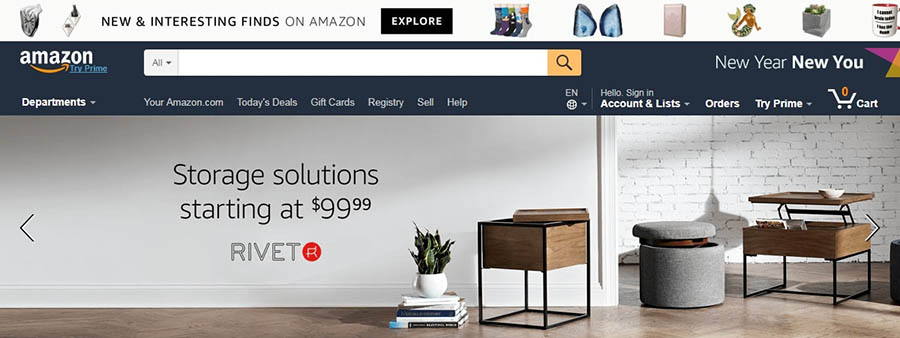
Amazon is probably the most famous (and successful) e-commerce website.

If you’ve never heard of e-commerce before, it’s a blanket term that refers to buying and selling goods or services online. So if you’ve ever purchased something on the internet, you’ve engaged in e-commerce.
We probably don’t have to tell you how vast and complex the world of e-commerce has become. You can buy nearly anything online, from toothbrushes to houses, and most items are offered by multiple sellers. What’s more, you can purchase digital products, services, and all sorts of other non-physical products as well. This means that if you’re interested in becoming a seller yourself, you’re going to have a lot of competition. Don’t be intimidated — it is possible to start your own online store and do quite well. However, you’ll have to put some work in first. The first step is choosing the best tools to build your store.

Why You Should Consider WordPress for Your E-Commerce Store


WordPress is an outstanding platform for building your online store.

While there are other options, such as selling your products through an existing marketplace like Amazon, most people get their e-commerce start by creating their own store. Of course, an online store is just another kind of website. So your first decision will be picking a platform to build your website.
If you aren’t sold on a particular platform already, we highly recommend WordPress. This free, open-source Content Management System (CMS) is a standout choice for websites of all types. It’s beginner-friendly but so flexible and customizable that you can build almost any site with it.
WordPress got its start as a blogging platform, but it’s now used for business websites, portfolios, news sites, and much more. It’s also an incredibly popular choice with business owners for e-commerce sites for a number of reasons:
  • The WordPress community has developed thousands of themes and plugins you can use to customize your site, including many tools for e-commerce. This means you can tweak the appearance of your store until it’s just right and add nearly any feature to it, whether you’re running a massive enterprise or a small business.
  • As a platform, WordPress is very secure. New updates and patches are regularly released to combat the latest threats. Plus, there are a lot of ways you can boost site security. This is a big deal for e-commerce sites since they typically deal with sensitive financial data.
  • There’s a vast community out there to support you. Getting involved in e-commerce can be tricky. No matter what question or problem you have, however, there will be plenty of people who can help you out.
You really can’t go wrong with WordPress for building your online store — no matter how big you want it to be or what you plan to sell. The only caveat is that, out of the box, the platform doesn’t provide dedicated e-commerce features. However, that issue can be quickly resolved by installing the right WordPress plugin.

An Introduction to WooCommerce


The WooCommerce plugin adds e-commerce capabilities to your WordPress website.

There are multiple plugins that can add e-commerce capabilities to your WordPress site. None of them can truly compete with WooCommerce. This free WordPress plugin is the most popular solution for online stores within the platform — and for good reason. Like WordPress itself, WooCommerce is both easy to get started with and endlessly flexible. Installing the WooCommerce plugin will immediately add all sorts of useful e-commerce functionality to your site, such as product pages, a checkout option, and a payment system. It offers a number of useful settings and options, so you can tweak your store to meet your exact needs.
WooCommerce works well for selling physical items, digital products, or both. Whether you’re starting up a small store to sell a few downloads or hoping to move hundreds of products a day, WooCommerce has you covered.

Key Features

  • Enables you to create dedicated, customizable pages for each product or service.
  • Adds a checkout feature to your site so visitors can make purchases directly.
  • Includes various options for payment methods and shipping.

Pricing

WooCommerce is a free plugin and is, in many cases, suitable on its own. If you want to expand its capabilities, however, there’s an extension store offering all kinds of additional features.

What to Do Before Building Your Online Store


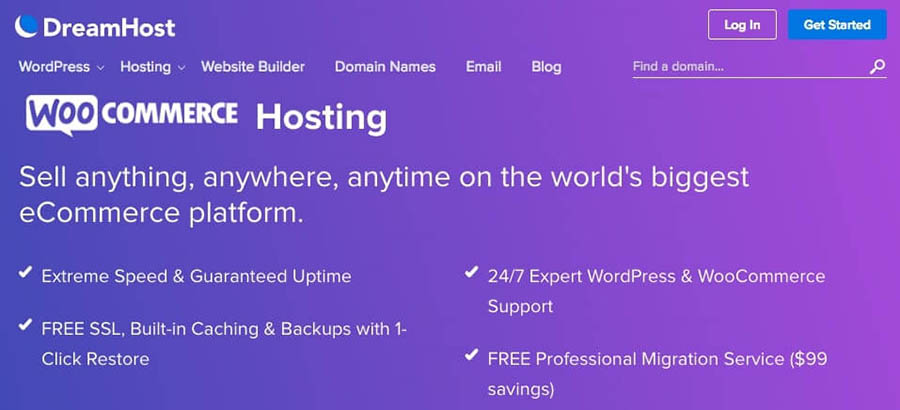
WooCommerce-specific hosting is the best way to start your store off on the right foot.

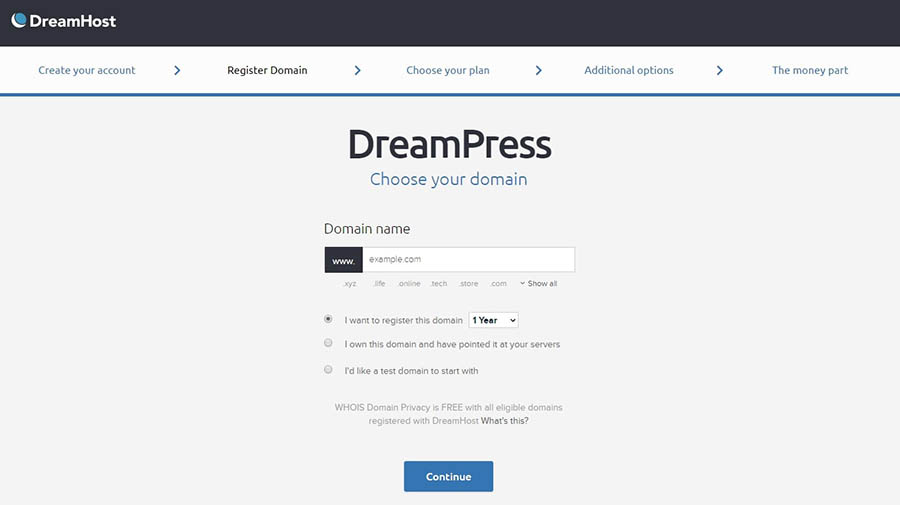
In a moment, we’ll walk you through how to set up an online store using WordPress and WooCommerce. However, there are two things you’ll want to do first. In order for your store to be available online, you’ll need both a domain name and a WordPress hosting plan. Your domain name is the part of your site’s URL that comes after the www — for example, dreamhost.com. Purchasing a domain is simple. You’ll have to pay an upfront cost, then a renewal fee each year, but these are usually quite affordable.
You can think of your domain like an address. It’s one of the key ways people will find you, so it’s important to make your choice carefully. Try to pick something simple and clear but also memorable enough to stand out. Take the time now to find something you’re happy with, so you don’t have to go through the hassle of changing your domain later.
If your domain is your site’s address, your hosting is where it ‘lives.’ Your web host provider will store your site’s files on its servers, so anyone with an internet connection can access it. There are many web host options, a lot of which are quite cheap. However, it’s best not to rush this decision either. After all, your web host will affect your site’s performance, security, optimization, and much more.
If you want to run a successful store, these elements are crucial. In addition, you’ll want to look for a host with a solid reputation, excellent support options, and — ideally — WordPress-specific features. It’s also best to select one with solid domain services since it’s easier to manage your hosting and domain in one place.

Related: Why You Should Consider Keeping Domain Registration and Web Hosting Under One Roof

Since you’ll be setting up a WooCommerce store, you should definitely check out our WooCommerce hosting. This plan is optimized for WordPress and comes with WooCommerce pre-installed (along with some other helpful tools). You’ll get lots of storage and resource scaling options so you can grow your store, and plenty of support for those times when you need help. Plus, it’s very affordable.

Your Store Deserves WooCommerce Hosting

Sell anything, anywhere, anytime on the world's biggest eCommerce platform with optimized hosting, starting at $16.95/mo.
Choose Your Plan
Before we move on, let’s talk a little bit about security. As we’ve mentioned, keeping your online store safe from hackers and malware is essential. One smart way to do this is through the use of HTTPS, which is a more secure version of the HTTP you see at the beginning of many URLs. If you want your site to run on HTTPS, you’ll need a Secure Sockets Layer (SSL) certificate. We mention this now because, while you can get an SSL certificate through an external source, it’s easiest to obtain it as part of your hosting. For example, our WooCommerce hosting plan includes a free, preinstalled Let’s Encrypt SSL certificate. This way, your store will be even more secure right from the very start. SSL certificates are important for most sites these days, but they’re a must-have for e-commerce stores.

How to Start an Online Store in 1 Hour

Once you have a hosting plan picked out and a domain in place, you’re ready to start building your online store! Let’s walk through the process, step by step. No developers required.

1. Install WordPress (5 Minutes)

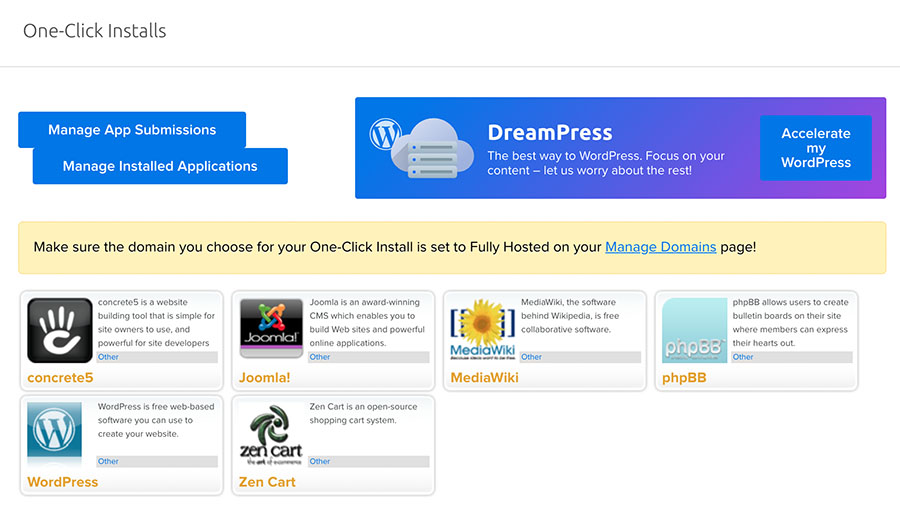
The first thing you’ll need to do to get your new website up and running is install WordPress. How you do this will vary, depending on your choice of host. In some cases, you may be able to skip this step altogether. For example, if you opt for our WooCommerce hosting (or our regular DreamPress plan), WordPress will be pre-installed so you don’t have to worry about it. If you have a different host or type of plan, you’ll need to log into your hosting account, find the installation button or link, and follow the resulting prompts. If you’re lucky, your host will simplify the process even if WordPress doesn’t come pre-installed. For example, on some of our more basic hosting plans, we offer a one-click install option. You simply need to visit your Dreamhost panel and navigate to WordPress > One-Click Installs.
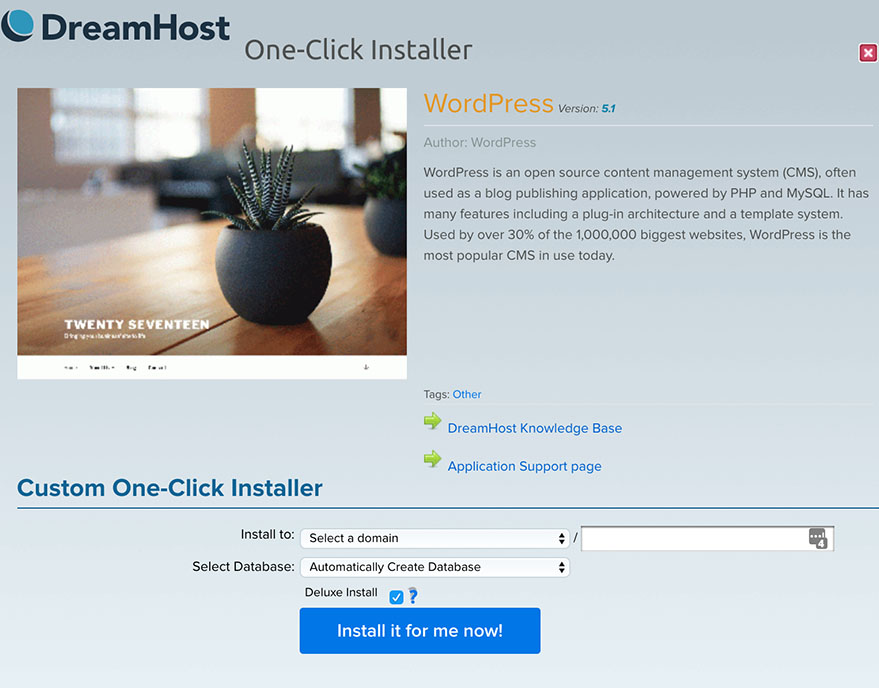
Select WordPress on the next screen, and you’ll be presented with a few fields to fill out. You can select the domain to use under Install to.

You can usually leave the other fields alone since they contain more advanced options. Check the Deluxe Install button if you want your site to come with some handy themes and plugins pre-installed, then select Install it for me now! After that, you’ll be sent an email at the address associated with your DreamHost account. It will contain your username and a link to your new site. Finally, in some cases, you may need to install WordPress manually. This is a little more involved, requiring a few additional tools, but can still be completed in less than five minutes. If you find yourself in that situation, we recommend following WordPress’ own handy installation tutorial.

2. Install and Configure WooCommerce (10 Minutes)

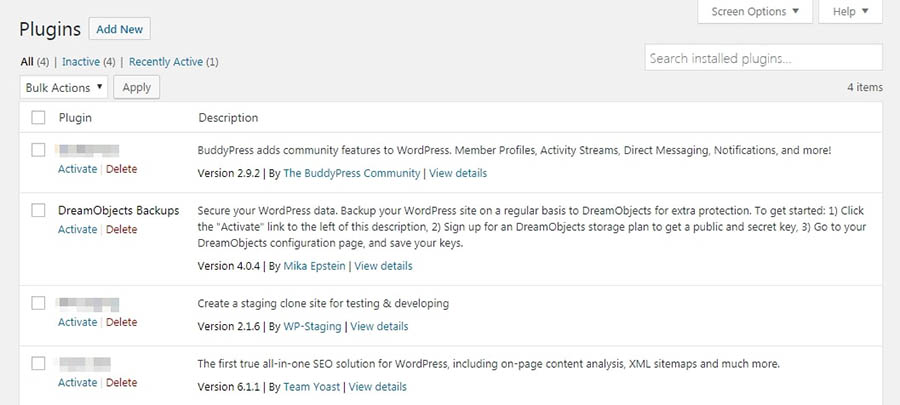
Next up, we have another step you may be able to skip entirely. After all, our WooCommerce hosting comes with the plugin pre-installed and pre-configured. This way, you’re ready to start building your online store from the moment you first visit your new site. Still, let’s walk through the process of manually installing WooCommerce and setting it up, in case you have a different plan. You’ll first need to visit your WordPress site, navigate to the Plugins tab, and select the Add New button at the top of the screen.
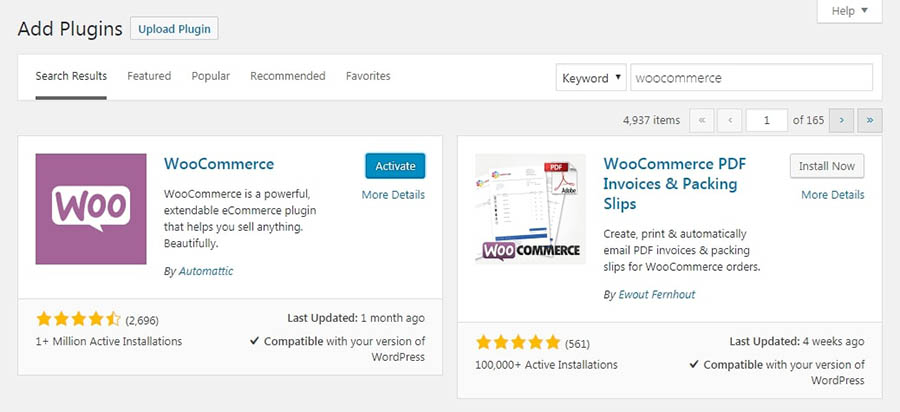
Type “WooCommerce” into the search field and the plugin should come up right away. Click on Install Now, and wait a few moments. A new button should appear, called Activate, which you’ll need to click.

That’s all you need to do to add the plugin to your site. It’s now ready to use and will automatically set up the essential pages you’ll need for your store (such as a shopping cart and checkout page). However, we recommend walking through the short setup wizard to configure a few key options.
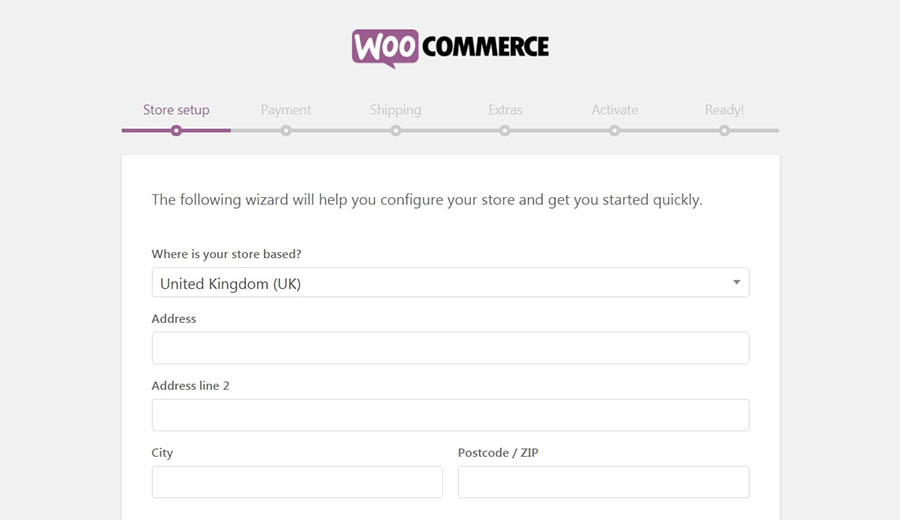
This wizard should appear right after you install the plugin. On the first page, you’ll enter a few key details about your store. This includes where it’s located, what currency it will use, and what types of products you’re planning to sell.

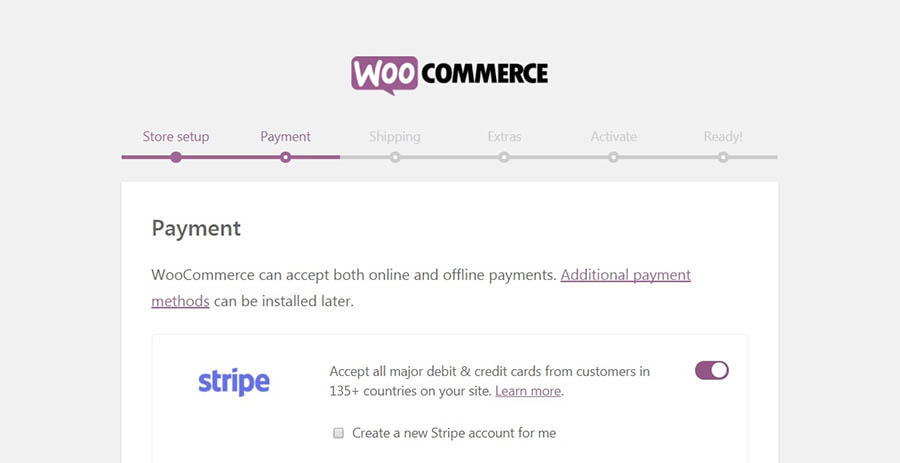
Keep in mind that you can go back and change any of these settings later. Next, you’ll select the payment options that will be available to your customers.

By default, you can choose any combination of Stripe, PayPal, and offline payments. If those options aren’t enough, you can always add more through extensions.
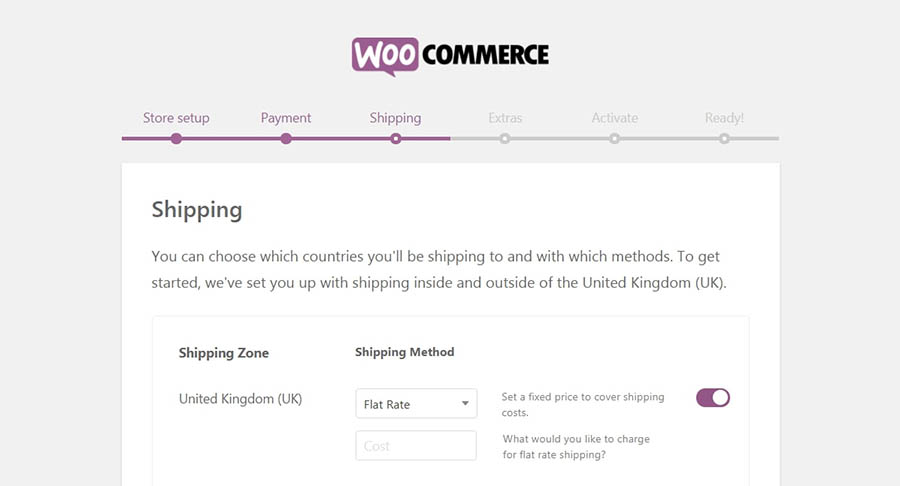
Click on Continue, and you’ll be able to configure your standard shipping rates. You can choose from either free shipping or a flat fee (again, more options are available in the extension store).

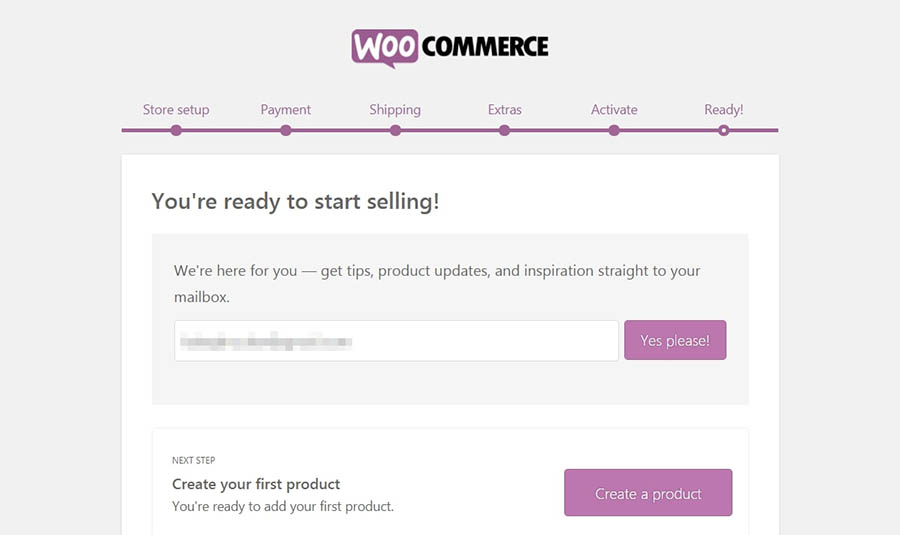
The next two screens offer a couple of extra tools, which you can safely skip for now. Keep moving through until you reach the Ready! step.

This lets you know you’re done with the setup wizard. There are a few handy links here, such as one to create your first product. We’ll get to that in a moment. First, however, we want to optimize WooCommerce a bit more fully, so select Return to your dashboard instead.

3. Optimize WooCommerce’s Settings (15 Minutes)

The WooCommerce wizard gets your store up and running. However, there are a lot more settings within the plugin to configure. To set up a unique store tailored to your requirements, you may need to spend some additional time tweaking it.
To get started, visit WooCommerce > Settings in your admin panel.

There are a lot of options here. We won’t go through all of them, but we’ll touch on some of the highlights.
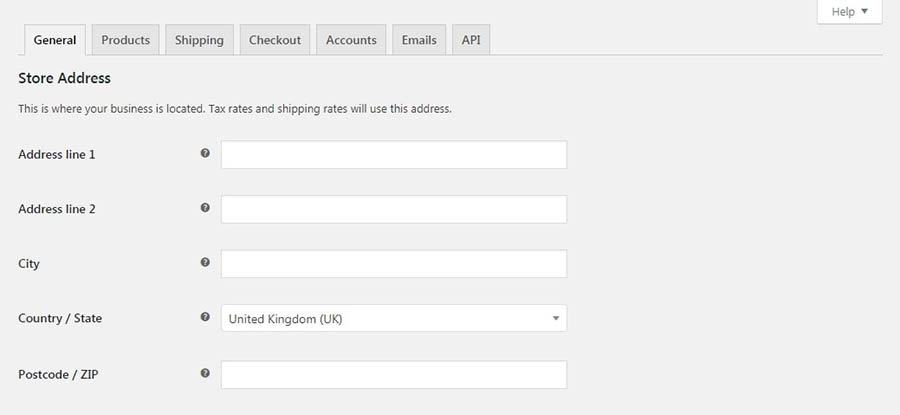
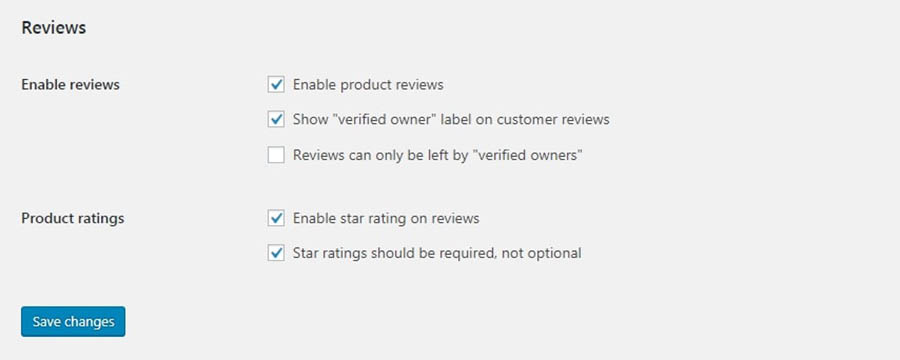
For example, under the General tab, you can choose what countries you’re willing to sell and ship to and decide whether to enable taxes. The latter is usually a smart idea since neglecting to collect taxes from your customers can leave you facing a hefty bill at the end of the year. If you’re new to the world of sales tax, the WooCommerce documentation offers a handy guide for understanding it. In the Products tab, you’ll see the same measurement units you set up in the WooCommerce wizard. However, you’ll also find some options related to reviews.
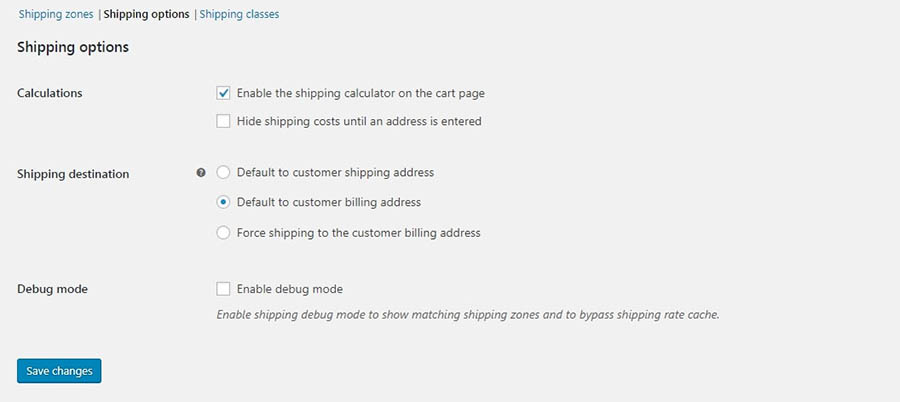
You can let customers leave reviews on products, and even give star ratings. This can encourage new visitors to purchase — as long as the reviews are positive! The rest of the sub-tabs here help you customize how products will be displayed, and determine how inventory will be managed. The Shipping tab enables you to add more shipping zones, if you’d like, to further customize your methods and rates. You can also configure how shipping works under the Shipping options sub-tab.
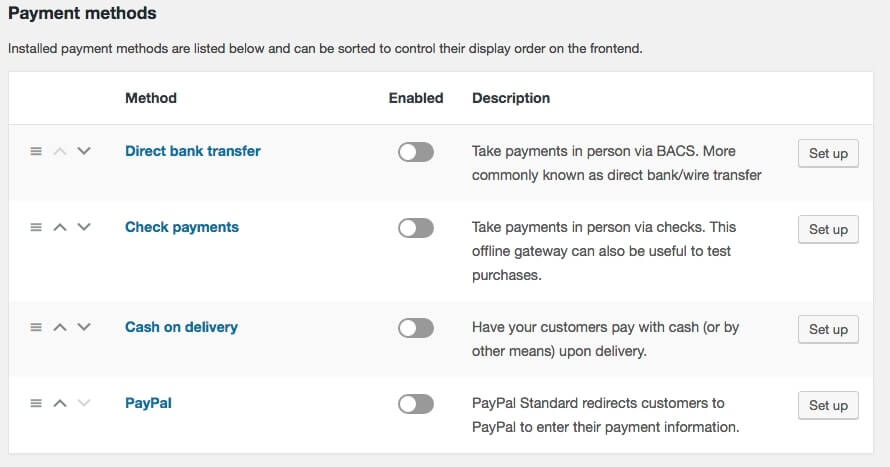
Moving on, under Payments, you’ll find a variety of settings. You can start by deciding how to accept payments from customers, including through in-person transactions such as bank transfers, checks, and cash. You can also manage default payment gateways such as PayPal.

By selecting a particular sub-tab, you can navigate to a screen containing settings that are unique to each type of payment. There, you can configure each payment type further.

Related: The 10 Most Popular Online Payment Gateways for Your Website, Compared

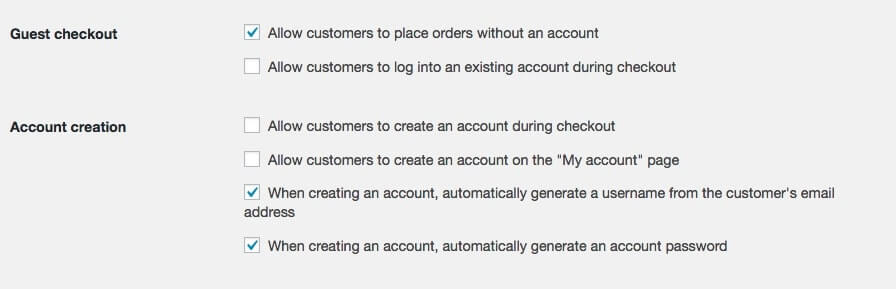
We’re almost done! The next tab, Accounts, lets you set up how customers’ accounts will work. For example, you can determine where they’ll register on your site and how accounts will be created.

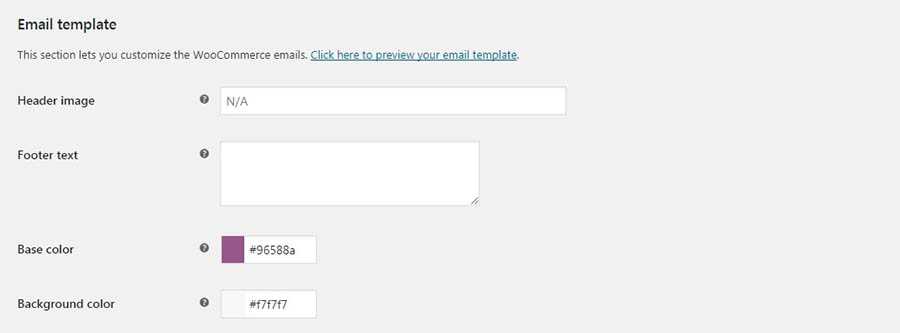
Under Emails, you can customize what types of notifications will be sent to which email addresses. At the bottom of the page, you’ll also have some options for personalizing what emails sent from your store to customers will look like.

The last tab, API, contains some more technical settings for advanced users and can be safely ignored for now. With that, you’ve made your way through the entire WooCommerce settings page! You can always return here and make changes whenever you’d like, as you start building your store and getting a feel for how you’d like it to work.

4. Add Your First Product (30 Minutes)

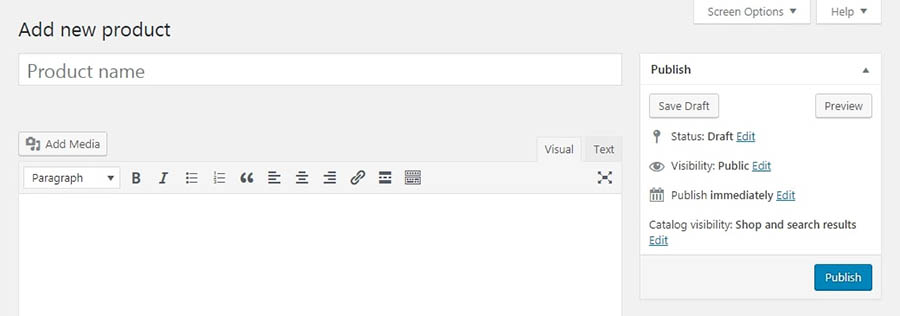
With your store all set up, it’s finally time to start adding products! Fortunately, WooCommerce makes the process pretty simple. To add your first item, navigate to Products > Add New in your dashboard.

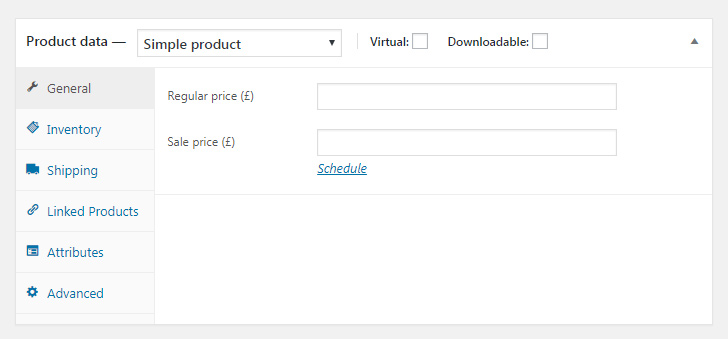
If you’ve ever created a WordPress website before, this screen should look very familiar. In many ways, it’s identical to the Classic Editor (which has recently been replaced by the Block Editor). Of course, there are a number of new options and settings. Start out by scrolling down to the Product data section. Here, you can choose what type of item this product is, whether it’s downloadable, and what its price should be.
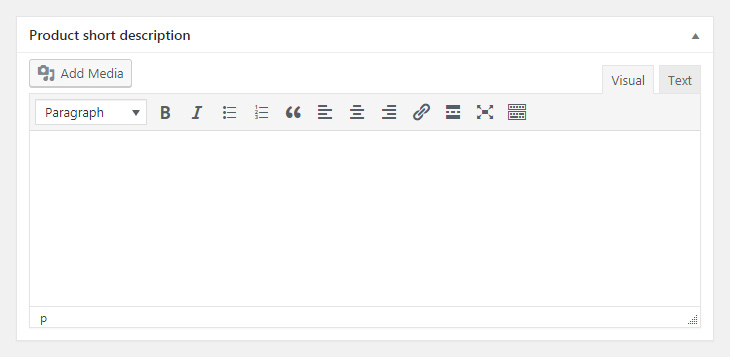
Under the next tab, Inventory, you can create an SKU (or unique identifier) for the product and configure a few other behind-the-scenes options. Then under Shipping, you can enter the product’s weight and dimensions and choose its shipping class if applicable. The rest of the choices in this section are pretty optional, although we’d recommend checking out the Linked Products tab. Here, you can determine what kinds of related products will be promoted to visitors, which is a smart way to increase sales. At the bottom of the page, you’ll find the Product short description section.
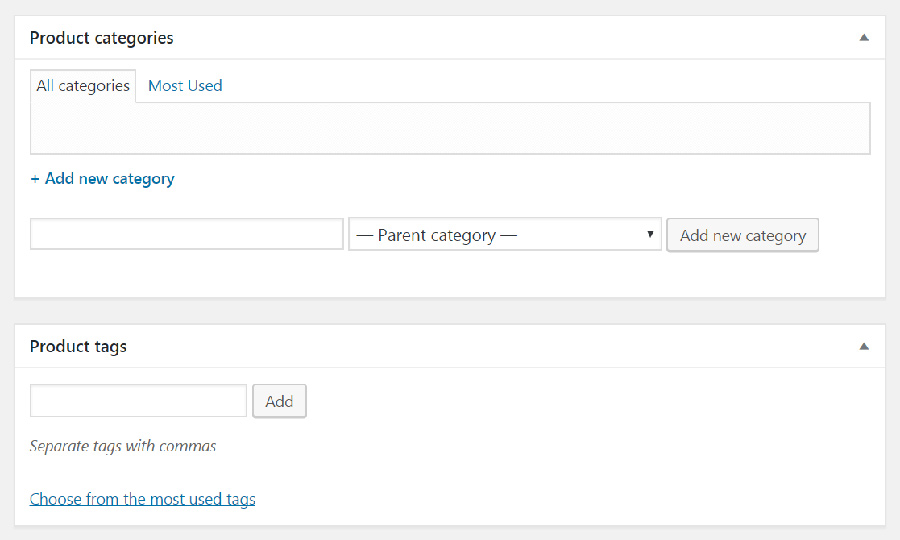
This is where you can enter a summary of the item, which will appear on your product listings’ pages. Keep it brief and focus on the key selling point. In other words, how does this product solve a crucial problem or make your customers’ lives easier? Scrolling back up, the main editor is where you can enter a full description of your product. Be as thorough as possible here, highlighting its essential features and providing all the information a customer will need to make an informed choice. Most importantly, don’t forget to use the Add Mediabutton to include images of the product, ideally from multiple perspectives. The better potential customers can visualize the item, the more likely they’ll be to open their wallets. To enter a main, featured image for the item, you can use the Product image section in the right-hand column. Just under that, there’s an option to create a Product gallery, which is an excellent idea if your item comes in multiple styles or colors. Also in this column, you can add a category and tags to your product.
This is recommended for a couple of reasons. First, it helps you keep everything organized. Second, it makes it easier for both potential customers and search engine bots to find your products and understand what they are. When you have everything set up the way you’d like, simply click on Publish to make your product live! Then you can repeat the process for each additional item. You can always come back and make changes to your existing product pages if information or images need to be updated.

5. Choose a WooCommerce-Compatible Theme (Optional)


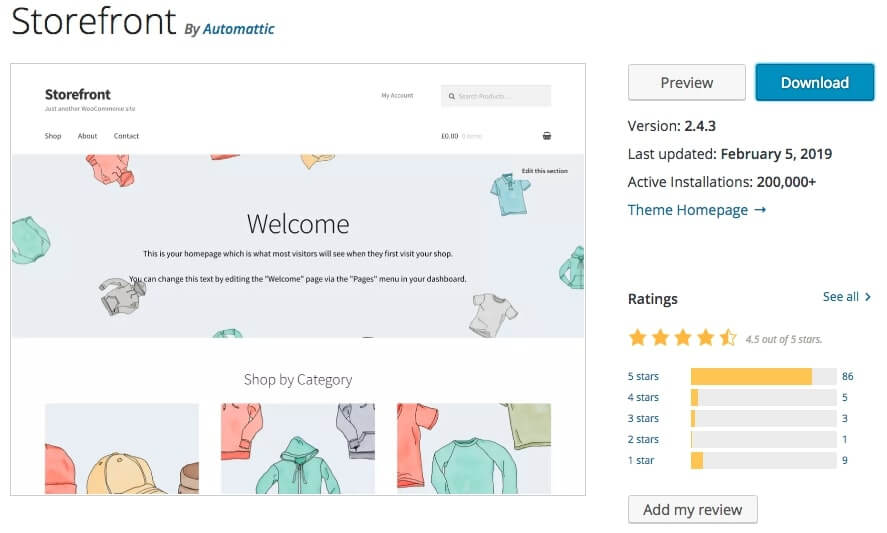
Storefront is the official WooCommerce theme and is a solid choice for most stores.

Your store is now set up, and you’re ready to start selling products. However, let’s address one more optional step. One of the nice things about using WordPress to create your online store is that you can use any theme you want to customize its appearance.
However, you may want to try out a theme that’s specifically designed for WooCommerce instead. This way, your theme will be optimized to work alongside the plugin’s unique features and fit its style. In addition, you’ll often get access to useful content types and functionality that will help you tweak your store further. For most people, the best choice here will be the Storefront theme. This is WooCommerce’s official theme and is built from the ground up to integrate with the plugin. It offers flexible design and display options, and you can customize it to match your branding. Storefront is free, although there are extensions you can use to add more options.
Another bonus? If you sign up for DreamHost’s WooCommerce hosting plan, you’ll have Storefront pre-installed. If you don’t like the look of Storefront, however, there are plenty of other themes you can use. ThemeForest, for example, offers a range of premium themes designed for the plugin. No matter where you get your WooCommerce theme, make sure to take your time and choose carefully. A quality theme can do a lot to improve your store’s odds of success.

Related: How to Customize WooCommerce With a Child Theme (In 3 Steps)

Tips for Improving Your WooCommerce Store’s Design


A simple, well-branded design will help your WooCommerce store stand out.

Before we wrap this guide up, we want to address two more crucial elements. First up, let’s talk about your store’s design. With both WooCommerce and a theme like Storefront installed, it should be looking pretty spiffy. As you’re building your store and tweaking its appearance, here are a few tips to keep in mind:
  • Incorporate your branding throughout your store, and use its elements consistently. This includes your logo, tagline, color scheme, typography, and so on. If you haven’t developed any branding yet, now is the time to get started.
  • Make sure your store is easy to navigate and search. If people can’t find the products they need quickly, they’ll probably move on to a different store. This means including a prominent search bar and organizing your items through hierarchical categories.
  • Include plenty of images all across your site, not just on your product pages. More importantly, ma ke sure all the images you use are high quality and optimized to show off your items without slowing down your pages.
  • Try to avoid clutter. Keep the focus on what you’re selling and don’t confuse visitors with too much information. A minimalist design can go a long way for an e-commerce business.

Promoting Your WooCommerce Store


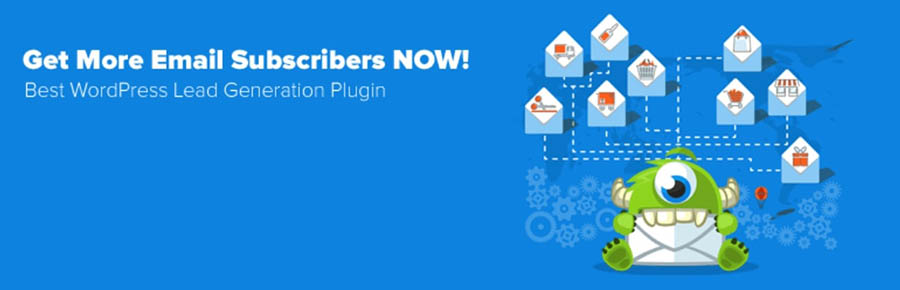
WordPress offers many tools, like the OptinMonster plugin, to help you market your store.

Finally, we’d be remiss not to mention the importance of promoting your online store. Simply hoping people will stumble across it in search engines won’t be enough — you’ll need to get out there and do some marketing. Again, this is a pretty complex topic, and no one approach is right for every store. So let’s run through some of the best ways to promote your e-commerce site and provide some resources you can use to learn more about each one:
  • Pay-Per-Click (PPC) advertising — This strategy is as simple as it gets. You pay a website like Google to have your store appear in relevant searches. Even better, you only pay when someone actually clicks on one of your ads.
  • Email marketing — Building an email list is a hugely popular strategy. You can capture the emails of interested parties, and then send them targeted messages and promotions. Plus, you can do this right from your WordPress site, using a plugin such as OptinMonster.
  • Social media marketing — Everyone is plugged into social media these days, so it’s the perfect place to find potential customers. You’ll just need to choose the right platforms to focus on, then use a few basic strategies to get the word out there about your store.
  • Promotions and discounts — Putting your products on sale or running a special promotion is a smart way to drum up interest and convince people to give you a try. WooCommerce offers its own features to help you do this, and you can also combine this approach with your email and social media marketing.
Promoting your e-commerce site takes some effort. Just remember that the more channels you use, the better your chances will be for getting lots of eyes on your products or services. The work of promotion is something to focus on before, during, and after the actual launch of your online store.

Selling, Selling, Gone

Getting started with e-commerce has never been easier, thanks to all the dedicated tools and solutions that are now available. However, it takes some work to ensure that you stand out from the crowd. Understanding how to build, perfect, and promote your online store beforehand is crucial to its success.
When choosing the right platforms for your e-commerce store, you can’t go wrong with WordPress and WooCommerce. First, you’ll need to pick a domain and then select a hosting plan.
Do you have any questions about the platform or how to build your WooCommerce shop? Join the DreamHost Community today and ask us anything!


Read More

Handsome and good profitable niches for blogging in 2019

1 comment
Want to start a blog because you hear about how amazing it is? I struggled to find a niche that is the perfect balance between passion and profit. 


In order to find a perfect niche, we need to head over back to the ancient Japanese principle called “ikigai”.
You need to find a niche that satisfies the below conditions.
  1. Choose a niche that you love
  2. Choose a niche you are good and knowledgeable in
  3. Choose a niche that’s profitable
  4. Choose a niche which the world needs
Almost 80% of the niches in blogging industry fall under any of the below umbrellas!
  1. Wealth
  2. Health
  3. Relationships
  4. Lifestyle
  5. Education
  6. Spirituality
  7. Fashion
These niches are so popular because they are tied tightly to the Maslow’s Hierarchy of Needs, that is hardwired in the human brain.
Here are some examples of niches under these categories
  1. Wealth > Online > Blogging (This is where I’m, a blogger for bloggers at BloggingX)
  2. Wealth > Personal Finance (This is where Michelle from Making Sense of Cents is positioned)
  3. Health > Dieting > Paleo Diet (That’s where David Sinick found his market)
  4. Health > Workouts > Crossfit
  5. Lifestyle > Hobbies > Kayaking
  6. You need to always find a niche where people have problems. You need to start blogging with a mindset of solving people’s problems. After finding a niche, while validating it you need to ask yourself – “Are there enough people in this niche who are having problems and are ready to spend money on getting their problems solved”.Angling of nichesListen. Only a few of them do it properly. Angling or niche overlapping is the process of overlapping several interests and passions into one niche. Below are the examples of angling Michelle from MakingSenseOfCents started her blog to help student debts
    Stefan James from ProjectLifeMastery
    Elna Cain from Elna Cain - Freelance Writer and Coach (Follow her if you want to excel in freelancing - she is not only for moms! Her initial target were moms.)
    Once you find a niche, you need to develop an ideal customer avatar and look if you can serve them. You need to know the following things about your customer. You can determine many of these things by using the Facebook audience insights tool, Google Keyword Planner, Facebook communities’ interactions, niche forum discussions, Reddit, and so on. These niches are evergreen and broad so you won’t run out of ideas, ever.1. Health and Wellness: Health and wellness niche still works in 2018. Weight loss tips, exercises to burn calories, nutrition guide, etc… haven’t lost its CPC value. Health-related apps and software are gaining in popularity. A generic keyword such as ‘fitness gym software’ has a CPC of over $60.
    1. Demographics – Their location, age, gender, income, so on.
    2. Psychographics – Their beliefs, values, attitudes, so on.
    3. Technographics – Are they technology early adopters, what softwares they use, what smartphones they use, so on.
    4. Pain Problems – What are the common problems they face?
    In the case of blogging, you need to drive more SEO traffic to your site. Right?
  7. 2. Forex and insurance: Forex and insurance have consistently been a lucrative niche for over a decade. ‘Compare car insurance’ has a CPC of 469.12 but the competition is pretty high too. Forex brokers are always looking for leads and CPCs in that niche are not likely to go down. 3. Stress and Motivation: Tons of thousands of blogs are already getting into motivational content and personal development. Most of them haven’t nailed the goldmine yet – stress management. It’s a niche with increasing demand every year. Adults suffering from stress are searching for solutions online. They feel comfortable seeking help online rather than visiting a psychiatrist. 4. Lawyers: Legal matters are discussed all over the internet. Owing to the weight of such discussions, the keywords have high CPC. Local SEO keywords have the least competition. CPC on these keywords run all the way up to $500. Accident attorneys and personal injury attorneys are sought for, in U.S local searches.
    Tech And Trending High Paying AdSense Niches 5. Bitcoin: Bitcoin AdSense keywords have everything going for it. The crypto realm is red hot right now. Though the CPC is not over $100, ranking websites in this space are really easy. “Bitcoin merchant account’ is the highest paying keyword in the niche, with CPC of $64. CPCs in this niche is expected to rise in coming years. 6. Tech updates: 1 in 3 searches on the web are tech related. People search for industry news, how-to tutorials, gadget reviews, software reviews, etc… They like to catch up with events discussion and latest trends. Social media related searches have a constant presence too. 7. PC repair: This evergreen niche still has some of the best CPC rates. The niche branches down to hardware and software. Power problems, memory- RAM issues and hard drive/motherboard issues forms the top hardware related keywords. Malware, spyware, viruses, hanging PCs, system errors, pop up ad issues based keywords also have high CPC rates. 8. Vegetarian diets: Veganism and vegetarianism are taking over the internet like a storm. There are over 375 million vegetarians worldwide. People are getting into vegan lifestyle and getting increasing diet conscious. Keywords involving vegetarianism, eastern food, and medicine, etc… have high CPC rates. 9. Entertainment and celebrity news: Celebrities are topics of debate all the time. Entertainment industry comes up with discussions of topical interests. Fan groups are keen to know celebrity insights and receive daily updates about their stars. Hollywood stars like Jennifer Lawrence create plenty of discussions online. 10. SEO and blogging: SEO is a topic that’s going to stay until the end of the internet. Keywords such as ‘SEO Explanation’ and ‘online courses on digital marketing’ deliver a CPC of around $100. Webmasters are always going to discuss the white hat and black hat methods. To teach how to make money online is also a profitable niche for Google AdSense.
There are even mom bloggers making money blogging! Yes, if you’re a stay-at-home mom, you can start a mom blog!
So, I thought I’d share some of the popular blogs for you. You may have been learning that the ONLY way blogs make money is if you….blog about blogging.
That’s not the case.
My other blog helps people become a freelance writer. It’s strictly a service-based blog and that provides most of my income.
I know so many other bloggers that don’t blog about blogging that are making a full-time income doing this. Let’s look at eight blog niches that you can start today and make money doing it!
These types of blogs are killing it!
Want to start your own mom blog that makes money? Check out my free course on starting a mom blog!

8 Popular Blogs Driving Traffic and Making Money

1. Sewing

Sewing and knitting is a HUGE niche on Pinterest. It’s a visual type of blog that fuels the creativity for other people. It’s no wonder that you can make money as a craft blogger.
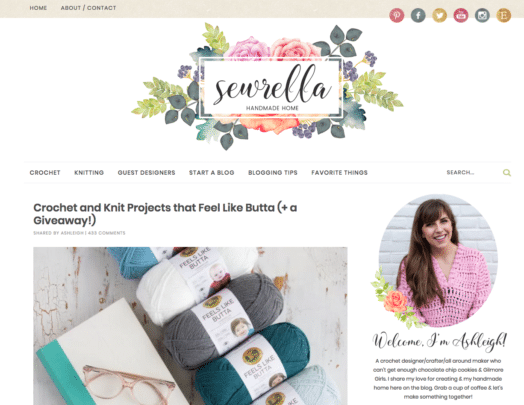
Ashleigh of  Sewrella, is a stay at home mom and crochet designer. She used her experience with designing crochet patterns to make money with her sewing blog.
She learned that crochet is a huge niche online and she used this to help her grow her blog.
In the crochet niche of the internet, I’ve found one thing to be true – lots of people crochet, but not very many are publishing new patterns and putting out content. There is a very small group of crochet bloggers out there (spend any time on Pinterest and you’ll quickly name several) dominating the market.
Her latest blog income report shows that she made over $10,000 with ads, affiliate marketing and selling her patterns on Etsy.
Wow and amazing!

2. Parenting Blog

Parenting is a profitable niche and one of the popular blogs new bloggers can start. Just think about it – there are entire stores dedicated to newborns and children. There are hundreds and thousands of products just for parents too.
This a niche that is also universal – moms are everywhere!
Carly of Mommy on Purpose is also a stay at home mom who blogs about pregnancy tips and being a mom. She quickly grew her blog to over 400k pageviews and was able to make $5,000 a month in less than a year!
Her main methods of monetization are ads, affiliate marketing and products. You go mama!

3. Health

Health and wellness are HUGE niches online. It seems that universal topics where many people know about them become profitable blog niches. And that makes sense – you are speaking to a big chunk of people in the world.
While blogging about blogging is highly profitable, you are only really speaking to a very (VERY) small percent of people in the world.
So, if you want to start a blog, think about the global scale of your blog and define your niche that way!
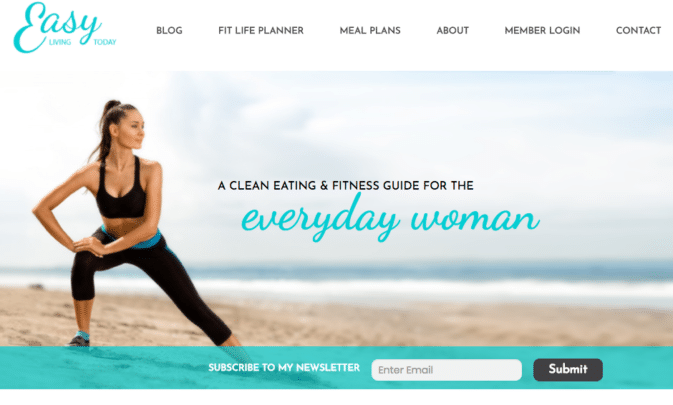
Jessica of Easy Living Today is a mom who shares her love of eating healthy and living a fit life.
She mostly targets her help for other moms, but her blog opens up her niche to include women that want to be healthy.
Jessica posted that she earns $12,000 a month from her blog, but recently reported to make up to $20,000 a month with her blog. Amazing!
Her main ways for generating income is from sponsored content, ads, affiliate marketing and her own products.

4. Lifestyle

A lifestyle blog is a poplar blog with many different topics. These blogs usually target one type of demographic – new moms, college kids, pet lovers. Some bloggers think you can’t generate an income with a multi-topic blog.
The reasoning behind that is that a niche blog with one core theme speaks to one type of audience. If you can speak ONLY to them, you can help them with their problems (by promoting products and services to help them).
But, you can make money with a lifestyle topic!
Ashli of the Million Dollar Mama blogs about eight topics – from recipes to blogging to travel and more.
Ashli is a stay at home millennial mom that loves to blog about being a mom and finding creative ways to save and make money.
While she hasn’t posted a recent blog income report, I do know that she routinely makes $5000/month JUST from Amazon affiliate marketing.

5. Frugal Living

Did you know that saving money is one of the biggest niches on Pinterest? There are some massive group boards just for frugal living bloggers.
With my other blog, Smart Mom Ideas, I was going to go in the frugal living vein since one of the most popular posts on that blog is all about ways to save money. But, I found it hard to monetize.
How do you make money by giving tips to save money?
Jenny from This Tiny Blue House knows how!
What’s great about her blog is how ALIVE and thriving it is. She has created a loyal following who read her posts and comments on them. But not only that, her blog generates $1500 a month for her!
Her main monetization strategy is affiliate marketing.

6. Home Decor

Is your Pinterest feed filled with DIY projects and farmhouse decor? I love looking at pins for DIY projects to improve my home decor. It’s another huge popualar blog niche on Pinterest – because it’s eye candy mamas!
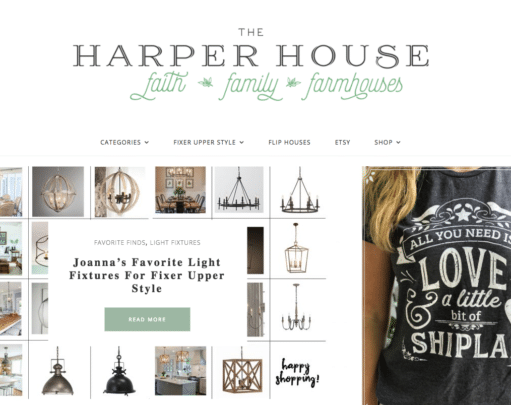
Christy from the Harper House is a mom to three kids and started her blog, The Harper House, as a way to make money (and to share her love of design too!).


Her blog is filled with personal projects, new finds and interior inspiration. Her blog generates $6,000 a month from ads and affiliate marketing.

7. Newborn

Aren’t newborns just so darling and precious? But, they also come with a lot of products! From nipple cream to bottles to strollers and more.
Just like how the parenting niche is profitable, the newborn niche might be a tad more profitable.
Caroline of Swaddles n’ Bottles is making a killing with her traffic and income!
Her focus on her blog is all things baby. She’s a mom with little ones and she knows all about the newborn phase! She posts her income reports on her other blog, The Basics of Blogging.
Her most recent income report says her blog generated over $11,000 using affiliate marketing and ads.
That’s amazing!

8. Christian Blog

Many people go online not to only solve a problem, but to connect on a deeper level with others and to help strengthen their way of life. The blogger behind the Christian blog, Arabah Joy, has built a very loyal following that absolutely love her words of wisdom.
Who would’ve thought popular blogs like a Christian blog can be profitable?
Arabah Joy’s monthly income is over $6,000, which primarily comes from eBook sales, printables and affiliate marketing.

Starting a Profitable & Popular Blog

Reading about these income reports from niche blogs is inspiring! There are some common threads between what type of blogs make the most money.

They Love What They Write About

You can tell they are monetizing their passion. They love talking about home decor or craft projects. If you are interested in starting a blog, think about what fuels your creativity.
What hobbies do you enjoy doing the most and can you turn that into a profitable blog?
Read More
Next PostNewer Posts Previous PostOlder Posts Home