Meet The Author

Main Uddin is one of the pioneer blogger cum e-marketer from North East India(Assam).He is also a Skilled web Developer and regular columnist for various news portals around the globe.Read More

author

Blog Content Monetization: Perfect Rules and Method in 2018

Leave a Comment
The opportunity for content monetization has never been greater.Individuals around the globe have built their content empires by publishing the unique details of their personal experiences for the world to see, and it’s all thanks to the internet. From foodies to entrepreneurs, fitness instructors to political figures, there’s droves of new content publishers across social media, video platforms, web hosted blogs, and email newsletters. Where there’s a dedicated audience, there’s a content creator ripe for monetization. And in today’s industry, these moguls are most commonly referred to as “influencers.”


Although there’s a definite cool factor associated with being an influencer, it’s important to debunk the myth that influencer is synonymous with the elite. Everyone and anyone is qualified to create content, publish it to their social media accounts, website, webinar, or email list, and monetize it by working with brands who value their message and target audience.
The term influencer is commonly associated with massive readerships and social media followings. But that’s a narrow point of view. In fact, brands are discovering more and more that large followings don’t necessarily equate to high quality, and the reverse is often true.
Small, dedicated audiences with a higher propensity for engagement, are more qualified to become potential customers than large, inactive followings. However a content creator chooses to define her or himself; whether it be as an influencer, an affiliate marketer, a brand advocate, or ambassador, their job is to inspire, inform, educate, and empower their unique audience.
"A content creator chooses to define her or himself; whether it be as an influencer, an affiliate marketer, a brand advocate, or ambassador, their job is to inspire, inform, educate, and empower their unique audience."
In this article, I’ll demonstrate the key ways in which creators monetize their content, and why one often overlooked model can outperform the other. I’ll also debunk the myth that influencer marketing is inherently different than other types of content creation/marketing, and highlight the importance of partnership in order to advance your earning potential.
You might also like: What is Affiliate Marketing? The Myth vs. Reality.

How is content monetized?

Content publishers — i.e. anyone who shares their content on the internet, including influencers — can monetize their messages by partnering with brands. Brands are hungry to understand ways in which they can work with content creators, but it’s not always a clear path to success for either party.
"Brands are hungry to understand ways in which they can work with content creators."
In fact, the term “influencer” eludes the majority. What do they actually do, and how can brands initiate a relationship with them? How are they compensated? Well, the answer to these questions varies significantly, and in fact, there are multiple layers of content creators.
The most common monetization model is sponsored posts, where the content publisher is compensated with a flat fee for posting on behalf of the brand. This model is most closely aligned with content creators who refer to themselves as influencers. The trouble with limiting oneself to sponsored posts is that, just like billboard ads or TV commercials, there’s no way to know how effective the ad will perform.
Unlike sponsored posts, performance models are built on a commissionable compensation framework, where the content publisher is paid a percentage of sales, or a bounty for desired actions — like email signups, subscriptions, or app downloads. This monetization model is most closely associated with affiliate marketing.
There’s a number of reasons the latter is preferable to brands. Primarily, it allows them to invest in a content publisher without risk of losing money. But there’s also a strong business case for content publishers to use a performance model. Performance-based compensation allows content publishers to advance their business in a number of ways. Here are the top benefits to performance models for publishers:
  1. Win more business. Being open to commissions will create more opportunity for new partnerships, by posing less risk to the advertiser.
  2. Long term earnings. Long term earnings can outpace the earning potential of a one time fee.
  3. Return customers. Brands will continue to invest in profitable partnerships, allowing publishers to develop long term partnerships.
  4. Tracking. Working on commissionable earnings means there will be a tracking link involved in the post, which helps both the advertiser and the publisher to monitor performance, and gain deep analysis of what works and what doesn’t.
  5. Optimization. Working on a performance basis allows the publisher and the advertiser to analyze the content performance, allowing both the ability to test new ways of appealing to the publisher's audience, and ultimately, improve both parties’ goals.
Content monetization can take many forms, but the two most common are through flat fees and commissions. With that in mind, both monetization models are a point of contention. Content monetization is a hot topic, especially as more publishers discover its benefits, and the market catches on.

The great debate: Is monetized content authentic?


It’s always been a marketers mission to be where their target customers are. And with the age of the internet, the voice of the customer is heard, and their appetite for transparency is clear.
They want to discover a brand from people like them, or people they admire, and are interested in their opinion of the brand. This is in contrast with how brands used to market, where advertising was a matter of how they wanted to be perceived by the market.
Now, brands are flocking to individual content creators in the hope that they’ll provide potential customers with information about their brand, to help a creator’s audience make informed purchasing decisions. Content creators are becoming the most coveted marketing channel for advertisers to tap into.
So why has this powerful marketing solution become a subject of contention?
One of the greatest assets of brands working with content creators is the transparency consumers gain from receiving unbiased opinions, reviews, and information about the brand. But that practice is put into question when money is in the mix.
The topic of content monetization has become more pronounced with new regulations that require disclosure of partnership. For the sake of transparency, the practice of disclosure is critical. But that doesn’t mean the concept of monetization is unethical.
"Despite popular opinion, content monetization does not indicate inauthenticity. In fact, the best content creators are incredibly dedicated to delivering an authentic experience."
Despite popular opinion, content monetization does not indicate inauthenticity. In fact, the best content creators are incredibly dedicated to delivering an authentic experience. The myth that monetized content is disingenuous, fraudulent, untrue, or unethical, needs to be dispelled.
At PatreCon 2017, Jack Conte, the CEO of Patreon, shared his journey with content creation in the form of his music. He described his fear of being pegged as a sell-out when Hyundai approached his band to sponsor their music video. Yet, the partnership not only helped them earn some money that they could reinvest back into the band, but it also gave their music a bigger platform.
They leveraged the opportunity and in the long-run were able to deliver an even higher quality of music to their fans. And that decision was made in the interest of their audience.
Content publishers share the same dilemma. The two key priorities of successful content creators are:
  1. Serving the audience well. For long term success, content creators must deliver a value in the messages they share, which means they will only partner with brands that deliver value to their unique audience. They think about what their audience wants to know, what interests them, and what they can do to help solve a problem. Today’s content creator pros never risk promoting a brand that won’t appeal to their followers. Just like successful businesses, publishers need to deliver strong user experience, which means they must put the needs of their customers/readers first.
  2. Figuring out how best to monetize their content. Just as Jack did with his music, content creators need to assess what type of monetization works best for their long-term goals, and what feels authenticate to their business.
You might also like: 7 Tips to Help Cultivate Authenticity for your Affiliate Marketing Business.

The new age of content monetization


If you can recall the world before social media, you might remember flipping through the pages of a magazine, which often include traditional advertisements.
This advertising exists in two key ways. The first is in a traditional display format, like a full-page Rolex spread. The second is native advertising. You have to read between the lines to discover it, because it’s contextual, inconspicuous, and organic in nature. If you’ve ever read a “Who Wore it Better” article, you’d have seen suggestions from the editor on how you can achieve the look, nail the beauty regime, or find an outfit at a cheaper price.
That content represents an additional way for the magazine to monetize their publication. The advertiser allocates spend to the magazine in order to be included in their message to a relevant audience. This represents an integral revenue stream for the magazine, and when done well, it’s of high value to its reader. In fact, the majority of publications lean on their editorial team to decide on which brands to mention in their content.
Today, digital influencers have taken on the challenge of monetizing their content through native advertising, too, and make all the decision when selecting the brands, products, and experiences they wish to share with their audience.
"Back in the day, the only logical way to pay for advertising, whether a celebrity endorsement or a native advertisement published in a magazine, was to negotiate a flat fee. But that was before the world of digital tools, where marketing performance is easily measurable."
Back in the day, the only logical way to pay for advertising, whether a celebrity endorsement or a native advertisement published in a magazine, was to negotiate a flat fee. But that was before the world of digital tools, where marketing performance is easily measurable. With digital media, content publishers and advertisers alike can determine exactly how effective their media is, right down to the level of which customer came from what source, on which day, and at what time.
With data, an advertiser is empowered to make decisions that will make their marketing spend go further. They can identify the publisher that referred the most customers, the highest sales revenue, and the most loyal customers who returned to the brand again. They’re able to select the referral source, based on what will drive the highest return on their ad spend. That’s why publishers need to be armed with their own performance data, prepared to explore multiple monetization formats, and able to clearly describe their value to the advertiser.
"That’s why publishers need to be armed with their own performance data, prepared to explore multiple monetization formats, and able to clearly describe their value to the advertiser."
With digital media, publishers have more than one choice when it comes to monetizing their content, and advertisers have the capability to measure their value. There’s many ways to take advantage of that to advance the interests of the content creator, the advertiser, AND the customer.

The top three monetization mistakes influencers make


To be an industry pro, you need to know how to set yourself apart. With more people monetizing their content, the competition for a brand's attention will continue to heat up. To win the hearts and media dollars of brands, here are three of the most common mistakes to avoid.

1. Media kits and vanity metrics

Many content creators, specifically those who refer to themselves as influencers, will have what’s called a media kit. But the majority of media kits seriously miss the mark.
A media kit is a snapshot of what the creator has to offer the brand. Media kits are supposed to help the advertiser understand the opportunity of partnering, but the majority don’t include the information advertisers really need to understand in order to invest in the partnership.
A typical media kit will include metrics that paint a picture of the publishers value. The problem is, these metrics focus on what digital marketers call vanity metrics.
Vanity metrics are things like average likes on a post, average engagement levels, number of followers, readers, or blog impressions, and page hits. Although that data can help a publisher understand their position in the industry, an advertiser only needs to know how well their media spend will perform based on qualitative and quantitative data.
When a content creator doesn’t clearly articulate qualifiers that the advertiser needs to know in order to estimate the measures of their investment, the publisher limits the potential of his or her business.
Advertisers want to see data like:
  • Average click through rate
  • Average conversion rate
  • Audience demographics
  • Behavioral data, such as audience interests and other brand affinities
It’s also important to understand an audience’s needs, pain points, challenges, and the solutions that would better their life; whether it’s their day-to-day, business, career, or their next vacation. Advertisers want to see information about the type of brands and businesses that an audience will respond best to. That level of analysis helps them understand an audience, their synergy with the brand, and whether there’s a strong alignment for partnership.
"Ultimately, the advertiser is looking for one key metric: Return On Ad Spend."
Ultimately, the advertiser is looking for one key metric: Return On Ad Spend. This is not something content creators can discern without an open line of communication with the advertiser they partner with. But it will help the publisher be competitive among those who don’t have this level of data.
Partnerships are built on a give and take framework, and it’s important that both parties are accountable to performance. With that in mind, sharing pre and post campaign insights will lead to better performance.
Having an understanding of what the advertiser can expect to gain from the exchange will move mountains in developing a lucrative long term partnership. There are other goals beyond sales that brands have, and content creators can deliver value in more ways than one. Publishers can tap into metrics that help articulate the value the brand will get from the partnership, like how many followers on average become a follower of the brand as a result of the promotion, how many times the branded content was shared, and how many people signed up for the brand’s newsletter.
Understanding how an audience interacts with the brand is critical to not only building long term partnerships, but in winning over the next client. Including this level of data in a media kit will change the game. Focus less on vanity metrics, and more on the benefits the brand can expect to gain.
You might also like: 4 Tips to Help You Create a Profitable Blog Affiliate Blog Post.

2. Defining yourself as an “influencer”

The second mistake content creators make is defining themselves as an “influencer,” “affiliate marketer,” or anything in-between. True, an “influencer” has a cooler sound to it than “content creator that has a large audience and monetizes content published on behalf of brands.” But an influencer carries a connotation that the publisher is only open to one particular monetization model, and that can be incredibly limiting to brands, deterring them from engaging in a partnership at all.
In contrast, an “affiliate marketer” has a stigma attached to the word that many just can’t shake. It doesn’t pack the same punch, and it implies the affiliate is less focused on content delivery and more focused on promotional methods, like paid media marketing.
Now, affiliate marketing as a marketing channel is highly sought after, lucrative, and impactful for a brand. But that wasn’t always the case, and unfortunately the title packs some negative connotation in the minds of those who don’t understand it’s full nature. For that reason, referring to yourself as an affiliate may indicate to advertisers that your content isn’t as valuable as that from an influencer.

The difference between influencer and affiliate

To set the record straight, an influencer more commonly charges a flat fee for their content, and is typically engaged by an advertiser for the goal of building brand awareness. This makes the type of content more “upper funnel” in nature, and less accountable to the business outcome.
Similar to celebrity endorsements, endorsements aren’t intended to lead to direct incremental sales, but it’s purpose instead is to build brand awareness and positive sentiment over the long run.
By contrast, an affiliate marketer typically monetizes their content through a performance model, which means they’re compensated on an agreed upon commission rate for the sales, leads, or downloads they refer to an advertiser. This tends to focus more on “lower funnel” marketing, where the publisher is encouraged to close the deal. The beauty of this model is that their unique tracking link helps advertisers determine their precise value, and over time, the relationship between the two parties can develop into a highly profitable one.
"Brands don’t care whether you’re an influencer, an affiliate marketer, a brand ambassador, or something in-between. The bottom line is, if you inform, educate, empower, or inspire an audience, you’re valuable to a brand."
Here’s the big secret: nobody cares which you are. How you define yourself is up to you. But what both of these models represent is simply a method of content monetization. Brands don’t care whether you’re an influencer, an affiliate marketer, a brand ambassador, or something in-between. The bottom line is, if you inform, educate, empower, or inspire an audience, you’re valuable to a brand, and they’re likely to invest in you if you arm yourself with the right data to show them what their return on ad spend will look like.
Which leads us to the biggest mistake of all.

3. Limiting yourself to a single content monetization model

Regardless of how you choose to define your profession, there are various different models in which brand partnerships can come to fruition. All an advertiser really wants to know is whether they will achieve their goals with their investment in a content creator. Will it deliver against their defined marketing goals? Will they receive new customers, increased sales, new subscriptions, or app downloads? And ultimately, whether in the short or long term, will sales outpace the cost of the creator’s content?
With a performance marketing model, advertisers only pay for the direct value they receive in return. With sponsored posts, advertisers pay for content creation without knowing what the return value will be. Furthermore, it’s much more difficult for a brand to monitor the value from sponsored posts because typically they don’t include links directing to the brands product page.
Brands are beginning to ask more of influencers. Although the industry remains in a phase where flat fees are common compensation practice, advertisers are increasingly turning to affiliate models where publishers are compensated only when the brands desired action is achieved. The accountability and low risk of a performance model can be a win-win for both parties.
So why are the majority of influencers shy to adopt a performance-based commission model?
  1. Sponsored posts remain the norm, particularly on platforms that are difficult to include links (like Instagram).
  2. Flat fees are predictable and more comfortable for publishers who are unfamiliar with other models. What an influencer will earn is laid out in front of them.
  3. They don’t know how much they’ll earn in commission from the post, because they don’t know their performance metrics or audience data.
  4. Content development requires time, and in many cases money. It’s easier to justify the development of high quality content when earning expectations are abundantly clear.
So how should you monetize?

The power of partnership

Working with brands as if they’re a partner rather than a transaction will pay dividends. Identify what you both need out of the relationship, and come to a pricing model that will yield the highest degree of success possible for both of you.
It’s not necessarily a matter of choosing one monetization model or the other, but being open to both, or considering the advantages of a hybrid model. Hybrid models will allow for an upfront investment from the brand, where your efforts are compensated upfront.
This upfront investment will be less than the total quantity a typical flat fee sponsored post would be, because the remaining compensation will be in the form of a commission. That means you can also reap the rewards of long term content monetization, where the sky's the limit for how much your content earns. The decision lays in your data, the brands goals, and the strength of your partnership.

If you are publishing content, you can earn money


As a content creator, you can better monetize your content by understanding your metrics. Don’t pay so much attention to vanity metrics (follower count, likes, impressions, etc.), but rather, understand how you offer value to the brand you promote. If you don’t have hard metrics to tout yet, hone in on the qualitative benefits of your audience reach, their characteristics, their propensity to visit the brands you share with them, and the type of content they like to see.
Many view the monetized website as a method for escaping the rat race. They long for an opportunity to work from home, be their own boss, create their own schedule.
A website that brings in money could provide a crucial first step, or be the entirety of the solution if it is successful enough.
Others are serial entrepreneurs. To these individuals, there is little other reason to having a site than turning it into a successful business.
They might be acquiring a site that they will “flip” into a money making venture. They may be building it from the ground up to bring in the cash.
Either way, they see business as the primary goal and the website as a tool for achieving that aim.
Can you monetize any website? The short answer is “yes.” It’s important to remember that the site isn’t what makes money. The website is a tool to promote your business model. Your business idea is what will attract people and earn your money.
Can you monetize websites without ads? It is possible, but it takes some dedication. There will be an even greater focus on creating loyal visitors, as they will become your primary supporters.
Some schools of thought even see ads as detrimental to a monetization mindset, especially if the focus of the site is blogging. More on that later.
Can you make money by selling sites? Yes. There’s a whole website trade, complete with brokers, centered around this concept. If you have lots of ideas for businesses, this method may be ideal for you. We’ll touch on how to use the website trade to generate income in this guide.
How does site traffic play a role? No matter how you want to monetize your site, you’re going to need traffic. With no visitors to “convert,” your business model, whatever it is, will be stuck in the water.
We’ll go into some specific strategies for generating traffic. Generally speaking, though, it involves engaging your audience and adding a personal touch to the site (along with a generous helping of self-promotion).
What about web content? Content is essential. You’ll also need to make sure any content you have on the site is good enough to keep visitors coming back. Learning strategies for trimming the fat, keeping your ideas straightforward, and connecting with visitors is a must.

Part 1: Building Content & Generating Traffic

As we mentioned, these elements are the foundation of properly monetized sites.
Your content will vary based on your specific business interests. No matter what the enterprise, though, no one will care if the meat of your site is boring.
There’s not shortage of guides on creating great content. Some for blogs, some for video, others for podcasts and the like. In all of these mediums, the core component is caring about what you’re doing.
Passion, you will find, is the top motivator for creating content that captivates. Without it, you will experience setbacks and quit. With it, you will falter, learn, then grow.
Make sure that your content is of a high standard of quality. Make sure that the subject matter is something that will interest viewers/readers/listeners. Make sure that visitors can easily digest and share the content, and hold yourself to a regular schedule for releasing it.
Once you’ve built a solid foundation, you will need to lead people to it. You will need to employ careful analysis, marketing, and networking.
For example, using word of mouth to extend your reach. People come to your site, see the great content, then tell their friends to visit as well. You speed this process along by giving out free content that is easy to share. A newsletter, free e-book, tip-of-the-day, etc.
You might try getting your site mentioned by other sites in your wheelhouse. Do some guest posts. Trade with another site for links. Establish an expert presence on newsgroups and forums so that people will want to check you out.
You’ll also want to take advantage of the “tried-and-true” methods of traffic generation. These include:
Email Marketing — Reaching out to potential visitors directly through email. It isn’t as fashionable as some other methods, but it works. A successful email campaign should be simple, engaging, and include a strong call-to-action.
Social Media Marketing — Email marketing’s sexier cousin. By building a following on popular social sites like Facebook, Twitter, and Instagram, you create an audience that you can then get to visit your main site. Social is highly valued because it allows for users to share popular content quickly.
Search Engine Optimization — The proverbial “pink elephant.” A concept so all-encompassing that every website takes heed. This is the practice of tailoring your site and content so that it will produce a higher ranking in search engine results.
There’s no one way to approach it, but finding what works for your site will go a long way in earning you traffic.
A word to the wise: No one strategy will secure you steady traffic. The takeaway here should be that you need a base of great content and a combination of strategies to get visitors to your site.
It may take some trial and error, but with perseverance, you can build a consistent user base that you can then use to aid your monetization efforts.

Part 2-A: How To Monetize A Website With Ads


Now to answer the question, “how to monetize my website?” The first set of strategies involves using advertising to bring in the dollars. It’s a straightforward collection of methods that you can find plenty of examples of all over the net.

Selling Ad Space Directly

One of the oldest methods for generating money. You have the site, you have the traffic, and you have all that free space to subtly insert ads from sponsors.
These could take the form of a sidebar banner, small pop-ins, or the occasional link at the bottom of the page. Pricing for each can vary.
The direct approach is time-consuming, but it allows you to cut out the middle man and maximize the amount of ad dollars you can earn.
You might charge a flat fee for a month of running an ad. It’s direct, and you’ll know what you’re getting every month. You might be limiting your potential, however.
The alternative is a pay-per-visitor or pay-per-click model. Here, you get paid based on the amount of people that come to the site and see/click the ads. You have the chance to strike big with lots of traffic but could get very little if your number of visitors starts to trail off.
These figures are often measured as something called “CPM,” the revenue generated from 1,000 impressions. It’s difficult to calculate an across-the-board average, but for display ads, you should try to shoot for $2-3 for best results.
Next, you’ll have to let advertisers know that you’re looking to sell space. You’ll need a media kit, a summary of your site designed to entice potential advertisers.
Within your kit, you’ll need to present upfront information on your website’s audience. This means the total number of visitors, their ages, and a gender breakdown.
You’ll want to include detailed info, like their marital status, number of children, etc. If you have niche site, then information showing that your audience fits the niche is also vital.
To obtain this information, you can use online tools like Quantcast, Alexa, Similar Web, or Smart Viper. These tools analyze who is coming to your site and will provide basic details about who they are. The drawback is that you don’t have much customization over the information you get.
For that, you’ll have to ask your users to self-identify through surveys. You can put these on your site or email them directly to your visitors. You should try to keep the questions simple and make them fun so that visitors are more likely to respond.
The problem is that it can take a while to get a “statistically significant” number of respondents. There’s also no way of knowing if respondents are answering your questions truthfully.
You may want to experiment with both methods to see which gets you the best data. When you’ve made a determination, the information you gain will be a large part of the pitch that you make to potential advertisers.
Now that you can prove that your site has the numbers to make it a worthwhile, you have to show off your real estate. These are the spots on your site that are prime for advertisements. They should be prominent, and convey to advertisers that their product or service will get noticed.
When the media kit is complete, you’ll then need to identify potential sponsors, find the appropriate contact, and send your package off with a solid proposal explaining why they should pay attention to you.
If you don’t already have direct relationships with companies, this could be a tricky step. You can get a leg up by checking out who is advertising with your competitors. You can also make use of resources like LinkedIn and SellerCrowd to find out who to contact.
Once you’ve tracked down your targets, be direct, be upfront, and back up your claims with the data you gained while doing research on your site.

Selling Ads With Google AdSense

The process above might seem overly-complicated for some people. Those that want something less involved can make use of Google AdSense as an alternative.
This method allows brands to make use of Google to display ads on “publisher sites” like yours. You get a code from Google, then place it on your site in the location you want ads to go.
Google handles the rest. They find relevant ads. They run an auction so that the highest paying ones get to your site. They’ll even take care of the “money stuff” behind the scenes. You get paid whenever someone clicks on an ad.
It’s a straightforward procedure, but you have to give Google a piece of the action. If you’re willing to take that trade, though, you stand to make hundreds or even thousands of extra dollars a month with a large enough audience.
Just make sure you review the Terms Of Service carefully. They’re sticklers about what they allow, so you’ll have to stay on your best behavior to remain in their good graces.

Affiliate Marketing, Paid Posts, And Native Advertising

If neither of those options grabs you, you can try affiliate marketing, paid posts, or native advertisingto generate a cash flow.
When you become an affiliate, you find products and services that you enjoy. You promote these products/services on your website or blog, slipping an “affiliate link” into posts where you talk about them. When visitors click the affiliate link and make a purchase, you get a kickback.
Popular affiliate marketing programs include ClickBank, Commission Junction, Share-A-Sale, and Amazon.
Paid posts and “native advertising” usually take the form of “sponsored content” that an advertiser has paid you to feature on your site. Often, these will be akin advertorials plugging their products or services.
Done properly, this method can supplement your normal content with a little “extra” that falls in line with what you’re already doing. For example, a positive review of a product that you already that was worth getting.
Done poorly, native ads can come across as cheap, insulting, and tarnish the reputation that you worked hard to obtain. This could range from content written in whole by the advertiser that you allow on the site unchallenged, to blatant “shill posts” promoting something that is widely panned by your audience.
By law, you’ll have to disclose which posts are bought-and-paid-for. If you’re upfront with your audience, they may see it as a way to enhance the site (rather than you selling out for cash).
If you’re looking to get started with the native ad method, you can try the direct route. This would involve reaching out to your contacts at advertisers you already know.
You might also try checking out specialists on the matter like Nativo and Sharethrough. They have “native ad boards” that can put interested publisher sites in touch with potential advertisers.

Part 2-B: How To Monetize A Website Without Ads

You might find the concept of making money through ads distasteful or counterproductive. You aren’t alone in that respect. There are several drawbacks to ads that detractors readily point out.
  • Searching for advertisers eats up time
  • Ads don’t always pay that much
  • The income stream is unreliable
  • Sometimes advertisers will refuse to pay you
  • Ads can be creepy and intrusive
  • They also slow down site performance
  • You’ll have to forfeit some control to please your sponsors
To make money from your site without giving in to “the man” you have to build value and an audience. Once you’ve established your value, you have several methods of turning that into cash.

Start Selling Something

We touched on this earlier. You might have a product or merchandise of your own that you can market. A book, T-shirts, or something else physical in nature.
You might be offering a skill or consulting services. You could use your site build yourself up as an authority on a topic. Then you charge for people to hire you for your expertise. You could even start doing classes and charge others to learn your unique talents.
As an expert, you can parlay a massive online following into an offline one. Set up a speaking tour, seminars, or day-long lectures. If your followers like what you do, they’re likely to attend.
If you’re an entertainer, the website becomes a similar means for getting people interested in your art. Then you direct them to your live shows, where you earn money from people that want to see you perform.

Set Up A Paywall

Somewhat related to the earlier concept of “selling something” is the paywall. In this case, you’ll be selling your content rather than a physical product.
You can block off segments of your site to “members” who pay a fee to access it. You could deliver individual portions of content as “drip” with each content block costing a small fee. You might even try a subscription service so that users pay a monthly fee to access your content.
Portions of your site can remain free to all, to entice new visitors. The “premium content,” however, is only available to your “premium membership.” If your content is that compelling, you can gain a fair number of members who will gladly pay.
There are several approaches to setting this up. Quicksprout has an awesome guide that lays it all out in plain terms. The short of it, though, is making sure that you are providing value to your visitors, and they feel that the value is enhanced by paying extra.

Value For Value

The third option involves you creating the incredible content, then leaving it all free to access.
Politely ask your audience to donate to the cause, reminding them that their patronage will allow you to continue bringing them what they love about your site.
You provide value in the form of your content. The audience reciprocates, offering value in the form of monetary compensation.
You won’t get everybody to donate. You might not even get half of your audience to donate. If you have a good amount of traffic and strong content, though, you’ll receive enough support from contributing visitors to finance your operations quite nicely.
You could set up a donation button on your page to allow users to contribute directly through options like PayPal. You might even try setting up a page on a service like Patreon. It allows audiences to browse content creators and finance the ones they like best.

Part 3: How To Monetize Your Site By Selling It

how to monetize my websiteYou could also try building up your site and selling it to someone else for a lump sum. Plenty of entrepreneurs are looking for sites with steady streams of visitors that they can “leverage” for their own ends.
There are also tons of resources for selling a site. In particular, website brokers who can get your site in front of interested buyers and handle all the tedious paperwork.
To sell a site right, though, you can’t simply slap WordPress onto an existing domain, bill it as “having potential,” and then call it a day. You have to turn it into a worthwhile investment.
This means going back to the two fundamentals that we’ve harped on this entire guide. Create good content, then build up your site traffic.

Conclusion

Those two building blocks are the foundation from which all website monetization strategies grow. If you remember nothing else, remember this: get your site in order first. The money will follow shortly after. Once your site has great content and lots of visitors, it doesn’t matter whether you want to sell ads, sell T-shirts, or sell the content itself. You’ll be able to do it because you have the audience in place to support your efforts.
You may also do well by employing more than one monetization strategy at a time. Different audiences will react to different approaches. A thorough analysis of your audience (along with some trial-and-error) will reveal what methods will work best for turning your web presence into a steady source of extra income. However you choose to define yourself, whether it’s as an influencer, an affiliate, or a content creator, if you are publishing content, you can earn money. Great partnerships are built on delivering a strong experience. That means considering the value you’re creating for your audience, while understanding how you can meet the goals of the brand you’re promoting. It’s up to you and the brand to define how best to monetize, and the only way to do this well is to understand your audience with ready-to-share performance and behavioural data.
Read More

Quick Guides to Choose Small Business Hosting Plans from Server Providers

Leave a Comment
Does your small business have a website? If not, it's time to build one. Companies without an online presence face an incredibly difficult uphill climb because we live in a connected world where people discover products and services by searching on the internet—you don't want to miss that potentially lucrative boat. Sure, creating a business website may take months of painstaking planning, debating, and compromise, but setting up a decent website doesn't have to be painful, provided you have the proper tools. And the most important tool is the right web hosting service.


Photo: Shazida Khatun


The Small Business Hosting Basics

If you aren't familiar with web hosting, here's a simple explanation. A web host is a company that has servers that you'll use to store and deliver the audio, video, documents, and other files that make up your website and its content. These servers can be of the shared, dedicated, or virtual varieties. If you want to learn more about those hosting types, please visit the highlighted links that are sprinkled throughout this article for primers on each of them. And if you want to launch your own web hosting company without many of the associated hardware headaches, you should look into reseller hosting.


There are dozens upon dozens of web hosting services clamoring for your dollar, including super-popular services (such as GoDaddy) and the lesser-known offerings (such as SiteGround). Large businesses can spend hundreds and (sometimes thousands!) of dollars each year on dedicated hosting or virtual private server (VPS) hosting, the two categories we're focusing on for small businesses with website needs.


One thing we learned while reviewing web hosting services is that reading the fine print is a must, especially if you are concerned about keeping prices low. Many web hosts have several increasingly expensive tiers, with introductory features in starter packages and more robust offerings in higher-priced plans. We recommend a healthy course of comparison-shopping before pulling out a credit card; you'll want to sign up with a service that has the features that best align with your website-building goals.

Small Business Hosting Prices

If you're a small business owner, you're going to want to run with either dedicated or VPS hosting. A dedicated server will likely cost you more than $100 per month; it's definitely not cheap web hosting. The benefit? Your website lives on a server all by its lonesome, so it takes advantage of the server's full resources. You'll probably need to handle firewalls and maintenance yourself, however, unless you opt for a managed server, which costs even more money.

If you want to save some cash, VPS hosting is generally a sufficient—and more wallet-friendly—option. VPS hosting falls midway between shared and dedicated hosting. By building your website in a VPS environment, you won't share resources with the other sites that live on the same server, the way you would with shared hosting. In fact, your site lives in a partitioned server area that has its own operating system, storage, RAM, and monthly data transfers so you can expect smoother, more-stable site performance. You can get solid VPS hosting for approximately $20 to $30 per month.


Don't be swayed by the big fonts touting the monthly fee: Make sure that a particular pricing tier actually offers what you need. Some hosts charge extra for access to website builders that can help you design your site. Other hosts require you to commit to a three-year hosting agreement in order to get that low per-month price. Or the price is an introductory one, and after a month, you will revert to a higher price. Until you know what features you need and how quickly you plan to grow, you might not want to commit to annual plans.


The Features You Need

When you begin shopping for a site, it's good to have a list of the features you need. For example, you'll want a web host that offers unlimited monthly data transfers and email, a choice of solid-state or traditional hard drive storage, and 24/7 customer support. Even the server's operating system selection is important; Windows-based servers offer an environment to run scripts written in a Microsoft-centric framework, though Linux-based servers are also available (and more commonplace).

Please note that if you're planning on selling a product, look for a web host that offers a Secure Sockets Layer (SSL) certificate, because it encrypts the data between the customer's browser and web host to safeguard purchasing information. You're probably familiar with SSL; it's the green padlock that appears in your web browser's address bar as you visit an online financial institution or retail outlet. A few companies toss in an SSL certificate free of charge; others may charge you $100 for that extra layer of security.

How do we decide if a web host is good? 

Do bandwidth and disk storage features still matter these days? Which type of hosting service should you go with? In this article, we will get these questions answered with the following walk-through and a 15-point checklist. 
How to choose a web hosting service?

In brief –
  1. Know your hosting needs.
  2. Investigate on host reliability and uptime guarantees.
  3. Study web host upgrading options.
  4. Check all hosting features (such as a number of addon domains allowed) based on your needs.
  5. Check prices for both sign up and renewal.
  6. Check hosting control panel.
  7. Read hosting company’s ToS to find out more about account suspension and server usage policy.
  8. Other supporting features (ie. site backup, environmental friendliness, etc)

Knowing Your Hosting Needs

You can never get the right web host without knowing what you need. So before you go any further – put everything aside (including this guide you are reading) and think thoroughly on your own needs.
  1. What kind of website are you building?
  2. Do you want something common (a WordPress blog, for example)?
  3. Do you need Windows applications?
  4. Do you need a special version of the software (ie. PHP)?
  5. Does your website need special software?
  6. How big (or small) can the web traffic volume go?

The Importance of Uptime

All the aforementioned features are valuable parts of the web hosting experience, but none matches the importance of site uptime. If your site is down, clients or customers will be unable to find you or access your products or services.
wpengine sept uptime - site has not down for 1757 hours

To test this important aspect of hosting, we include uptime monitoring as part of our review process, and the results show that most web hosts do an excellent job of keeping sites up and running. Sites with uptime problems aren't eligible for high scores. All services suffer ups and downs, sometimes for reasons beyond their control. Those sites that fail to quickly address the problem are penalized accordingly.

web hosting upgrades

Are You Ready to Get Started?

PBT understands that no two businesses have the same web hosting requirements, so we've rounded up our best-reviewed web hosting companies for small businesses and detailed their offerings in the table above so that you can get a jump-start on picking a service. If an offering catches your eye, make sure to click the appropriate link from the capsules below to read the in-depth review of the service in question. Whatever options you choose for your small business, a good web hosting provider will play a big part in your success. Whether through support, uptime, or a killer design template you found on their site builder, your web host will help you put your best online foot forward. As your company grows, you’ll want to expand your hosting plan. Cloud or VPS hosting gives you more power, reliability, and flexibility as your business starts to take over the market. When you’re ready to scale, check out our recommended business cloud hosting options.

auto installer


I am always surprise that some web hosts out there still do not offer these basic hosting features nowadays. You need Cron for day-in-day-out operations, Auto Script Installer (like Fantastico, Simple Scripts, Quick Installer, Softaculous, Installatron, and so on) for easy web apps installations and updates, .htaccess access for security/page redirects/etc purposes, Server Side Include (SSI) for easier site maintenance (especially when you are building a static site), and FTP access for easy file transfer.

Unless you are signing up on a specialty web host like WP Engine and Pressidium, else these basic features are must-have. You SHOULD NOT settle with hosting providers that do not supply them.
Ignore Disk Space and Data Transfer Capacity (for now)

Disk space and data transfers are hardly a meaningful comparison factor for shoppers – especially if you are new – these days.

One, if you check, almost all shared hosting providers are offering “unlimited” storage and data transfers. While the term “unlimited” is nothing but a marketing gimmick; web hosting users get more than enough capacity in storage and data transfer. (In most cases, it is RAM and processor power that limit the usage of an unlimited hosting account.)

Two, if you think about it, disk storage and bandwidth hardly matter to an average website owners these days. Images can be stored on Flickr; files and documents on Google Doc, videos on YouTube and Vimeo, large data files on cloud storage.

So in conclusion – you don’t need to care that much on your hosting storage or bandwidth for now.
 e-Commerce Features
  • Are you running an e-commerce website?
  • Are you using any specific shopping cart software?
  • Do you need to process business transactions on your website?
  • Do you need special technical support (ie. PrestaShop guide, or so on)?

If yes, then it is important for you to pick a web host with sufficient e-commerce features support. SSL certification, dedicated IP, and one-click shopping cart software installation are some of the essential features/supports you will need.
8. An Easy-to-use Hosting Control Panel

A user-friendly and functional hosting control panel is very, very important.

It doesn’t matter if it’s a cPanel or a Plesk or a third party control panels (like what we have at GoDaddy) – we are okay as long as it is user-friendly and come with all the necessary functions. Without an adequate control panel, you will be left at the mercy of the hosting tech support staff – even if all you need is some basic server changes.


Account Suspension: What are the limitations?

Here’s a money tip that most hosting review sites will not tell you: Hosting companies will pull the plug and suspend your account if you are using too much CPU power (yes, unlimited hosting is limited) or violating the rules. So before you sign up on a web host, it is important that you read the rules.

Sounds too simple? You bet.

Truth is – You do not need a lot of choices to make the right call. What you need instead, is a trustable source (that’s us!) to tell you which hosting company to go with (and which to ignore). Our hosting comparison table is built based on our real usage experience and it is one of the most useful guides available online.
Read More

Easiest Methods to Migrate WordPress Website From one Hosting to another

1 comment
This tutorial explains how to make a WordPress transfer to a new hosting platform. Whether you're transferring from WordPress.com or from another regular hosting provider, here you will find detailed instructions on how to migrate WordPress to a new host. Migrating a site manually can be fiddly and you risk messing things up (though if you follow our step-by-step guide How to Safely Move Your WordPress Site (Without Losing Anything!) you shouldn’t have any problems at all). If you want to avoid the hassle and cut down on the amount of time it takes to move a site, there are plenty of plugin options that make migration a piece of cake. The list below includes free and premium migration plugins (and one script!).

Migrate WordPress to New Server

Make a full WordPress Transfer

A WordPress migration from one hosting provider to another is an easy task if performed properly. It consists of three parts - moving the files, moving the database and reconfiguration (if needed).

Transfer WordPress Files

To move your files from one host to another you can use your favorite FTP client. For more information on how to use FTP, you can check our FTP Tutorial. It explains how to move the files of the application first to your local computer and then to upload them on the new account. If your old host is using cPanel, you can use the File Manager tool to create a .ZIP archive of all your site files. You can then transfer it to your new host and extract it. This will save you time because transferring one big file is much faster than transferring thousands of small ones.

Migrate the WordPress Database

The second step is to move your database. First you need to export your database from the old hosting account. If it uses cPanel you can follow these instructions. If not, contact the support team of your previous hosting company in order to receive more information on how to export your database. After you have your data exported, create a new database on your new hosting account and import the migrated content in it.

Reconfigure WordPress to work from the new server

Next you have to reconfigure your WordPress application to work from the new place. To do this, open the wp-config.php file in the WordPress root folder and locate the following lines:
1
2
3
4
5
6
7
define('DB_NAME', 'user_wrdp1');
/** MySQL database username */
define('DB_USER', 'user_wrdp1');
/** MySQL database password */
define('DB_PASSWORD', 'password');
/** MySQL hostname */
define('DB_HOST', 'hostname');
You need to replace those values with your actual database, database username and password for it. The hostname should be replaced with localhost. Then save the file and your WordPress site should be up and running from your new hosting account!
If the domain name used by the WordPress is changed on the new server, then additional reconfiguration is required. You can check this tutorial how to do that.

Transfer WordPress from wordpress.com

To transfer your blog from WordPress.com to a stand-alone WordPress installation on your hosting account can be done with just a few clicks. To move your site, first login to your WordPress blog at wordpress.com and go to the Tools menu. There you will see two sections - Guided Transfer and Export. Click the Start Export button under the Export section.
Then choose All content and click the Download Export File and you will be prompted to download an .xml file, which contains all the data from your WordPress.com blog.
Now you need to import the information from the .xml file to your stand-alone WordPress installation. If you have one installed, login with your admin username and password. If you want to install a fresh WordPress application, check out our WordPress installation tutorial for more information on how to do this. Once you login, select the Tools menu from the left column and chose Import. On the next page, click the Install Now button under the WordPress section at the bottom.
The plugin required for the import will be automatically installed, after which the Install Now button will change to Run Importer. Click that button and on the page that opens click Browse. Then a popup will show up and you must navigate and select the .xml file that you have downloaded from your wordpress.com blog earlier. Then click the Upload file and import button.
If the content which you want to migrate is quite large the corresponding web server's timeout value can be reached before the data is fully copied. In this case you need to reupload the .xml file. The system keeps a record for the migrated content and will proceed with the remaining data. Repeat the procedure until you receive a confirmation that the process is successfully completed.
Since you will be inserting new posts and pages WordPress needs to know who will be their author. On the next page you can either select an existing user as posts author, or you can create a new one for the imported data. Note that you should check the Download and Import file attachmentscheckbox if you want your photos and other attachment to be transferred too. Finally, click on the Submit button.
That's it! Your data is now transferred from your WordPress.com account to your stand-alone WordPress application.
IMPORTANT NOTE: 
Note that this will transfer only your content - posts, pages, media. All the plugins and themes you've used at WordPress.com are proprietary and not part of the transfer. You will have to choose a new theme and install all the necessary plugins you need additionally on your self-hosted WordPress site.
Read More

Observation Reveals: Most Perfect Mistakes Make by the Pro Bloggers

Leave a Comment
It is the 13th year of my blogging and 9th year of professional blogging. In this period I have learned lots of things about blog and blogging. When you’re just getting your blog up and running, it’s easy to get caught up in the excitement of just launching a blog and rush to get going – so much so, that you make mistakes along the way.


I know from personal experience how easy it is to screw things up with a blog – or even just miss opportunities I could have taken advantage of. So – to help you get started on the right foot (or get back on track if you’ve run off course) here are the 28 most common (and biggest!) mistakes I see pro bloggers making:
Today I’m going to cover some of the biggest mistakes bloggers are still making. Most of these fall under the category of “structural” or “conceptual.” Chances are, if you’re a novice, you’re guilty of at least a couple.
Don’t stress, this post will set you on the right track to becoming a more successful blogger.
But be warned…
You may find yourself compelled to throw out some posts, or even move your blog in a new direction altogether.

Mistake #1: Not Getting Your Audience

One of the biggest mistakes bloggers are still making is not identifying their audience.
Many get the topic and have the facts, but don’t connect with anybody.
As bloggers we have to understand the problems our readers face and empathize with them.
Literally feel what they feel and see through their eyes.
Once you do this, creating engaging posts that solve problems and answer questions is a breeze.
Aside from interacting with readers comments and installing Google Analytics, asking questions with a survey plugin like YOP Polls is great for identifying demographics.
You can even step the look up a notch with a service like Survey Monkey.
With the free version you get up to 100 responses and 10 questions per survey… and it’s easy to set up.

Mistake #2: Not Choosing a Strong Niche

Another big mistake that bloggers make is trying to be everything for everyone.
You can’t underestimate the benefits of strong focus.
Having a tightly defined and clear mission, makes you much more likely to gain a strong and passionate following that’s incredibly valuable.
Being passionate and excited about whatever it is you’re blogging really presents itself in your writing.

Mistake #3: Covering Too Much

A lot of bloggers want to appeal to a broad audience, so they write about a ton of topics.
You might be thinking, “well, that’s doesn’t seem like such a bad idea.”
The issue is, the blog can get a little too bloated and easily lose connection (and trust) with the reader.

Mistake #4: Inconsistency

This is one of the greatest factors of an unsuccessful blog, both in publication frequency and quality.
The hard part is these “elements of success” can sometimes seem like opposing forces.
Creating great content doesn’t typically take 5 minutes, which is a problem for those of us accustomed to instant gratification.
Ensure quality content on a regular basis by simply adhering to a publishing schedule.
Base your blogging on routine, not on whenever the muse comes to visit.
Don’t put out a great first post and follow it up with rushed crap. You’ll lose readers quicker than it took to write your lackluster content.

Mistake #5: Lack of Commitment

Not committing to blogging is another big mistake.
A lot of people get into blogging, and think it will have an instantaneous impact on their business – most receive a rude awakening.
You should plan on writing at least a couple posts per week for the first six months. It’s not likely you’ll experience overnight success.
But don’t get discouraged and quit because…
“Anything in life worth having is worth working for.” –Andrew Carnegie

Mistake #6: Quantity Over Quality

Your readers don’t want quantity, they want QUALITY!
Internet users want solutions to their problems with easy to digest information.
It WILL take you some time to research, write, and edit a good blog post…
Otherwise, a quick Google search would offer “good enough” information for your prospect.
Do yourself a favor and set your blog apart with unique content!
Steve Kamb of NerdFitness.com does a great job of making his content stand out in a VERY competitive industry.

Mistake #7: Writing For Yourself and Not Your Audience

Even if it sounds fun to share what’s on your mind in the moment, if it doesn’t help your audience, don’t post it.
You can’t be selfish. You need to leave that to your readers.
They want information that’s helpful to them.
Recognize your audience’s selfishness and feed them.
Indulging yourself doesn’t help your reader, which doesn’t help your blog.

Mistake #8: Making Your Blog About You

Remember, your audience doesn’t care about you unless you’re a celebrity.
Write blog posts that are entertaining, topical, and/or useful.
Unless you’re somehow directly relevant to how useful, interesting, or good your blog posts are, don’t make it about yourself.

Mistake #9: Poor Writing

A blogger’s job is to find and retain readers.
When you have more readers, you have an opportunity to help more people and make more money.
With this in mind, there’s one SUREFIRE approach to turn away new readers…
POOR WRITING.
Always proofread before posting. Use spell-check and review your readability statistics in Microsoft Word.
Take time to research the concepts, facts, and ideas in your posts.
Remember, your focus should always be helping people – especially if you plan to profit.

Mistake #10: Not Using Provocative Headlines

Engage your readers with compelling headlines.
Everyone’s more excited to check out a blog post when it has a provocative headline.
Make people want to read your stuff with seriously enticing headlines.
Here are 11 great examples of provocative headlines:
  • Don’t Even Think About Blogging Without Reading This Report!
  • Amazing New Discovery Kills Kitchen Odors Quick!
  • Why Some People Almost Always Make Money Online?
  • Is The Life of a Child Worth $1 to You?
  • 7 Reasons Income Diary Readers Live Better
  • Free Book Tells You 12 Secrets of Incredible Sex
  • Why Some Foods “Explode” in Your Stomach
  • The “Friendly” Health Advice You Should NEVER Take
  • The Strange Breathing Technique That Improves Your Posture
  • Thousands Now Play Who Never Thought They Could
  • Lose Weight While You Eat (10 Foods That Actually Burn Calories)

Mistake #11: Blogging on Your Own

Learning to adopt skills from popular journalists, digging up stories and interviewing others from my industry has enhanced my writing skills and opened many doors.
A lot of bloggers think they have to do everything themselves.
And I was guilty of this too.
Thing is, this puts a lot of weight on our shoulders and drains creativity.
Expand your reach by emailing other bloggers from your industry and asking them for interviews and to exchange guest posts.

Mistake #12: Adding to Information Overload

Don’t just publish content for the sake of publishing content.
Try to create something unique and compelling.
Make sure every post has a lot of value, and doesn’t just contribute to the clutter that’s already out there.

Mistake #13: Too Much Self Promotion

Go outside your own products, services, and company and talk about other necessary subjects to offer solutions to your readers’ issues.
This builds trust, and shows you really care.
Besides, you can’t solve everybody’s problems.

Mistake #14: Not Connecting With Your Audience

A lot of bloggers just publish their posts and forget about them.
Looking at your comments, responding to them, and sincerely engaging with your audience, will help build strong relationships.

Mistake #15: Not Thoughtfully Responding to Comments

One of the most blatant mistakes a blogger can make is not taking time to respond thoughtfully to comments and interact with users.
Show your readers some love and respond to them.
Let them know you’re a real person that truly wants to improve their lives.
Make it clear by going beyond the initial response and following it up with engaging comments of your own.

Mistake #16: Not Promoting Your Blog Posts

To my disbelief, I see many bloggers not promoting their stuff. 
Once the article goes live, they’ll jump on Facebook, put a link on the fan page and that’s it.
Then you have those who go overboard and promote too much…
You have to strike a balance, getting your posts the attention they deserve without driving your followers crazy with self promotion.
Ideally, you want people sharing your content. Your traffic will go up once your stuff starts to get shared on social media.
You’ll achieve this by consistently writing engaging content geared toward solving your readers’ problems.

Mistake #17: Not Becoming Part of the Community

One of the most limiting mistakes bloggers make is trying to do everything alone.
There are a lot of dedicated, passionate writers out there who would like to help you craft a community blog around the great content in your niche…
This would accelerate the growth of your site with additional promoters and give you a greater social circle to utilize for exposure.
Resources like Blog Catalog can help you find other popular sites in your niche.
And communities like BlogEngage are awesome for the exchange of feedback and links by like-minded bloggers.

Mistake #18: Not Engaging Other Bloggers in the Industry

You want close collaboration with other bloggers in your industry.
You could even try to form a blogging group in your local community and start or join a group on Facebook.
The sky’s the limit.
Don’t think of your blog as a separate entity, acknowledge it as part of a larger community – collaborative partners can only help your site.
Think of your blog as one of many and link up with others for the benefit of your audience. You’ll destroy yourself trying to cover everything your niche has to offer alone.

Mistake #19: Not Sharing Your Expertise

Sharing your talent and expertise with other bloggers and websites builds trust, reputation, and credibility.
The quickest way to develop a community on the Internet is to share information.
Your readers can and will come from other authority blogs.
Get your foot in the door with the best blogs in your niche by doing guest posts, commenting on their stuff and asking to do interviews.

Mistake #20: Ignoring Keyword-Rich Titles to Appear Clever

A lot of bloggers choose really clever or catchy titles, but they don’t think about keywords.
Keywords can make a big difference to the search engines – especially for the long term.
Choosing a keyword-rich title can make the difference between your post living on and fading into nothingness.
You DEFINITELY want a catchy title, just make sure it’s relevant to your message.
We live in the age of information.
On a daily basis we’re exposed to more ideas, blog posts, and news stories than we could ever consume.
That said, time is a limited resource for most people these days.
And with an abundance of mediocre and regurgitated information, treating your readers’ time with respect is critical…
Remember, the best way to respect your readers’ time is by delivering great content on a regular basis.
Success by choice, not by chance.
Read More

Top Secrets Can Improve Professional Blog Into Perfect website Instantly

Leave a Comment
Websites are ongoing projects. They are never completely finished. Content needs to be updated, new pages created. When you have a blog, you need to publish new posts. Not to mention, there are a lot of maintenance tasks.
In short, there is always something you can do. It’s gift and a curse really.
On the one hand, you always need to do at least a little bit. On the other hand, there are always ways to improve your site and make it more effective at what it does.
In this article, we want to concentrate on latter. In the following, we will look at quick and easy website improvements that, while small, can have big impact on your site.
The post will include improvements from different areas such as website speed, SEO and conversion. However, everything on this list is guaranteed to be doable within 10 minutes or less. Therefore, you are not looking at large weekend projects, just quick and simple fixes.

Quick and Easy Website Improvements For a Better Site

Are you ready for some small changes with huge effect? Then just keep reading.

Do a Mobile-Friendliness Test

Our first task is to run some diagnostics. Checking the status quo of your site is a good way to keep up to date on how it’s faring. An important test is to check whether your site is mobile friendly.
You are hopefully aware that mobile friendliness is crucial these days. Since Google’s mobile friendly update it’s an integral part of running a website in terms of usability and SEO.
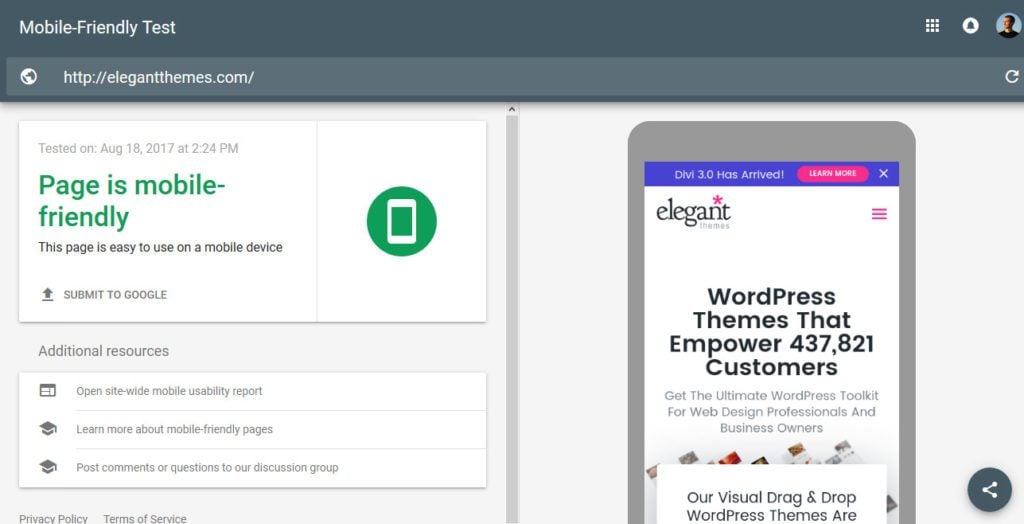
Luckily, Google provides their own mobile friendliness test tool. Just plug in your URL and the service will tell you whether your site is mobile friendly and, if not, how to make it so.

Google mobile friendly test


A quick note: It’s usually enough to only test your home page. However, if you have a page that significantly differs from the rest of the site (such as a blog), it might be good idea to test it individually.

Run a Speed Test

Continuing with the theme of testing, next up on our list of website improvements is a speed test. Page loading speed is another one of those factors that can make big difference in the success of a website because of its impact on page abandonment.
40 percent of users will leave a site that doesn’t load within three seconds. Time to find out if your site is one of them.
For a first overview, you can use Google PageSpeed Insights. Again, just input your site address, hit the button and it will tell you how your site fares in terms of page speed and what to do about it.
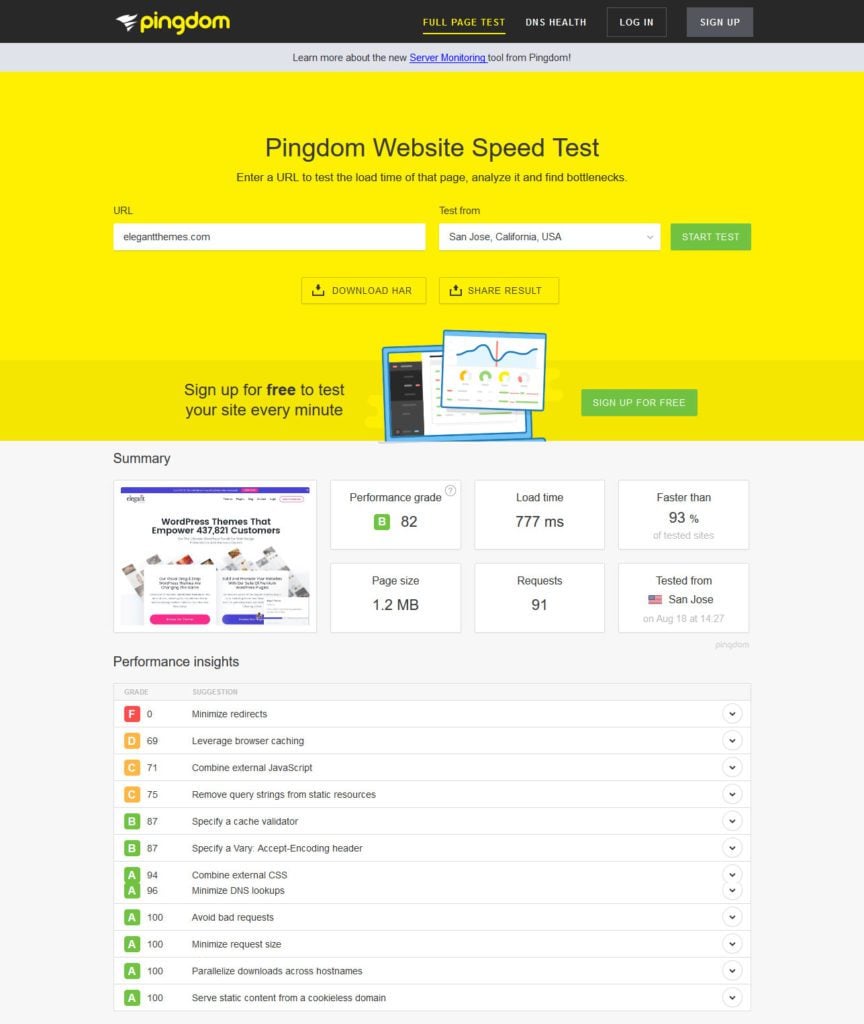
My favorite tool, however, is Pingdom. It not only lets you test your site from several different locations but also gives you a lot more information about what slows it down.
pingdom speed test results

While putting what you learned into action might take longer than 10 minutes (though, as you will see below, not necessarily), running these tests will provide you with the necessary information to make a difference.

Enable Gzip Compression

One of those small changes that can make a huge difference in terms of page loading speed is adding Gzip compression to your site.
Just like zip files on your computer it means compressing your website’s files to make them smaller. Smaller files download more quickly, resulting in faster loading of the page. Easy peasy.
The speed test in the beginning will tell you whether you have Gzip compression enabled or not. Alternative, you can also use Check Gzip compression to find out.
If your site doesn’t have it yet, it’s thankfully not very complicated to set up. You can either ask your host to do it, use a plugin like W3 Total Cache or WP Super Cache to do it or do it manually.
For the latter, just access your FTP server and find .htaccess (note: you might have to show hidden files for that). Add the following code to it (Thanks to GTmetrix):
<IfModule mod_deflate.c>
# Compress HTML, CSS, JavaScript, Text, XML and fonts
AddOutputFilterByType DEFLATE application/javascript
AddOutputFilterByType DEFLATE application/rss+xml
AddOutputFilterByType DEFLATE application/vnd.ms-fontobject
AddOutputFilterByType DEFLATE application/x-font
AddOutputFilterByType DEFLATE application/x-font-opentype
AddOutputFilterByType DEFLATE application/x-font-otf
AddOutputFilterByType DEFLATE application/x-font-truetype
AddOutputFilterByType DEFLATE application/x-font-ttf
AddOutputFilterByType DEFLATE application/x-javascript
AddOutputFilterByType DEFLATE application/xhtml+xml
AddOutputFilterByType DEFLATE application/xml
AddOutputFilterByType DEFLATE font/opentype
AddOutputFilterByType DEFLATE font/otf
AddOutputFilterByType DEFLATE font/ttf
AddOutputFilterByType DEFLATE image/svg+xml
AddOutputFilterByType DEFLATE image/x-icon
AddOutputFilterByType DEFLATE text/css
AddOutputFilterByType DEFLATE text/html
AddOutputFilterByType DEFLATE text/javascript
AddOutputFilterByType DEFLATE text/plain
AddOutputFilterByType DEFLATE text/xml
  
# Remove browser bugs (only needed for really old browsers)
BrowserMatch ^Mozilla/4 gzip-only-text/html
BrowserMatch ^Mozilla/4\.0[678] no-gzip
BrowserMatch \bMSIE !no-gzip !gzip-only-text/html
Header append Vary User-Agent
</IfModule>
Save, upload and you should be good. Test your site once more to see if it worked.

A/B Test Your Call to Action

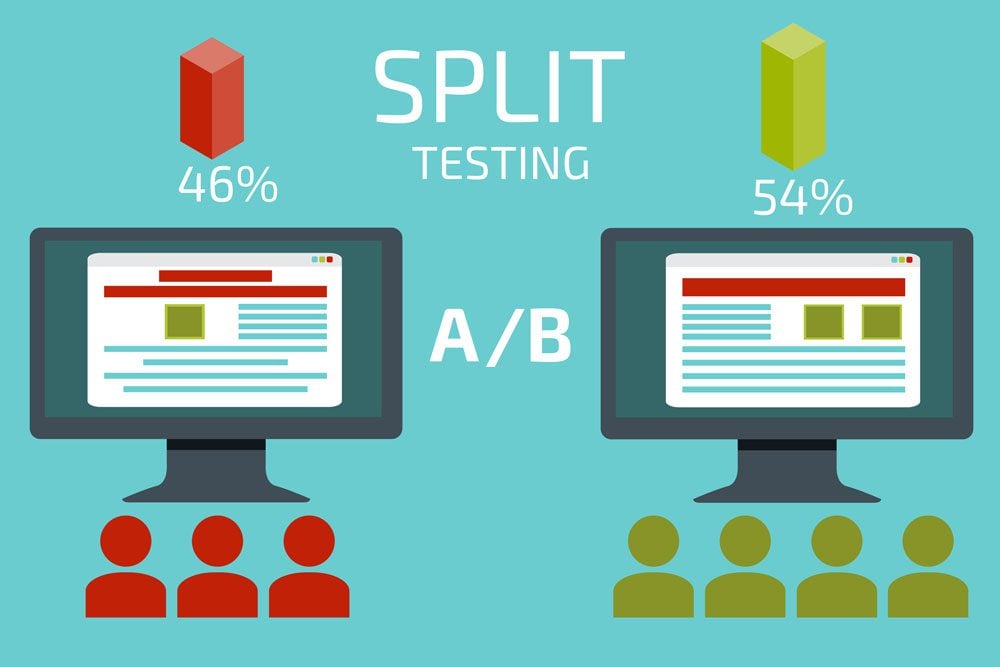
Calls to action are one of the most central factors for conversion rates. Here, the smallest changes like altering a word or button color can literally make the difference between a sale and nothing.
website improvements split test call to actionImage by Andrii Symonenko / shutterstock.com.

So, whether your goal is to have people sign up for your newsletter, use your service or buy your product, it’s a smart idea to test your CTA every now and then.
Thankfully, it doesn’t take too much time and WordPress offers several tools for it. If you are using Divi, you can also use Divi Leads for A/B split testing as laid out in this article.
Come up with a hypothesis of what could improve your call to action. Implementing it shouldn’t take more than 10 minutes. Then just let it run and pick the winner. Boom, conversion rate permanently improved.

Install an Image Optimization Plugin

Images and visuals often make up large part of a page’s weight. For that reason, reducing their size as much as possible is a good way to speed up your website.
Besides always using image just as large as you need and optimizing them before uploading (e.g. with TinyPNG), one of the quickest ways is to use an image optimization plugin.
WP Smush and EWWW Image Optimizer are both excellent options. They will not only automatically optimize any image you upload to your site, but can also do the same for existing ones.
Just install your favorite and then let it do its magic. Quick website improvement? You betcha.

Review/Update Older Content

In today’s net, content is a central pillar for success of any website. For that reason, many of us churn out blog posts day in and day out.
However, what about your older content? Yeah, the stuff that you wrote a few months of years ago. It’s still online, (ideally) still relevant and bringing in visitors. However, it could probably do with a facelift.
Updating older content is a great strategy to give it a second wind. Google loves up-to-date stuff and rewards it with better positioning. So do your visitors. Here’s how to go about it:
  • Edit style and readability — If your content is a few months or years old, chances are good you have become a better writer in the meanwhile. I actually cringe reading my earlier stuff. However, that’s natural and means you can use your new skills to make your older content more readable.
  • Update information — Are the facts in the post still true? Has new information come to light? Is there additional stuff you could mention? If so, by all means do.
  • Add/update links —  Are your external links still up to date? Do you have additional or better sources to link to? Can you add internal links to relevant articles that didn’t exist when you wrote the old post? Again, if the answer is yes, go for it.
  • Optimize for search engines — If you are using Yoast SEO, the plugin will tell you exactly what additional steps will make your article more optimized. Plus, they introduced the readability module just last year, so chances are good your older stuff can use some work in that area.

Update Your About Page

Staying with the theme of updating existing content, the about page is often one of the most important pieces of real estate of any website. People are naturally curious to find out more about who is behind what they are reading.
For that reason, it’s good idea to keep it up date. Looking over your page to see whether it still reflects reality is one of those easy website improvements you can in a jiffy.
Case in point, until a while ago my own about page was still mentioning my fiance even though I got married two years ago (thankfully nobody told my wife).
Maybe something like that is true for you, too. Apart from that, check whether your contact details are still current or if a new picture of yourself or your team would be in order.
Also, consider adding sign-up forms to your about page. It’s worth it.

Minify Code

Code minification is one of those things that all articles on site speed advise but that seems hard to implement.
In case you don’t know, minification means removing everything from your code that is only there to make it humanly readable. This includes formatting, comments and more. Doing so makes files a lot smaller which, as we have learned, make pages faster.
Thankfully, there is Autoptimize. Literally all you need to do is install the plugin, activate it, switch on minification and you are done.

Add New Keywords

In Google Search Console under Search Traffic > Search Analytics you can find the search queries that your site pops up in people’s searches for. It also lets you see their number of impressions, click-through rates and average search position.
This is very useful for finding new long-tail keywords for your content. Here’s how:
  1. Order the list by search position
  2. Scroll down to the point where the average position is larger than 10, so for which you are just missing the first page
  3. Click on a search query
  4. In the next screen, click on Pages to see the URL of the page that is ranking for that keyword
add new keywords via Google Search Console

How is that helpful? Because now you can go to that particular page and add said keyword to it. Two to five times is usually enough to give the needed bump. Plus, it shows Google that you update your pages. Win-win.
By the way, for more tips like that, check our advanced SEO tactics.

Check 404s and Redirect

Users hate very little more than clicking on a search result or link and landing on a page that doesn’t exist. The dreaded 404 not found error.
404 error page website improvementsImage by Ksusha Dusmikeeva / shutterstock.com.

Even if you have a custom 404 error page, this error often causes people to leave your site. For that reason, last on our list of quick website improvements is finding and eliminating their occurrence.
To find non-existing pages on your site, use Screaming Frog, Google Search Console (Crawl > Crawl Errors) or Broken Link Check. After that, it’s only a matter of setting up the Redirection plugin to send visitors on to more suitable pages.

Do You Know More Quick Website Improvements?

Websites need constant improvement in order to stay relevant, up to date and good at what they are intended for. However, that doesn’t always mean a big overhaul. Instead, it can be very effective to do small website improvements regularly over time.
Testing your site, doing small things to speed it up, updating content and improving SEO can all have tremendous impact on your site’s performance. While the changes are small, their cumulative results are nothing but.
We hope you have found something in the above that you can do on the fly to imprive your own website. If you have other tips for small website improvements ideas that make a great difference, please share!
Do you have additional improvements you can recommend? If so, please do in the comments section below.
Read More
Next PostNewer Posts Previous PostOlder Posts Home