Meet The Author

Main Uddin is one of the pioneer blogger cum e-marketer from North East India(Assam).He is also a Skilled web Developer and regular columnist for various news portals around the globe.Read More

author

Blogging Secretes for Beginners for 2019

Leave a Comment
In 2019, it’s easier than ever before for anyone to start a blog and make it profitable.


This is true even if you aren’t tech savvy, don’t know how to code, or understand the first thing about web design.
With a little bit of guidance and a few basic resources, you can have your very own personal or professional blog up and running less than 30-minutes after you finish this article (but there’s no need to rush it).
I’ll hold you by the hand and walk you through every part of the process while helping you avoid the common mistakes that stop most new bloggers dead in their tracks.
Sound good?
Then let’s dive in and get started.
P.S.  If you’re curious about how much it will cost to start and maintain your blog, the simple answer is $0 to $60/year. I highly recommend that you opt for paid domains and hosting, but you have the option to start for free to test the waters. 

Why Start a Blog? What’s In It For You?

When I first started this blog, my aims were simple.
I wanted to teach people how to navigate the tricky (and often less-than-ethical) world of blogging and web development.
With time, my site began to pickup steam, eventually attracting new clients for my company and giving me the opportunity to quit my day job and pursue blogging full time.
However, there are a myriad of different reasons that you might decide to start a blog beyond merely making enough money to hand in your two week’s notice.
For example:
  • A consistent blogging habit will make you a better writer
  • If you find the right niche you can make a full time passive income
  • A high-traffic blog makes an excellent addition to your resume
  • You have an opportunity to share you knowledge and expertise
  • You can make important connections and grow your network
  • And it’s FUN!
I could drone on and on about the benefits of blogging until the sun sets and the moon rises, but I think you get the idea.
The bottom line?
Blogging is awesome and it has the power to change your life.
Assuming you want to take the plunge and start your blog today, here are the exact step you need to take to get started. 

Step 1: Decide – Create Free Blog or Self-Hosted Blog?
Blogging platformsAs I mentioned in the introduction, starting and maintaining an average sized blog will cost between $0 and $60 a year.
So yes, you can start your blog for absolutely nothing, however–as with most things in life–just because you can doesn’t mean that you should.
Let me explain…
Yes, you can create a blog for free on many different platforms, such as:
  • tumblr.com
  • blogger.com
  • wordpress.com
  • ghost.io
  • etc…
But before you go smashing the above links and clicking “sign up”, read the rest of this section! 
Sure, these platforms are great for testing the waters and solidifying some of the ideas you might have regarding content and design.
However, if you are serious about starting a profitable and successful blog, you should avoid these platforms at all costs.
Here’s why:
These “free” blogging platforms have crippling limitations and totalitarian authority over your content.
They are, first and foremost, businesses. And their
main only purpose is to turn a profit by using your website to sell ad space and placing enough limitations on your account that you are eventually forced into a “premium” or “unlimited” blog plan.
Plans that are, more often than not, wildly overpriced and woefully under-equipped.
Without their expensive upsells, your account will be limited to a paltry few–and very generic–number of designs from which to choose, a “maximum” number of daily visits, limited storage, and all but nonexistent customer service.
And let’s not forget that these platforms have total control over your content.
So if you post something that one of your friendly neighborhood website moderators doesn’t like, your entire site (and all of your data) can be deleted in an instant.
Just think about that for a second…
You spend months hustling and grinding to grow your blog. Slowly but surely you acquire a decent number of loyal visitors and subscribers. Then, the money starts to roll in, from sponsored posts, paid ads, or your own products.
Things are going great. 
And then you accidentally violate your free web provider’s Terms of Service (see all limitations for Blogger.com and WordPress.com) and your entire online business is irrevocably lost to the trash bin of the interwebs.
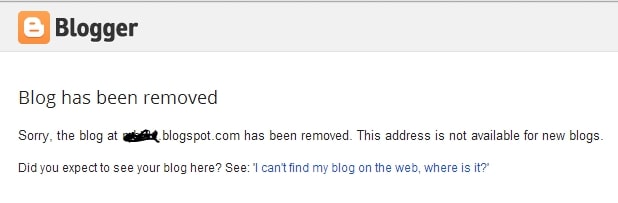
Blogger the blog has been removed
Or
WordPress.com blog has been removed
Do you really want to deal with this?
I hope not.
This is why all of the most successful bloggers started their own self-hosted blog. 
It’s cheap, grants you access to your own personal domain name (e.g. myepicsite.com vs. myepicsite.blogging-platform.com), and you’ll have no limitations.
Oh, and you’ll also have access to premium website templates and design plugins to ensure that your new site looks like something created by a pro.
The bottom line?
Bite the bullet and fork over a little cash to get your blog started the right way.
A few months from now, you’ll be glad that you did.

Step 2: Get a Domain Name, Web Hosting & Setup Your Blog

Alright, with all of the anti-free-blog preamble out of the way, it’s time to get down to the good stuff and go through the exact steps that you need to follow to build and launch your self-hosted blog today. 
To get started, you’ll only need two things:
  1. A Domain name – The web address of your blog (mine is www.websitesetup.org)
  2. Web hosting – A server to store your blog files and keep it online for others to browse and read at all times.
And with a few quick clicks you can purchase and setup both of these things as easy as 1… 2… 3…

1. Sign up with Web Hosting

Full disclosure: To keep my site up and running I use affiliate links for some of the products mentioned in this guide. This means that I earn a small commission (at no extra expense to you) anytime that you make a purchase using one of my links. Thank you for your continued support! 
Of the countless web hosts on the market, only a small handful are even worth considering.
Of those, only 3-4 offer truly exceptional services for the price.
And of those, Bluehost is the only hosting service that I recommend to first-time bloggers.
The reason is simple.
Bluehost is cheap, fast, reliable, and armed to the teeth with a slew of free goodies that will streamline your blogging experience and make your life infinitely easier.
Not only do they power more than 2,000,000 websites worldwide, but all of their packages come with a 30-day money back guarantee, exceptional 24/7 live support, and a free SSL certificate (a $60+ bonus).
Oh, and they also offer one click installs, making it dead simple to get your blog launched in a matter of minutes.
Simply click on the “Get Started Now” button and choose a domain name.

2. Choose a Domain Name

Unlike many of the more profit-centric web hosts that will charge you upwards of $14.99/year for a new domain, BlueHost gives new customers a free domain name for the entire first year of their web hosting service.
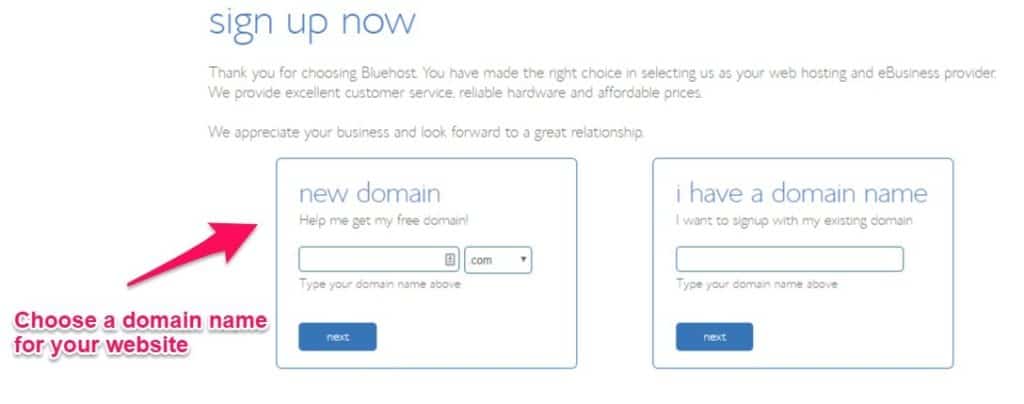
choose a domain name
If you’re serious about building a strong online presence and visitors from all over the world you’ll want to get a domain name with a .com, .net, or .org, extension .
For those of you who are unable to claim your first choice of domain name, spend a few hours brainstorming ideas with friends and family. Think out loud and experiment with different words and variations to find the most brandable domain name for your new site.

3. Choose Web Hosting Plan and Finish Your Registration

Now that you’ve decided on your domain name, it’s time to select your web hosting plan, finish your registration, and begin your forays into the wonderful world of blogging.
As a general rule of thumb, I recommend that opt for BlueHosts’ ‘Prime’ plan since it comes with a free SSL certificate from “Lets Encrypt”.
This will keep your visitor’s information secure, improve your engagement (no one wants to spend time on a website plagued by a giant “Not Secure” warning), and earn you a few extra brownie points with Google.
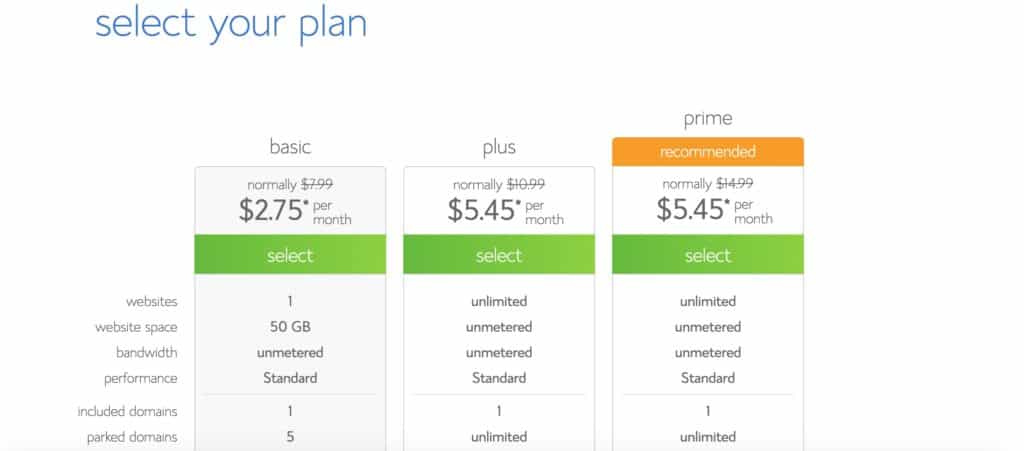
Choose your web hosting plan
Since the renewal prices for BlueHost’s Prime plan are a bit pricier than their introductory rate, I recommend that you purchase as long of a subscription as possible to make your budget go as far as possible.
Once you’ve chosen the plan that best suits your needs you can finish off your registration and checkout using a credit card or PayPal.
And there you have it! You are now ready to launch your blog instantly (instead of waiting 2-3 days for activation like you would with many of their competitor’s).

4. Setup and Launch Your Blog

Once you’ve completed the registration process, it’s time to setup an admin panel (or cPanel) password–make sure it’s as strong as possible to keep hackers at bay–and login to your Bluehost admin panel via my.bluehost.com.
Once you are there, you should be able to see this screen:
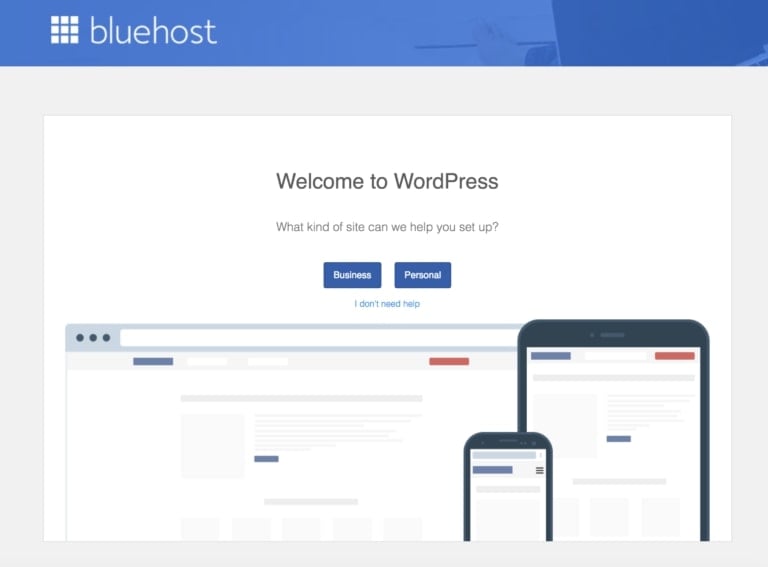
Bluehost welcome to WordPress
Congratulations! If you see this, it means that your blog is already setup.
However, there are a few things that I’d recommend you do to ensure that it’s visible as soon as possible…
  1. Go to Settings > General (left sidebar)
  2. Add Site Title and Tagline (your blog name and tagline)
  3. Change your site address to your domain name. In my case, I’m using websitesetup-start-blog.com
  4. Add your email address (so you can reset your password later)
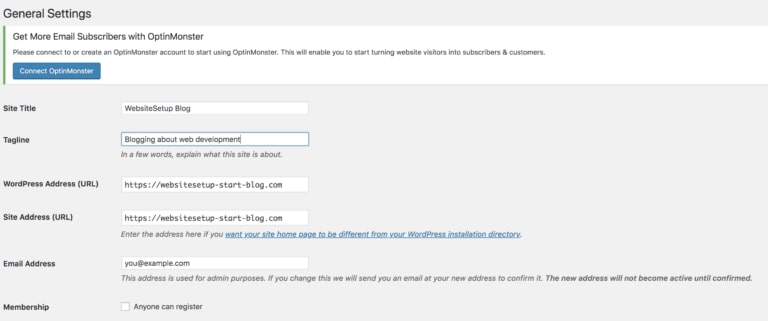
WordPress General settings
Once you’ve completed this, launch your blog by clicking “Coming Soon Active” at the top of WordPress dashboard and then “Launch Your Site”:
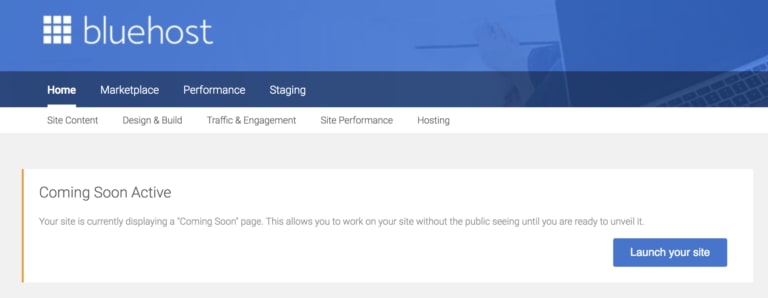
Bluehost launch your blog
Now that you’ve launched your blog, you’ll be able to see–what can only be described as–a skeleton of a website.
And this is where it gets fun.
With your domain name, web hosting, and blog setup, it’s time to get down and dirty and start customizing the aesthetic of your website.

Step 3: Design Your Blog – Make it Look Awesome!

The fastest and easiest way to customize your blog and make it look absolutely awesome is to use the free themes provided by WordPress’ theme library.

1. Choose a Theme and Layout You Like

To install a new theme, go to your website’s dashboard, then go to Appearance > Themes, then click Add New from the top.
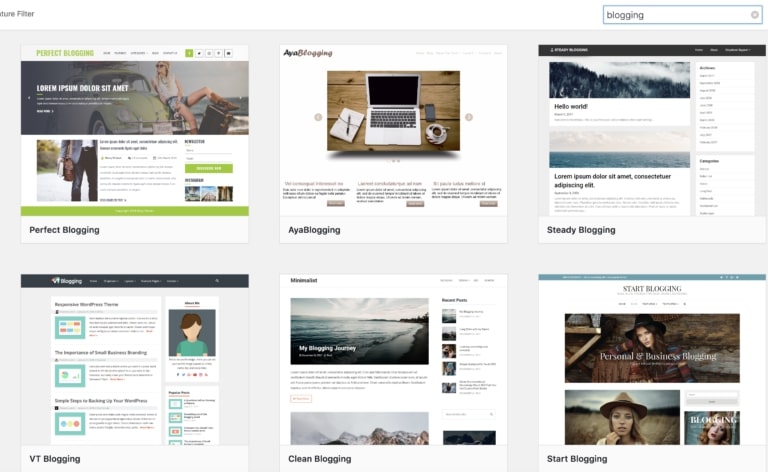
theme selection
From the search results you can test out each theme to see how you like it by clicking on “Live Preview”.
Once you find the perfect theme for your new blog, you can activate it from either the Live Preview (just click “Activate the Theme) or from the main search area by clicking the “Activate” button.
As soon as the theme is activated, it will be installed on your site and you’re now ready to start posting viral content and generating raving fans.
P.S. If you don’t know which theme to choose, I’ve compiled a list of most popular WordPress themes.

2. Manage Your Blog’s Content (Blog Posts & Pages)

When you’re first getting started your site will be adorned with little more than the default “Hello World” post.
To add your first post navigate to Dashboard > Posts > Add New.
From here, you can add the title and start writing amazing content for your new blog.
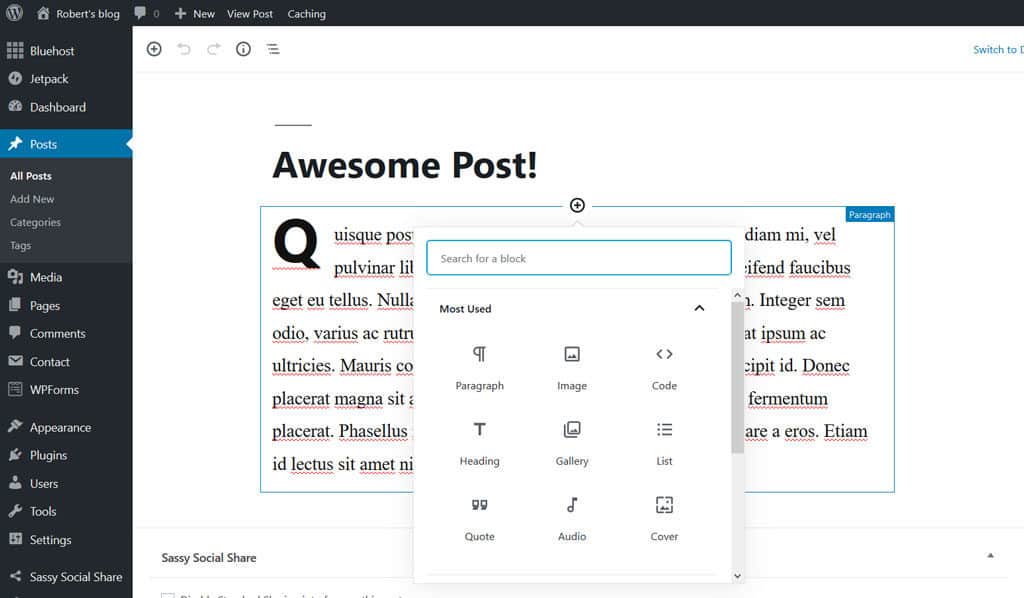
WordPress add new post
With the new Gutenberg editor, you can add different types of content blocks into the editor by clicking on the “Add Block” icon.
Since I don’t have the time to cover every type of block included in the new editor (there are quite a few of them), I implore you to try it for yourself as most–if not all–of them are self explanatory.
Next, you’ll want to add a featured image to spruce up your post and add some visual flair for your readers. To do this, simply click the “Featured Image” box on the right hand side of your screen, upload your image, and click “Save”.
Once you’re satisfied with the quality and layout of your post, hit the publish button, sit back, and prepare to take the blogging world by swarm.
You have officially published your first post!
If you want to add a welcome page on the homepage of your site instead of a list of recent blog posts,all you need to do is go to Pages > Add New and then add the title and content.
Then rinse and repeat this process to create another page for your blog list, choose an appropriate title (like “blog” for example), and then hit publish.
With both pages created, go to Dashboard > Settings > Reading, then in the “Your Homepage Displays” option, check “A static page”, select your welcome page in the “Homepage” setting and your blog page in the “Posts page” setting, then hit save.
Your welcome page will now be published and ready to greet your new visitors as they arrive.

3. Create a Menu

One of the most important aspects of good user experience on any new blog is navigability, a.k.a. the ease with which your new viewers can find the content for which they’re searching.
And the most important part of navigability is a well designed and up to date menu.
Luckily, creating a menu inside of WordPress is pretty straightforward.
To get started, simply go to Dashboard > Appearance > Menu.
From here, create and add a new title for your main menu and then–in the left pane of the menu editor–check the pages you want to appear on your new menu and click “Add Menu”.
The checked pages should appear on the right pane of the editor and you can now rearrange their order by dragging the labels up and down.

WebsiteSetup menu
Once you’re happy with your menu’s structure, you can display it on your website’s main header by checking the “Primary” location checkbox (the name depends on the theme you previously selected) in the menu settings and hit save.

4. Install Plugins (They’re Free)

Plugins are one of the simplest (and cheapest) ways to extend your website’s functionality and increase the traffic and profits you generate each month.
Luckily, there are (quite literally) thousands of free plugins and libraries inside of WordPress and countless more on other external sites.
Let me give you a quick example with one of the most important plugins that you can download for your new site… A contact form.
First, you’re going to go to Dashboard > Plugins > Add new and search for “Contact Form 7.” Then, click “Install” and activate the plugin from the search results.
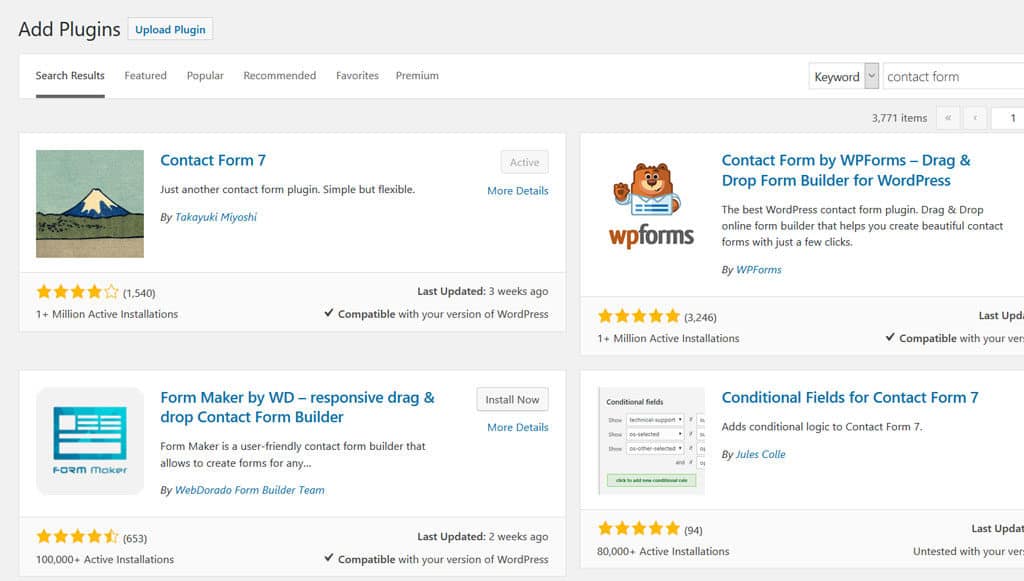
WordPress plugins
Once the new plugin is activated, it will create a new menu called “Contact” in the dashboard. Click it to access the contact forms generated by the plugin and then click “Contact Form 1” from the list to edit the new form.
At this point, the contact form is effectively up and running, however, you’ll want to make sure that the mail template is properly functioning so that you actually receive emails sent from the form.
To do this, go to the “Mail” tab and change the “To” value to the address where the email should be sent.
Next, you’ll need to copy the “shortcode” found just under the contact form’s name… It should look something like [contactform-7 id=”25″ title=”Contact form 1″].
After you have copied the shortcode, create a new page called “Contact Us,” and simply paste the shortcode in the content.
Then click “Publish”, sit back, relax, and check out your new content form in all of its glory:   
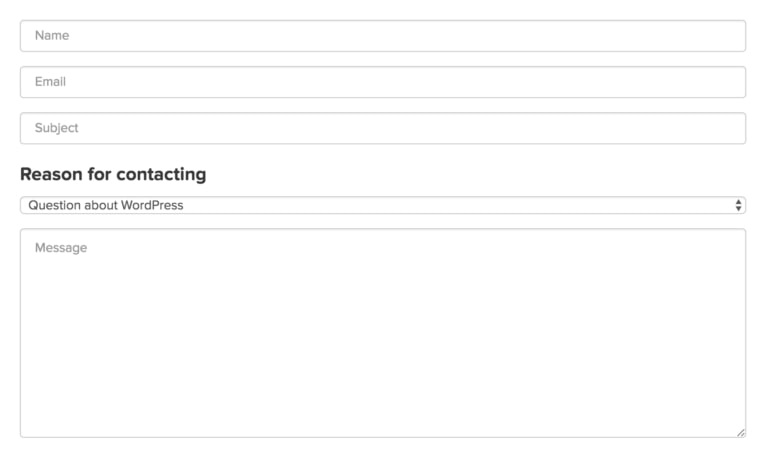
Contact form
If you are looking for more plugins that will improve the use and functionality of your blog, here’s a list of best plugins.

5. Customize Your Blog

To really add another level of flair and personalization, you’ll want to download another plugin that will allow you to change your website’s fonts.
Repeat the same steps listed above for the plugin “Easy Google Fonts” and then go to the theme customizer.
The customizer gives you the ability–much as the name would suggest–to customize your theme and preview it in real time.
Whether you want to change your site identity, colors, menus, widgets, homepage settings, or additional CSS, the customizer gives you almost total control over your website’s design.
With Easy Google Fonts installed, you’ll notice that there is a new option in the Customizer: Typography.
This setting allows you to change the fonts on your site to your liking and grants you a greater level of authority over your site’s aesthetic.
I encourage you to spend some time playing around with the Customizer until you have a strong grasp of the options available to you. Then, once you’re happy with the new look of your site, click “Publish” (as always) and double check the changes in a new tab.
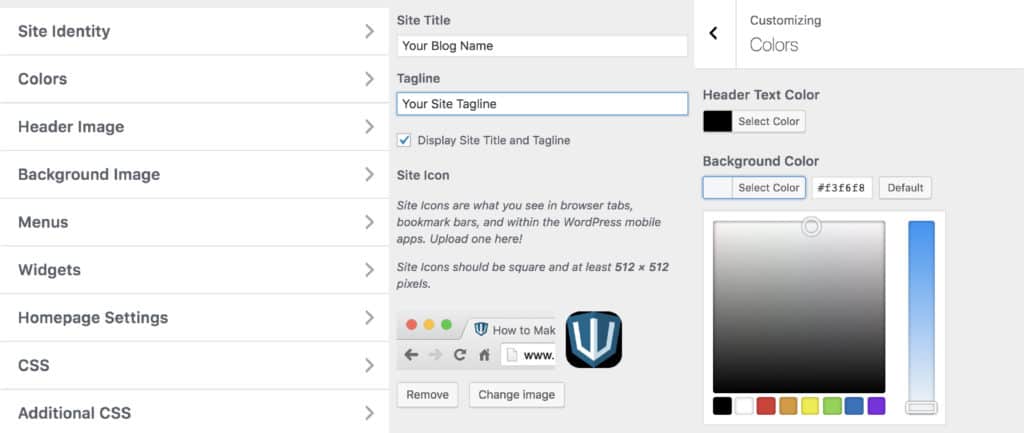
WordPress site customizer
To make it easier for your readers to share your articles on their favorite social media channels, you’ll also want to install a social sharing plugin that will allow your viewers to seamlessly promote your new content from your posts and pages.
Just do a quick search in the plugins page with the keyword “social share” and you’ll be presented with hundreds of results. Install any plugin that strikes your fancy and set it up by going to its settings in your dashboard.
If you want to further customize your blog, read this WordPress Customization Guide.

6. Create a Personal Email Account

Having a domain-based email account like yourname@yourdomain.com boosts the professionalism of your website and increases the authority with which your correspondents will view you.
Luckily, BlueHost includes the ability to create a custom email account from your domain as a part of your web host account.
To access this feature, simply login to your BlueHost portal, click “Email & Office” in the left menu, scroll down and find “Basic Email”, and then click “See Options”.
From here, you can create your custom account in a matter of seconds.
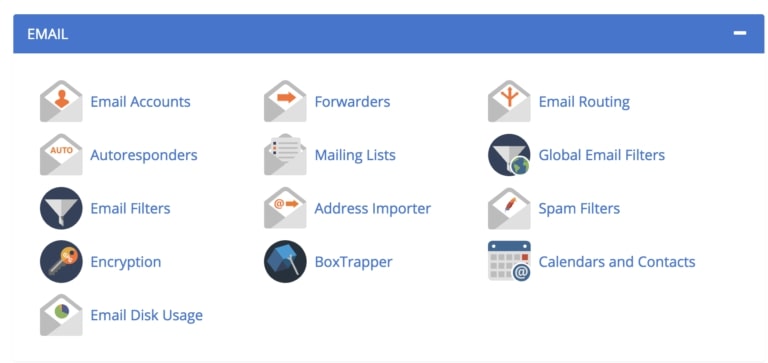
Bluehost e-mail
Once your email account is created, click Email Accounts > Access Webmail to access the webmail application.
After confirming your credentials, you’ll be off to the races and you can now manage, send, and receive emails from your new domain-based account.
I’d encourage you to create an “About” page and add your new contact information so that all emails sent on your new site will be sent to the account you just created.
If you get stuck, here’s a guide for creating a custom email address for your blog.

Congratulations, You’ve Made It

Phew!
That wasn’t so difficult, was it?
At this point, you should have your very own fully functioning blog up and running.
But this is just the beginning.
Use the other content on my website to take your new blog to the next level and be sure to take few days to learn all the ins and outs of your new WordPress blog.
Read More

Logo & Graphic Design Matters for Bloggers and Marketers in 2019

Leave a Comment
Gathering graphic design ideas for your business might seem overwhelming. There’s so much good design out there but there’s also a lot of bad design.

Image: www.indilens.com

How do you sift through it all and find graphic design ideas that will work for your business’s logo, website, social media accounts and email marketing campaigns?
We’re about to give you some insider tips and tricks that will make your life much easier when it comes to graphic design ideas for your brand!

Logo Graphic Design Ideas

You may have neglected creating a logo for your business or maybe you have one but you’re looking for an upgrade.
Whatever the reason, you are in need of some graphic design help. We’re here to give you some graphic design ideas and inspiration from the pros.
Before we get started with graphic design ideas for your logo, let’s go through some basic tips for designing your logo.
  • Start with a black and white design. This will allow you to focus on the details. If you can grab someone’s attention with black and white, then imagine what adding color will do!
  • You will want to create your logo so that there are several different versions of it. If you are using full color that’s great, but you will also need your logo on a grayscale.
For example, if you put your dark logo in the footer of your website which happens to be black, you will need a completely white version of your logo.
  • Think about what your brand stands for and what you want to communicate with your audience. This should come through in your logo. If it doesn’t, it’s back to square one.
  • Choose your font wisely. A serif font gives a professional and sophisticated feel whereas a sans-serif font is more playful. Mixing fonts can be fun too, but we recommend using a maximum of two fonts.
  • Make your logo memorable! Brand recognition is key when marketing your products or services and it all starts with your logo. Brands put their logos on websites, social media pages, and promotional products.
Since your logo will literally go everywhere, make sure that people remember it.
  • Sometimes the best logo is simple. If you are trying to incorporate color, graphics, fonts and objects, take a step back and reevaluate. Decide what is most important to your brand. You don’t want your logo to be too busy or distract from your purpose.

Letter Based Logos

There are more than 26 variations to a single letter logo design. You can experiment with different fonts, adding color and shapes, shadows, lines and more!
Logos that only have a single letter as their main component can be easily recognized and become famous over time. Take the McDonald’s M for example.
It’s more than just a letter. It stands for the iconic golden arches that were modeled after the restaurant architecture. If you were to show someone today a golden letter M they would more than likely associate it with the McDonald’s brand.
If you’d like to associate your business with a single letter, ensure that it makes sense for your brand. Your letter doesn’t have to be plain, you can add other elements to make it more appealing.
Take this logo for example. Its main letter is a B but includes an arrow that shows movement and makes the logo more interesting.
graphic design ideas
Pro Tip: When creating a letter based logo think about the goals of your business and what feelings you want to evoke from your customers when they think about your company.

Wordmarks – Text Based Logos

Logos that just include text are incredibly popular. Did you know Coca-Cola’s logo is just a fancy font that was hand drawn?
By now it has turned into a famous script that has had a few tweaks over the years but has stayed true to the classic font that people recognize worldwide.
For this type of logo you can create your own text or use one of the millions of possibilities that other people have created. If you think that there isn’t much you can do to make your text logo stand out, think again.
You can vary the colors, fonts and sizes of your letters or use different font sizes to make certain words stand out. Add in color to separate your text or make a color block.
If all else fails keep it simple. Take Google for example.
Their logo is simply text with various iconic colors. One thing you can learn from this logo design is that it’s okay to make updates as design trends change.

If Google was still using their logo from 1997, you can bet the company wouldn’t be as popular as it is today.  Google logo graphic design Distorting Text

You do not have to have a separate graphic to have a logo, you can insert it right into your text. Even adding the smallest shape to your text can create a new shape or graphic.
Look at the logo below. Without the addition of a small triangle below the i and l in pencil, it’s just text. But adding this small element of a triangle creates the shape of a pencil within the word.
logo graphic design
This logo is simple and colorless, but you can bet your customers will remember it! The slightest change to a letter can add a graphic element to your otherwise plain text.
Read More

Top Brands for Bloggers & Marketers in Social media to Get Inspiration in 2019

Leave a Comment
Social media marketing might seem scary. After all, there are so many different social platforms–from Pinterest to Facebook to Twitter–and there are so many guidelines to remember for each one!


As a busy business owner, you might not have time to keep up with them. So how do you become one of the best brands on social media?

Luckily, you don’t have to come up with a social strategy for your small business all by yourself. There are so many brands out there that are doing a great job with their social media accounts. Why not take a look at their posts and let them inspire you?
We’re going to break down some of the best brands on social media, dissect what they’re doing right, and figure out what concepts you can carry over into your own social media strategy. Let’s get started!

Pop-Tarts

A universally recognized brand that belongs to Kellogg’s, Pop-Tarts has been making sugary toaster pastries since 1964. And their Twitter account does everything right.
The voice of their Twitter account is sarcastic and caters to a younger, Twitter-savvy demographic. The company’s tweets don’t sound like they’re coming from a brand.
Instead, their tone mimics the tone of many popular Twitter accounts. And if a tweet is going viral Pop-Tarts hops on board and creates their own version.
best brands on social media
Pop-Tart’s parent company, Kellogg’s, follows a more traditional method of posting. While Pop-Tarts tweets things like, “How beautiful do I look in my new profile pic, very beautiful or extremely beautiful…let me know.”
Kellogg’s counters with tweets that sound more like ads: “For a limited time, new special edition Froot Loops straws are available at @KelloggsNYC. Find out how to make them at home!”
Interestingly enough, Kellogg’s has 89,000 Twitter followers. Pop-Tarts has 164,000. That’s more than enough to qualify them as one of the best brands on social media.
More and more restaurants are beginning to tweak their Twitter marketing strategy, filling their accounts with funny and sometimes questionable tweets. But it’s paying off. People click “follow” because they enjoy the content, even if they don’t patronize the brand. But down the road, they might become a happy customer just because of your social media content.
Studies have shown consumers like to see brands that are funny and aren’t afraid of a little friendly competition on social media.
brands on social media
Stocking your arsenal of jokes might result in a high conversion rate.
Pop-Tarts is also great at interacting with their fans. They like to “toast” their fans–“which is like roasted,” one tweet reads, “but actually funny.”
How can you apply these principles to your own Twitter marketing strategy?
First of all, figure out your brand voice and stick to it.
If you can’t imagine tweeting something like “This is more beautiful than my ex which doesn’t really say much tbh I never needed you” for your business, don’t! That may work for Pop-Tart’s brand voice, but it doesn’t have to be yours.
best brands on social media
However, you do need to put some thought into what you want your brand’s voice to be–and once you’ve decided, post consistently and stay on-brand.
Interacting with customers and fans is also extremely important. Social media, Twitter in particular, exerts a huge influence on the buying habits of many consumers.
85% of Twitter’s 330 million active users think it’s important for businesses to provide customer service using the network.
And a whopping 93% of them plan to purchase for the SMBs (small and medium businesses) they follow.
Furthermore, 69% of users have already made a purchase from an SMB because of something they saw on Twitter.
Again, when you interact with your fans, don’t mimic Pop-Tarts exactly. The company once held a contest where it asked fans to share selfies and then proceeded to criticize each one–a gutsy move. But no matter how you interact with your fans, just do it!
The top things to take away from Pop-Tarts’ Twitter strategy
  1. Develop a brand voice
  2. Interact with your fans
  3. Make your content fun to read

Reebok

This athletic apparel company that produces shoes, sportswear, and more is one of the best brands on social media. Reebok has a strong overall digital marketing strategy and does a great job of utilizing different social platforms.
Reebok’s Instagram is full of colorful fitness photography. It’s Facebook page sports appealing photos of the latest Reebok shoe. And the company also puts out some great content on its YouTube channel. But, perhaps surprisingly, the place where Reebok truly excels is on LinkedIn.
best brands on social media
What does Reebok do right? Simple: the company shares content on a regular basis. Not only does it post LinkedIn status updates. But Reebok also regularly links to posts from its blog including interviews with athletes, fitness tips, and more.
Reebok has a deep understanding of its target audience (in a nutshell, athletes). And they are great at creating content their audience wants to read.
You can share content on LinkedIn, too. And you should! 40% of LinkedIn users login everyday looking for new content. Content that contains real value will mark you as an expert in your industry and drive more potential customers your way.
When it comes to sharing content on LinkedIn, where do you start?
Statistics have shown that posts containing multimedia — such as videos or posing questions for headlines — don’t perform well.
Instead, craft a strong headline that makes a statement and include lots of images. It’s also helpful to use bullet points to create “skimmable” content. On LinkedIn, people expect long-form content (2,000 words), but they still want to be able to read through it quickly.
This is how the best brands on social media structure their LinkedIn content, and you can write yours this way, too.brands on LinkedIn

StubHub

Pinterest is an important marketing tool – and we’ll prove it to you! Having a well-run Pinterest account can help lock in your branding, increase your website traffic/sales, and grow your audience. StubHub is one of the best brands on social media because of its strong Pinterest presence.
StubHub, an Ebay-owned company, is the world’s largest ticket marketplace, letting customers buy and sell tickets for sports events, concerts, and more.
For a company like this, setting up a Pinterest account may have seemed tricky, as Pinterest is naturally best suited for apparel or DIY companies.
But StubHub came up with a creative plan: for every type of event they sell tickets to, there’s a board for it – from “Baseball Hub” to “Indie Music Hub” to “Broadway Hub.” Pins range from interviews with performers to photos of athletes.
StubHub’s 55,000 monthly viewers vary across multiple demographics. They have diverse interests. So StubHub caters to all of them.
best brands on social media
Pinterest is a place to get creative. The majority of brands that are successful on Pinterest might be based around home, food, or apparel. But if your small business falls into a different category, you can absolutely still utilize Pinterest as a marketing tool!
It just requires a little out-of-the-box thinking. Consider your type of audience and the kind of content they want to see. For instance, StubHub’s audience wanted to read more details about the celebrities they were buying tickets to see.
Once you’ve gone for a walk in your audience’s shoes, go looking for content that fits what they want to see. You can share your own content on Pinterest. But to save time and to make sure you’re not pushing your product too much, repin content from others, too.

Wayfair

Instagram has a slew of new features that make things uber-easy for brands. If you utilize the app’s shopping features, it’s no longer difficult to get the casual scroller off of the Instagram app and onto your site. Instead, it can happen in just one tap of a finger.
Wayfair has been selling furniture and home goods since 2002. And they’ve beengetting conversions from Instagram since the new shopping features came out in early 2018. Making them one of the best brands on social media.
Wayfair’s Instagram account is full of beautiful photos of sleek and attractive living room or bedroom sets. If followers like what they see, all they have to do to view product names, prices, and details is tap on the photo. And from there it’s easy to navigate to Wayfair’s website.
Occasionally, Wayfair intersperses these photos with humorous quotes such as “Does refusing to do the dishes count as resistance training?” These posts are a great way to drive customer interaction. They get approximately 150 comments instead of Wayfair’s usual 30.
best brands social media
60% of Instagram user (600 million people) find new brands on Instagram. Meaning this is a platform your small business absolutely must take advantage of. Here’s how.
First, your business profile has to have a product catalog set up on Facebook with Shopify or BigCommerce or another applicable shopping platform. Once Instagram approves your account, you’re good to go.
Using the shopping features is simple: when you upload a photo, you tag the products in the photo, just like you’d tag friends in a group picture. Your followers can then click on the products pictured and view them on your website.
Instagram also has shoppable stories, where you can add a product sticker to a photo on your story. Instagram stories are just as important as posts, so don’t overlook them.
Key takeaways:
  1. Utilize all features that are available on any given social platform.
  2. Make it painless and easy for people to get onto your website.

Wendy’s

Wendy’s Twitter account sounds a lot like Pop-Tarts’–sarcastic and funny with lots of interaction and input from fans.brands on Twitter
Wendy’s does one important thing on Twitter that boosts their interaction and helps them classify as one of the best brands on social media: they stay on top of current events!
“Might need a Scott Frosty to ice down the beating Nebraska is taking,” they tweeted after one football game. Tweets like this get big interaction numbers–try almost 3,000 comments and 14,000 retweets on for size.
There’s always something going on in the world, whether sports or otherwise. Before you post on your social media accounts, spend some time scrolling through your feed and figuring out what’s in the news. Once you have a handle on what everyone is talking about, put your own spin on it.
social media best brandsWendy’s also has an excellent Facebook page that has two important things–customer service and seasonal posts.
You can incorporate these two things with your small business Facebook page, too. Facebook is a great place to provide customer service to your customers, whether through Messenger or by responding to comments. Just remember to actually follow up on the retribution you’ve promised.
And seasonal posts–content themed around whatever holiday is approaching–will always drive interaction and be a fun way to promote your business.

branded social content

Cisco

Cisco Systems, a technology company that’s a worldwide leader in the IT industry, knows what they’re doing when it comes to social media. Let’s start with theirLinkedIn.
Cisco was #4 on LinkedIn’s Top 10 Company Pages list in 2017. There are a few key reasons why the company was recognized as one of the best brands on social media.
best brands on social media
As we discussed earlier, sharing content on LinkedIn is important, and Cisco does a great job of it. But the company does another thing right, too: its company page.
Cisco’s LinkedIn copy is clear, concise, and immediately lets you know what you’re looking at. You can find a link to its website and see a map of where Cisco’s headquarters are located. You can even view a “stock snapshot” and see that Cisco was ranked on LinkedIn’s top companies list.
Every detail of Cisco’s page is deliberate.
As you craft copy to explain your own business on LinkedIn, make sure it speaks directly to your customers and their pain points. Give them a clear idea of how your products or services will solve their problems.
And make sure to fill out every facet of the page to give people the max amount of information possible about your business.
Cisco’s Facebook page is also knocking it out of the park with content:
  • A “What’s on your desk?” article with an employee.
  • A feel-good story about how Cisco helped Ellen surprise a high school football team
  • An interesting piece on how Instagram uses AI can detect cyber bullying
Cisco does a fantastic job of consistently sharing content that interests everybody.
best brands on social mediaCisco also understands how important video content is on Facebook. The company regularly holds live streams with the hashtag #CiscoChat, where employees and guests discuss topics that would be of interest to Cisco’s IT customers.
Cisco also has shared video profiles of its employees and short animated clips announcing company news.
So, what can you learn from Cisco’s Facebook page? First of all, don’t be afraid to mix it up. Don’t share the same type of content every day. Get creative and think about the different types of stories and information you could share.
And second, take advantage of Facebook videos and live streams! 55% of SMB owners say that video marketing is an essential ingredient in their marketing strategy. But since 47% of all businesses don’t upload any videos, this is a place where you can get ahead of the game and become one of the best brands on social media.
Just make sure your videos are top-notch because every second matters. As consumers scroll through Facebook, many of them only watch a few seconds of any video they see. So this is an important area in which to invest time and money.
Live streams are also an easy way to drive more views to your page. Like Cisco, figure out what your audience is interested in and then bring in an influencer from your niche to have a conversation on the topic. If you’re out of the office at an industry event, that’s a great time to go live, too.

Target

Target’s Facebook page is every bit as good as Cisco’s: the retail giant shares videos, content, and provides great customer service.
Target also does a great job on Pinterest. The brand covers such a wide variety of products that it may have been difficult to narrow things down. But Target’s Pinterest contains fun boards such as “Baby Style,” “Elf on the Shelf ideas,” and “Wedding Registry Ideas.”best brands on social media
Pinterest is an important platform. Pins are 100% more spreadable than a tweet. Better yet, Pinterest even provides educational workshops and webinars to help your small business succeed on the virtual bulletin board.
As a small business, how should you structure your Pinterest boards? Try having a board where you pin photos of people using your product, if applicable. And then create several boards that focus on topics your audience would be interested in.
That’s what Target does, and it works for their ten million monthly viewers!
You can also create a board where you pin blog posts from your website. Each pin that Target adds contains a link back to their site. This is great for SEO!

Letterfolk

Letterfolk is a family-owned home decor company that creates and sells small felt letterboards. And their 300k+ Instagram followers are loving it.
Why is Letterfolk’s Instagram so popular? Simple: people can relate to it.
It’s easy to tell that Letterfolk is family-run. The husband-and-wife team behind the business doesn’t shy away from sharing the nitty-gritty day-to-day details about life as entrepreneurs.
great brands on social media
Letterfolk’s feed is full of photos of the letterboards–containing quotes such as “For Halloween, I would love to dress up as a well rested mom who arrives on time” and “One does not simply walk out of Target with an empty cart.”
The most important thing about these images is that they’re taggable. A quick scroll through the comment section on Letterfolk’s Instagram reveals that nearly every comment is someone tagging their friend (or maybe even two or three of their friends).

Start Making Your Way into the Best Brands on Social Media Club

As you plan content for your small business Instagram account, put yourself in your followers’ shoes. If you saw your post in your own news feed, would you tag a friend to share it with? If so, you’re on the right track!
But if not, you may want to consider changing up the type of content you’re posting.
Your follower count can skyrocket from users tagging their friends in your posts. And before you know it, you might be one of the best brands on social media.
Looking to take these tips and put them on the fast track? Well that’s what we’re here for. We offer full service social media management packages to get your business on the right track and moving right on past your competitors.
Contact us today to learn more about the custom options we have to help you be one of the best brands on social media!
Read More
Next PostNewer Posts Previous PostOlder Posts Home