Meet The Author

Main Uddin is one of the pioneer blogger cum e-marketer from North East India(Assam).He is also a Skilled web Developer and regular columnist for various news portals around the globe.Read More

author

Leading Silent Cyber Celebrity Anand Khanse talks on Windows and blogging

Leave a Comment
Today, we have the pleasure and the privilege of interviewing Anand Khanse, who is one of the leading Windows bloggers and a Microsoft MVP (2006-16). Our team sat in a conversation with one of the prominent and veteran IT professional in India who never tries to highlight himself except through his product(s).

Leading Silent Cyber Celebrity Anand Khanse replies on Windows


 1. How long have you been blogging? What’s your blog about? Who reads it?
 Anand Khanse: I started WinVistaClub.com around 7 years back. I then moved on to a new domain after Windows 7 was launched. My blog www.TheWindowsClub.com is all about the Windows operating system, although it does cover another consumer Microsoft software & services too. We primarily focus on discussing Windows features, offering tips, fixes, and troubleshooting Windows. Since we basically cover the Windows OS, folks using Windows computers and interested in knowing more about it or needing help to resolve Windows issues, read it.
  2. What do you offer your readers that no one else does?
Anand Khanse: Apart from the blog posts and tutorials, a support forum, TWC offers over 80 freeware developed for the Windows users. These include Ultimate Windows Tweaker, FixWin, Ultimate Windows Customizer, hotShut, File Association Fixer, Right-Click Extender, Quick Clean, Quick Restore Maker, Windows Screen Capture Tool, PassBox – the list is pretty large! I don’t think any other blog in the world, offers so many freeware for Windows users!
  3. How often do you update your blog and how many Page Views do you have each month?

Anand Khanse: Oh – we have at least 3-4 posts appearing every day. I make it a point to post one. The other posts are by the authors of TWC. TheWindowsClub.com gets around 9 million pages view a month. This includes the Forum as well as the News sub-domain.
  4. Do you have a big email list too?
Anand Khanse: I have no mailing list. :)
  5. How much time or money do you spend on blog design?
Anand Khanse: I normally spend 4-5 hours a day on TWC – spread over the day. But it’s mostly in the evenings or night that I work continuously. My works include publishing a post and editing posts of other authors, scheduling them and visiting the forums to help people with Windows issues. This is apart from the other back-end work which a blogger need to do.
6. What about blog maintenance?
 Anand Khanse: The routine work, I do it myself. But if something out of the ordinary is required, I seek professional help, as I am not very well-acquainted with this matter.
7. How many hours they work and if you hire anyone else to work on your blog?
 Anand Khanse: It depends on the work, and I retain their services on a per-job basis.
  8. Where do most of your readers come from? Google search, Social Media or other sites? 
Anand Khanse: Roughly 1/3rd each comes from Search Engines, direct visitors and external links. My traffic from social sites is somehow still negligible.
  9. Tell us the three most popular blog posts you’ve ever written and why you think they were so popular?
Anand Khanse: Based on Google Analytics data, I can say that the following three blog posts of mine get the most traffic:
I guess the first is popular because it is a very important and useful feature in Windows which can help solve many issues. The second and is kind of interesting and the third very relevant in today's times.
10. How did you learn to tell stories and how do you choose what to share with your readers? 
Anand Khanse: I don’t tell stories. :) I basically discuss features and post how-tos. Anytime a new Windows versions is launched, I explore it, look around and blog about the new features that it includes. I browse our forums and see what issues Windows users are facing and then write tutorials on how to fix them. If I come across interesting freeware, I review them too occasionally. 

11. How do you build up close of relationships with the big names of blogging? 

Anand Khanse: Unfortunately, I am not very active in that field now. My time these days is spent more on my business, family, and blogging. I am not very active on the social media too. 

12. Do you make a full time living from blogging? 

Anand Khanse: No I don’t. But I could. I had said it earlier, and I say it again, web earnings could allow me to quit a ’9-5 job’ and still live comfortably - but that’s never an option I’d consider. 

13. How exactly do you earn money from your blog? 

Anand Khanse: I use Google AdSense to monetize my website. Affiliate software sales are doing fine too. AdSense is truly amazing. They have helped develop the Internet. Without monetization options, I don’t think the free web as we know it today would have existed. 

14. What’s the best way to get new readers to a blog? 

Anand Khanse: These days, bloggers are lucky as they can make use of the social media to spread their content. It wasn’t this way before. Writing blog posts which are reader-friendly as well as search-engine friendly is the best way to get new readers, via search engines as well as the social media. If your content is interesting, you will have hooked the reader, and he or she will want to return to your site every now and then ....

15. Tell us your best blogging tips for new bloggers 

Anand Khanse: I always say – Don’t blog to make money. Blog to build a reputation. Money and recognition will follow. Blog consistently, maybe at least 2-3 times a week. Use good English. Focus on a niche, use a good blogging platform and a good easy-on-the-eyes theme. Give the visitor a great user experience. It is hard to predict how Google Search will anyway treat your blog in spite of the fact that you may be having great content. Still, the cliché goes and still holds true – Content Rules! If your content is good, it would be just a matter of time that your blog picks up. Post quality comments on related blogs. Participate in forums. Don’t spam your links in the comment or forum post. Let your name link to your blog URL or place your URL in the forum siggy. That’s a good way of getting backlinks and some traffic too. Submit your blog URL to all search engines, including Baidu & Yandex. Do not check your AdSense earnings or stats every day. It could depress you if you find them stagnating. Don’t waste your time reading about how to increase blog traffic or blog earnings. It won’t help much. In the first year develop your blog, build some quality content, some readership and then think of monetizing it. Your blog will do well, only if you enjoy nurturing it. 

16. Please, can you share one final blogging tip or something that would make you want to read a blog? 

Anand Khanse: Interesting, well-written, well-placed content is what make me read a blog post. Break the content in paragraphs of 4-5 lines, use headings and sub-headings. Make the important words Bold, so that even if a person runs his eyes fast over long content, they stop at the bold words and make him read it again. Judicious use of images too, goes a long way in making a blog post better. Towards the end asking questions may stimulate conversation in the comments. 

17. Where can people find out more about you? 

 Anand Khanse: Search for “Anand Khanse” on the internet, and you may be able to see some more mentions of me. 

18. Where do you live? Do you have a family? What do you do for work and play? 

Anand Khanse: I run an advertising business and live in Pune with my family. I enjoy reading, watching movies and traveling to different places. 

19. Is there anything else you’d like to share? 

 Anand Khanse: Blogging is fun, and it pays well too. One of the fastest ways to earn money these days (legitimately of course) is on the Internet. Plan your strategy, be consistent, focus on developing content and then choose the road for monetization. See what works for you. Ads? Or Affiliate sales? If you get the formula right – you could end up laughing all the way to the bank! If you are passionate, your passion will be seen in the way you have developed your blog – just as you can see the love of the gardener in a well-maintained tree. So go all out and enjoy the ride! 

Editor’s Note: I have come in the connection with this legend, via Tony John who is another evangelist of Microsoft and Google. Anand Khanse comes across as a very simple, hardworking and down-to-earth person, and his simplicity can influence thousands of newbies, along with the tech-savvy too.
Read More

An Infographic Shows Million Dollars Success Pathways For Entrepreneurs

Leave a Comment
An Infographic Shows Million Dollars Success Pathways For Entrepreneurs, I am not sure as you have got my point but here is every thing for a successful entrepreneur either online or offline. It is known to all that business has become marketing based success stories. There is no question how much better your product or service is but if there is no marketing then never get success in your business. Competition is anther factor for entrepreneurs. A lot of entrepreneurs fail in their business strategies due to lack of marketing.
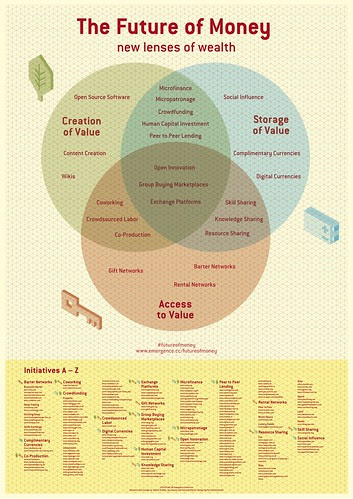
Infographic: New Lenses of Wealth
Infographic: New Lenses of Wealth (Image credit: Venessa Miemis)
Recently I was passing through a question from a client who is not fluent in English but having a mind to learn more about business success, so he wants more business ideas but that may be easy language as he can understand without any puzzle. Just I was checking and digging to find easy business ideas for newbie entrepreneurs those are interested in Online Business! When I saw an infographic on themaplekind.com which is really easy to understand. I have reproduced the same infographic for my readers along with the targeted client. I am sure that this will give you opportunity to make big money via online business and marketing.  A dreamer, a thinker and an Entrepreneur like me easily can assume the topic like a real time hooker as her mind never stops to flow money by hook and crook.
As I have said above that I am a dreamer , thinker and entrepreneur so, some of my ideas are special for me and unique which could not find anywhere, but I know, it would do really well once I get the time or the money to bring them to life with the ideas.

Is these enough for success?

I have never said that these are enough for entrepreneurs but getting the of of success is better via these. So, experts say that having updated ideas on a regularly may be the final point of success story in corporate world either via online or offline. Another precaution is uttered by the experts that having to many ideas may be a cause of failure as it is never taken action on any of them.
An Infographic Shows Million Dollars Success Pathways For Entrepreneurs

Infographic Shows Million Dollars Success Pathways For Entrepreneurs

Infographic source: themaplekind.com
Every where around the globe youth generation are running behind make money online especially those have recently come out from IT institutes. I am sure this infographic will extend great support to make a big money via online business and marketing which may be a great cause of successful entrepreneur.
Read More

MicroSoft Provides WebMatrix SEO Report to Improve Your Website

1 comment
WebMatrix is a free, easy way to customize and built Websites from popular open source apps like WordPress, Drupal, and Joomla, as well as a powerful tool to built sites from the ground up using ASP, NET, PHP, HTML, and other leading Web technologies. Run a WebMatrix SEO report and find out how to make your Website more visible to search engines like Bing and Google. WebMatrix takes the secrets out of search engine optimization and provides clear guidance on how to make your sites better.

WebMatrix and SEO

header_example_image
The WebMatrix SEO Report helps you:
1. Find Webpage violations and recommended actions for correcting them
2. Review inbound and outbound links
3. Check keyword counts on each page
4. Optimize your web pages for better search rankings

Watch How-To Video

play_tutorial_video_thumb5
This tutorial picks up where the Get Started with SEO Using WebMatrix tutorial left off. In this tutorial, we will dig into the More Details dialog of the SEO Report and explore some advanced areas of the report like keyword counts and incoming links.
In this tutorial, we will walk through the following steps:
Step 1: Create an SEO Report
Step 2: Access the More Details Dialog in the SEO Report
Step 3: Explore tabs in the More Details Dialog
Beyond the Basics
Let’s get started!

Step One: Create an SEO report

If you haven’t already done so, install WebMatrix.
image1downloadnow
In order to run an SEO report, run WebMatrix and select Site from Template.
selectsitefromtemplate
WebMatrix allows you to run an SEO report both for Websites built using WebMatrix, and for Websites that were not built using the tool. To run an SEO Report for an existing website that was not created in WebMatrix, choose the Empty Site Template and give it a name in the Site Name entry field.
emptysite
This will take you to the dashboard. Select Run a Report.
Run a Report
Click on Run an SEO Report for your site.
Run an SEO Report
Enter in a name for the report (ie: Website Name), the URL of the website you would like WebMatrix to analyze, and click OK.
New Report

Step 2: SEO report – Accessing the More Details dialog

WebMatrix will analyze the web page and create a report that identifies violations based on a set of rules that the search engines pay attention to. It also makes recommendations for fixing them.
contosohotelreport
After clicking on one of the violations in this list, more information and recommendations will appear in the right-hand side of your screen.
Click on View More Details underneath the recommendations to bring up the More Details dialog.
recommendations

Step 3 – View More Details dialog

By clicking on View More Details, you can access specific information on violations and how to correct them. WebMatrix will even take you to the exact place in your code where the violation occurs.
Click the Content tab on the More Details dialog to see where the violation occurs within the Web page code.
content-tab
You can also see specific details about the page, and can preview the page in the browser from here too. For example, the Details tab shows you elements of this page that are important for search engine optimization such as the Title tag, Meta Description, Server Status code and even how long it takes the page to load.
Click the Details tab on the More Details dialog to see more details about the page where the violation occurs.
details-page
WebMatrix helps you analyze the text content on your page for keyword density and counts. Click the Word Analysis tab to view the word list for the page, as well as link text used to reference the page.
The Word List on this dialog can be used to determine the density of keywords on the page. If you are optimizing the page for certain keyword phrases, this report will help you understand how many times the phrase is included on the page, and what link anchor text is used to reference this page in from other pages.
word-analysis
Click the tab to view both inbound and outbound links for this page. Having links to your page from other pages on your website and related websites coming will help you make your Website more useful to visitors and improve your search engine rankings. This report allows you to analyze the inbound links to the page (top), as well as the outbound links (bottom.)
links
The WebMatrix SEO Report is a powerful tool for analyzing your website and making improvements that can lead to better rankings in the search engines. Take some time to explore the reports and implement some of the recommendations on your Website.

Beyond the basics

To learn more about SEO violations, keywords, links and recommended best practices for optimizing your site, go to the IIS Search Engine Optimization Toolkit forums.
IIS Forums
Update: This tool will work on Windows7 and Windows8 operating system. [September/2013]
Read More

Internet Companies target Orientation and Green Movement

Leave a Comment
Internet giants’ brands are much more vulnerable to attack from the environmental movement than other industries. That explains in part why many of them pursue green technologies.
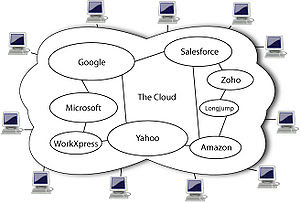
English: Diagram showing overview of cloud com...English: Diagram showing overview of cloud computing including Google, Salesforce, Amazon, Microsoft, Yahoo, Zoho, Longjump and WorkXpress (Photo credit: Wikipedia)

Internet Companies target Orientation and Green Movement

The internet giants may be on the forefront of green innovation compared to behemoths in other industries like manufacturing. But what’s their motivation? GigaOM’s Katie Fehrenbacher put that question to execs from Facebook and Switch on Thursday at Structure: Europe in London.

Switch EVP of data center technology Mark Thiele said that while public perception isn’t the internet giants’ entire motivation, protecting their brands is a big factor, especially because they’re so vulnerable to criticisms from Greenpeace and other environmental groups.
“The perception is that the work that Yahoo, Google and Facebook do on a daily basis isn’t work that keeps airplanes in the air or keeps your car running or keeps food on the table,” Thiele said. “By attacking any one of them they get noticed by a billion people. It’s not necessarily a negative thing but that’s just the reality.”
Facebook European data center operations manager Niall McEntegart also pointed out that internet companies have also cultivated those green expectations because of the way their businesses scale. Like most small businesses, internet startups aren’t focused on sustainability and energy efficiency when they launch. But as they grow larger they naturally gravitate toward cloud computing and data centers, which are not only economically more efficient, but more power efficient, McEntegart said.
Data source: Gigaom
The global green movement places very little value on the modern industrial society that has produced huge improvements in economic prosperity, health care, human rights, education and standards of living. In fact, the green movement hates and fears western-style capitalism. To them, the loss of industrial civilisation is of no great consequence. In fact, it is one of the top priorities of the Global Green Agenda.
The green movement has been obsessed with capitalism, especially evil multi-national corporations, since its birth in the 1960s. Long before the advent of ‘global warming’, the primary objective of the movement was, and always has been, simply the destruction of energy production. They know that the life blood of the industrial society is energy, especially fossil fuels, and a significant reduction in energy availability will deal a fatal blow to Gaia’s greatest threat – modern human society. Primitive societies are admired for being sustainable and living in harmony with Gaia. Western capitalist nations are reviled as “destroyers of the earth” which must be subdued. They make no attempt to conceal this agenda
Read More

15+ Steps To Creating Perfect Website With WordPress Instantly

Leave a Comment
Creating a website has become passion and fashion for new generation around the globe but only a few know the methods to creating a website. I have already written 500+ tutorials on blogging and online marketing. There are tones of services provide those allow to create website on complying their terms and conditions. My today’s article tries to the core factors to creating website via most popular blogging software WordPress.
English: The logo of the blogging software Wor...English: The logo of the blogging software WordPress. (Photo credit: Wikipedia)
Maximum internet savvy users have said that WordPress is the most popular Content Management system (CMS).  I am sure, countless CMS’ are available online, ranging from open-source to paid version and you’ll hear evangelists on all sides swearing that their choice is the best for newbie to internet savvy. More interestingly, Drupal, Joomla or any other CMS doesn’t hold a candle to WordPress for its ease of use, security and reliability for users. Here is the full check out list of 15+ Steps to Creating Perfect Website with WordPress Instantly.

15+ Steps To Creating Perfect Website With WordPress

1. Select and buy a Domain:-

Domain is the indication mark pattern of any website or blog as without a domain, no body will find your website. So, you have to register a domain from any registrant. Normally TLD (top level domain such .com, .org, .net, .info etc) is better for any business or target orientation. There are other domains are country level (.in, .co.in, .ca, .my .us etc). Normally domains are worked either naked [umain30.com] or with WWW [www.umain30.com] but both version are valid. There are four key elements to a domain: top-level domain, root domain, subdomain and subfolder.

2. Select and Buy Hosting Package:-

It is needed to buy a hosting package from reliable hosting company which will store your files and data on their server. Hosting service expert says that you might be bought hosting service from trust worthy provider because hosting service may empower your creativity via speedy loading and other factors. In the procedure of buying hosting servic , keep in mind that Does the host support WordPress, How many domains can you host, How much bandwidth and storage are you allocated, What up-time percentage are you guaranteed, How long has the company been in business, Does it have positive reviews by users, What kind of support does it offer, How much is the package you need, Are upgrades available if required, Are there any additional costs , Is there a trial period and a few more conditions. If you get reply of these queries yes then obviously you can buy their hosting service.  Hostgator, Bluehost,ipage are a few trust worthy name from the industry.

3. Configure Name servers (DNS):-

nameservers
After purchasing hosting package you have to add the domain name and they will provide name server for your website. But the domain is come with your hosting package, and then this step is not required. Name server will look like ns1.hosting.com and ns2.hosting.com, now login your registrant account and go to manage domain button and click on change DNS. Now you have to put the name server previously got from hosting provider.  If you failed to locate where to change the name servers, then do not hesitate to contact your domain registrar via ticket system or phone system. They will surely help you in this matter.

4. Instant WordPress Upload:-

Maximum hosting service provider offers instant WordPress upload option, so you have to no worry to upload WordPress from your Control Panel. Simply check Software button and follow with WordPress installation step by step. If there is no such option to upload WordPress then simply download WordPress from WordPress.Org and unzip the latest version of WordPress, and then upload it to your hosting account using FTP. To upload files using FTP, you must first download and install an FTP client program, such as FileZilla (the one I use). FileZilla will ask for your FTP credentials (host name, user name and password).
Logotype of FileZilla, the free FTP solutionLogotype of FileZilla, the free FTP solution (Photo credit: Wikipedia)
Your host will already have given you these with welcome message. Once you have connected to your server via FTP, you will be presented with a list of folders. Search for one named public_html or the name of your domain.

5. Creating Perfect Database:-

Database is the markup codes where all your WordPress data is stored along with content and customization. Each time a page loads, WordPress queries the database for all of the required information, such as title, content, categories, tags and published date. Using your host’s control panel, create a database and a database user name and password for WordPress to connect with your website. However, if you fail to do so then must contact your hosting provider and they will assist in the process.

6. Customize wp-config-sample.php

wp-config
After completing setup the data base with its user name and password, it’s time to use the FTP client to edit the wp-config-sample.php file.
First, rename the file to wp-config.php (i.e. remove sample). Then, using a text editor, open the file.
/** The name of the database for WordPress */

define(‘DB_NAME’, ‘database_name_here’);

/** MySQL database username */

define(‘DB_USER’, ‘username_here’);

/** MySQL database password */

define(‘DB_PASSWORD’, ‘password_here’);
Find these lines, and replace the placeholders with your credentials. Then save your edited file to the server.

7. Installation of WordPress:-

When you tries to install WordPress in your database then WordPress will request some basic information to complete the installation and create your account. The process is short and self-explanatory. Once you have submitted this information, you will be able to log into the admin panel at yourdomain.com/wp-admin. You will also receive a confirmation email in your registered mail inbox.

8. Select Perfect Theme or Skin:-

WordPress theme or skin is the design foundation for your website.  There are thousands of free and paid themes are available in Word Wide Web but you can create custom theme via yourself or outsource some one for this customization. Keep in mind some factors in theme selection process such as Great design, Valid HTML and CSS, Rock-solid code, Strong readability, Compatibility with the latest version of WordPress, Compatibility with the most popular plugins, Extensive support and documentation. So with the space being so competitive, all reputable theme providers will offer these features as standard.

9. Customize Basics With Plugins:-

After the installation of updated version of WordPress, it needs to poickup some essential customization on theme which can give more professional look of your website. A few major customizations on theme and basic of WordPress are Activate Akismet with  generated API key. If you don’t plan to allow comments on your articles, this step isn’t required. If you don’t want to allow comments, navigate to Settings → Discussion, and uncheck “Allow people to post comments on new articles, configure permalinks (Settings → Permalinks), Add Gravatar, add a few needed plugins and etc.

10. Secure WordPress

WordPress is relatively more secure than any other software but honestly no website is 100% secure as long as it is online. So, simply keep your WordPress updated and install trusted security plugin from Admin panel.  Many WordPress users leave the database table’s prefix as the default, wp_, allowing malicious hackers to search for that specifically in their exploits. By changing the prefix to something unique, you make the database less vulnerable.The WP Security Scan plugin does some of these things automatically and can assist you with completing the others. It is better, don’t allow any user to enter your Admin Panel.

11. Create needed Pages:-

There is a default page (sample page) where you can create pages as much as you need. Normally Home page is created default but other pages have to create as needed. But keep in mind that About Us page, Privacy policy page and Contact Us page are most essential for any website. Other pages are optional as your choice.

12. Search Engine Optimization (SEO):-

The SEO (Search engine optimization) is essential to ensuring that your copy draws as much targeted traffic as possible. Some WordPress themes have in-built seo functionality if there no such functionality then you can install a plugin called WordPress SEO by Yoast which is labeled as best in the industry. Main things in seo you have to do are Generation of XML site map, Site-wide and post-level control of meta data, Control of noindex and nofollow, verification of Webmaster Tools such Google, Bing and Alexa.

13. Setup Monitoring Analytics:-

analytics
Monitoring your website via analytics will give insight data of visitors and track them. It will help to get information on the factors such as how they landed on your website, how long they stayed, how many pages they viewed and which pages they viewed. There are lots of such tools available online but Google Analytics may be the best. Simply signup Google Analytics account and verify your site by putting meta data providing by Google

14. Keep Updated Back Up:-

Backing up is undoubtedly the most important thing have to do for website owner.  Your contents and other data will be missed handled or crashed for any reason, so it needs to take backup for your data. There are a lot of free and paid services available for backup such as Google Drive, MNS skydrive, VaultPress, BackupBuddy, WP-DB-Backup and many more. Just choose any one of them and take backup of your site.

15. Set Up Caching Tactic:-

When browser site request comes then every time a page is loaded by a user, WordPress processes that page on your server which is so long process and covers large amount of space, so you can cache your data via plugin such as W3 Total Cache plugin like many more but keep in mind you can use only one cache at a time.

Author’s View:-

This is the basic points to setup a WordPress website. I think, it has been listed all major factors related to WordPress website, even I hav missed some thing then must comment bellow for future updates. If you get any problem in setup process then contact me via Contact Us page.
Read More

Scam or Legit Review of Freelancers Heaven SEOClerks

Leave a Comment
I had joined a Freelancing website 3 years ago but never tested the site, how the site works? The site was launched on 6th October, 2011 and my account may be among first 100 users. After 3 years one of my Virtual Assistant has asked me to register myself to the site and has ask me to write a review about the freelancer’s market place. So, today I have started to collect some deep digging data about the freelancing website. I have started to use the website as a buyer. The freelancing website is SEOclerks, market place for buyers and sellers. My article tries to cover all the features, advantage and disadvantages about SEOclerk.

Scam or Legit Review of Freelancers Heaven SEOClerks

 Review of Freelancers Heaven SEOClerksReview of Freelancers Heaven SEOClerks

What Is SEOClerks?

SEOclerk was started in 20111 but the ownership went Ionicware Inc where Dillon Brooks is the man behind this project. As they officially announces that is providing a secure and safe online environment for internet freelancers to earn a stable income from their hard work. As per record is available in World Wide Web says that we became the largest dedicated SEO Marketplace on the planet.  It is confirmed by the Ionicware Inc. So, it can easily say that SEOClerks is a giant SEO Marketplace for freelancer where any one can openly buys and/or sells own services or product related to SEO or website or Internet.
Freelancers Heaven SEOClerks

How does a buyer think about SEOclerk:-

I have already said that I am starting to use the site as a buyer, so what are the things a buyer can get from the site.
1. Category wise market place
2. Search features with customization
3. Energetic and real time help forum
4. Instant support from administrator(s)
5. Easy pay button (Paypal, Payza,etc) along –wallet facilities
6. 80% instant refund policy
7. Rating system for buyer for service provider
8. Allows sending mails to all followers
9. Direct contact with seller
10. Reject any delivered and get refund with in 10 days.
There are many more facilities available for buyers in seoclerk which can give more success for marketers and entrepreneurs as it is cheaper than any other similar service provider. Another great feature is the safety of rejection of orders and mutually gets refund automatically without hampering both parties reputation.

 How a seller thinks about SEOclerk:-

I have talked with 20+ freelancers, those are working with seoclerk since last 2 years and they have earned lots of money from the site. What is their finding as seller in seoclerk-
1. Easy to list any service (no need to approve from moderator)
2. Gigs are indexed in search engine with in 5 minutes
3. Small to smaller gigs can list (minimum $5 for level 1 but other levels can post less than $1)
4. Instant notification (email) for order booking
5. Direct delivery option to the buyers
6. Rating system from buyers
7. Buyers recommendation from buyers
8. Minimum payout $10 via Paypal (level1) and $5(level2 and above) with out charge single penny.
9. Affiliate program for sellers (own or others gig can promote out side of the site)
10. Free offers for buyers and seller [Free money or coupon code)
 Review of Freelancers Heaven SEOClerksReview of Freelancers Heaven SEOClerks
There are many other great features also available and I am sure any one can earn huge income from this site with out any bondage. There support team is really real time and helpful. They also allow to list gigs like download and subscription.

Impartial mention of Disadvantage:-

Every thing is not perfect in this world, so there are a few disadvantages also seen on seoclerk. Normally, maximum listed services are low quality, no moderation system allows spammers to post, Fake account detection facility, deduction in refunding of 20% on cancellation  merely high, it takes 10 days to validate to withdrawal of earning money and a few more such disadvantages.

Final thoughts of reviewer:-

Before buying any thing from any seller must check his / her reputation on the site or recommendation from others. You will get bad result or experience if you select bad services or people for your works. On the other hand seller must list only real and possible gigs which really attract more buyers with out any hard promotion. Level system and rating system are really helpful to buyers and sellers too. Honestly offers and free coupon system can safe a few bucks and getting more users, eg: Get $2 for Free, Free $5 coupon etc . Over all, I am satisfied with their services. They never suspend or ban any member without prior notices for violation of their term condition, so SEOclerks is not a scam or fraud site for freelancers.
Read More

Deep Research Topic ! Bing search is more user friendly than Google

Leave a Comment
Bing search is more user friendly than Google but why ? Microsoft is one of the pioneer performers of the virtual world along with computer world. Bing was previously known as MSN Search, Live Search and Windows Live Search, the search engine from Microsoft Corporation. It was come online as MNS live search in 1998 with a few features. Microsoft purchased the semantic technology from Powerset in 2008 and renamed live search to Bing on May 28, 2009 with a better design and usability from user interface. Microsoft and Yahoo came under a deal to power each other search on July 29, 2009 and major redesign and algorithm changes were taken place in 2012 with sidebar and social indicator induction. Bing search is more user friendly than Google
Recently, one of my newbie blogger friend has asked a question on Bingo search “Is Bing search more user friendly than Google?” Honestly, I have no instant reply of her question. So, I have done a deep digging on this issue with an experiment on it. Today’s article is carrying the result of my findings of the experiment. You may not be agreed with my experiment results but really awesome findings.

Pro & Cons of Google and Bing Features:-

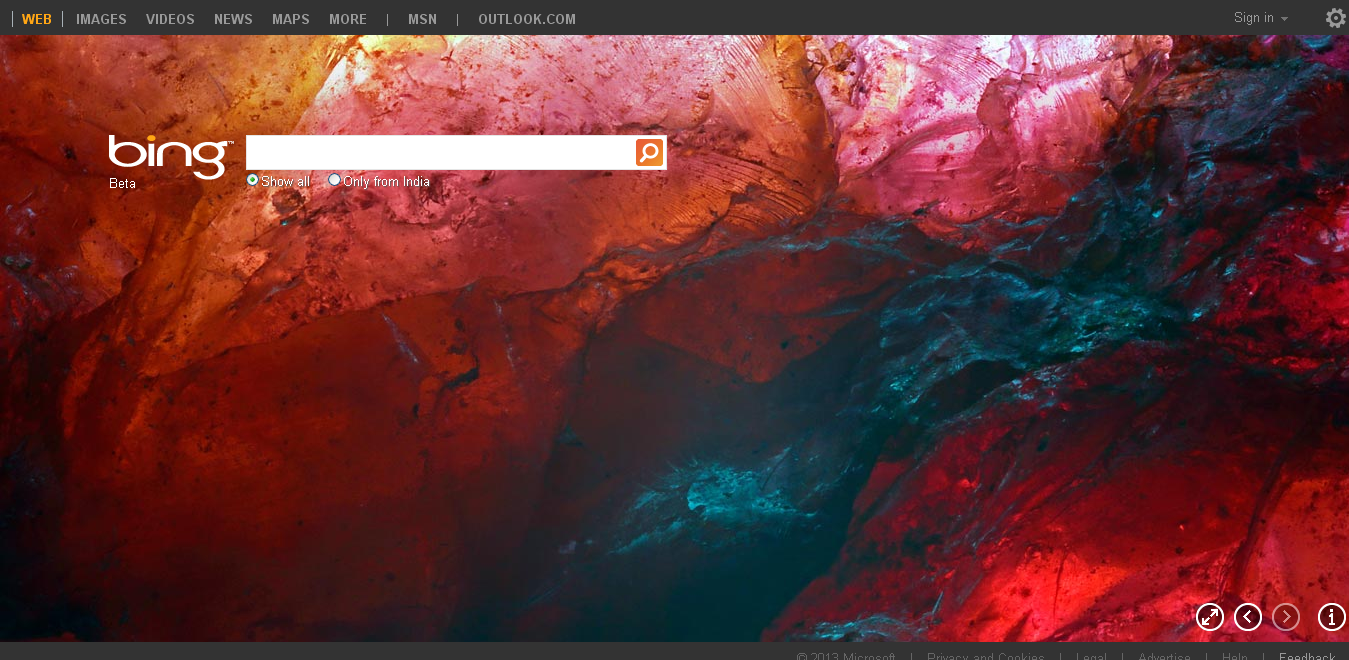
i. Bing changes background images daily and Google changes Doodle occasionally.
ii. Bing carries HTML-5 enabled video home page and Google prefer to show Youtube Video
iii. Bing shows main image with four other similar and Google shows single image.
iv. Bing’s left side navigation pane with social meter but Google shows advertisement
v. Bing’s right side extended preview is bigger but Google occasionally shows it.
vi. Bing shows sub links from same domain and Google also shows site links
vii. Bing allows third party site information on Bing but Google never allows except cache copy.
viii. Bing allows particular website search and Google also allows particular site search.
ix. Bing allows customer service phone numbers in main search but Google allows phone in local search only.
x. Bing allows media hovering and Google also allows media hovering (both image and video).
xi. Bing allows advanced filtering features with perfect ness but Google has the same with no effective functionality.
xii. Bing is beta version instant search but Google already has activated instant search.
xiii. Bing allows local search with particular topic with full coverage and Google also shows related all data available on their cache.
xiv. Bing is available in 100+ world languages and Google also available 100+ World languages.
xv. Bing search is integrated with Facebook but Google has no role in Facebook.
xvi. Bing allows mobile users with toll free helpline (Bing411) and Google allows mobile users but have no helpline for users.
xvii. Bing follows strict censorship in SERP but Google has a little censorship on adult or illegal contents.
xviii. Bing index websites slowly with quality but Google index quickly but has a little quality contents.
xix. Bing allows user encryption and Google also allows encryption on searches.
xx. Bing has 147 products along with search and Google has 136 products along with search.

Experiment Issues on Bing and Google Search:-

a. Person or name search effect:-

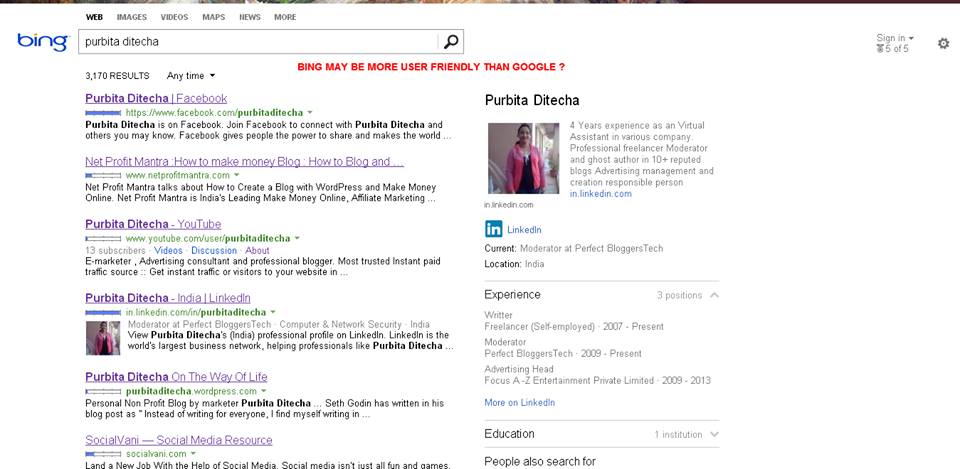
I have done searches in Google and Bing with same keywords – My own name was first search in Google and Bing for starting of this! Bing search is more user friendly than Google
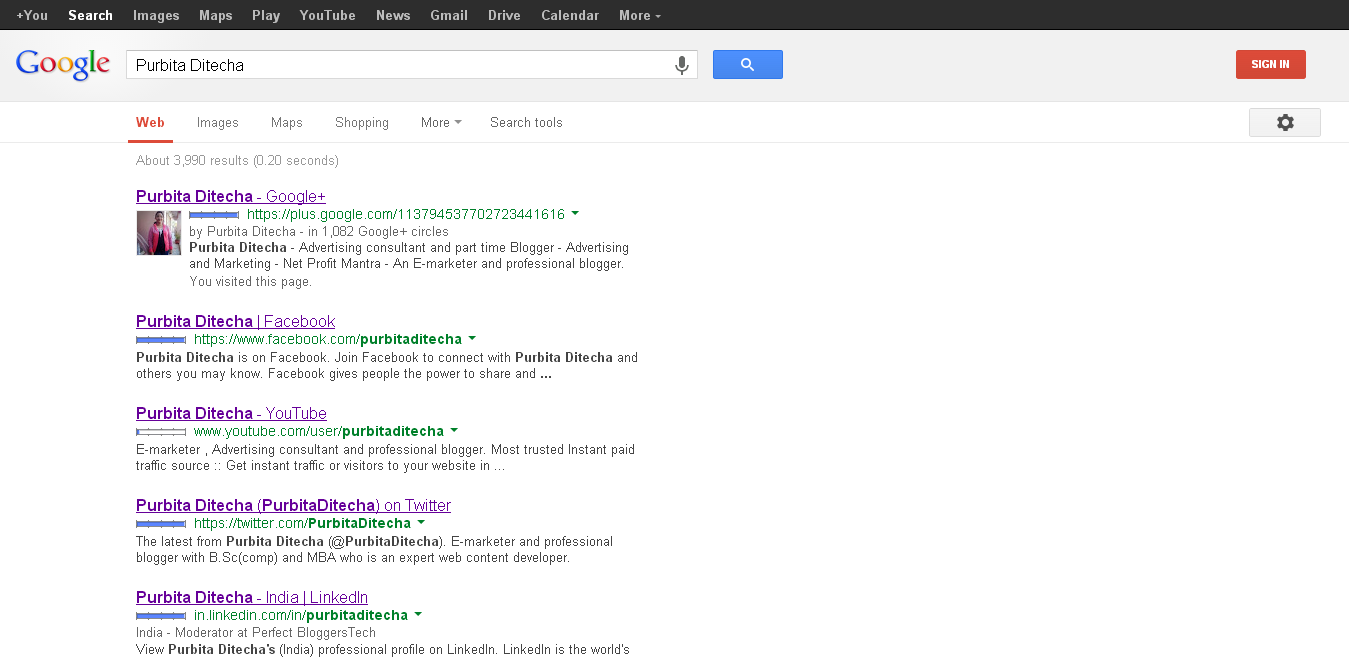
This search is clearly indicated the websites where I really interact and my information are available on those. More interestingly there is no such malicious or ir-related or little engaged websites. So, it is more user friendly than any other search engines. On the other hand same keyword in Google shows -Bing search is more user friendly than Google
The research shows the social media profiles those are hosted in Google in top ranked but no contributing websites. It is cleared that Google always gives important on their own products either quality or quantity which are not factor. Simply, we can say that Google’s SERP is influenced via their product policies.

b. Product search issue:-

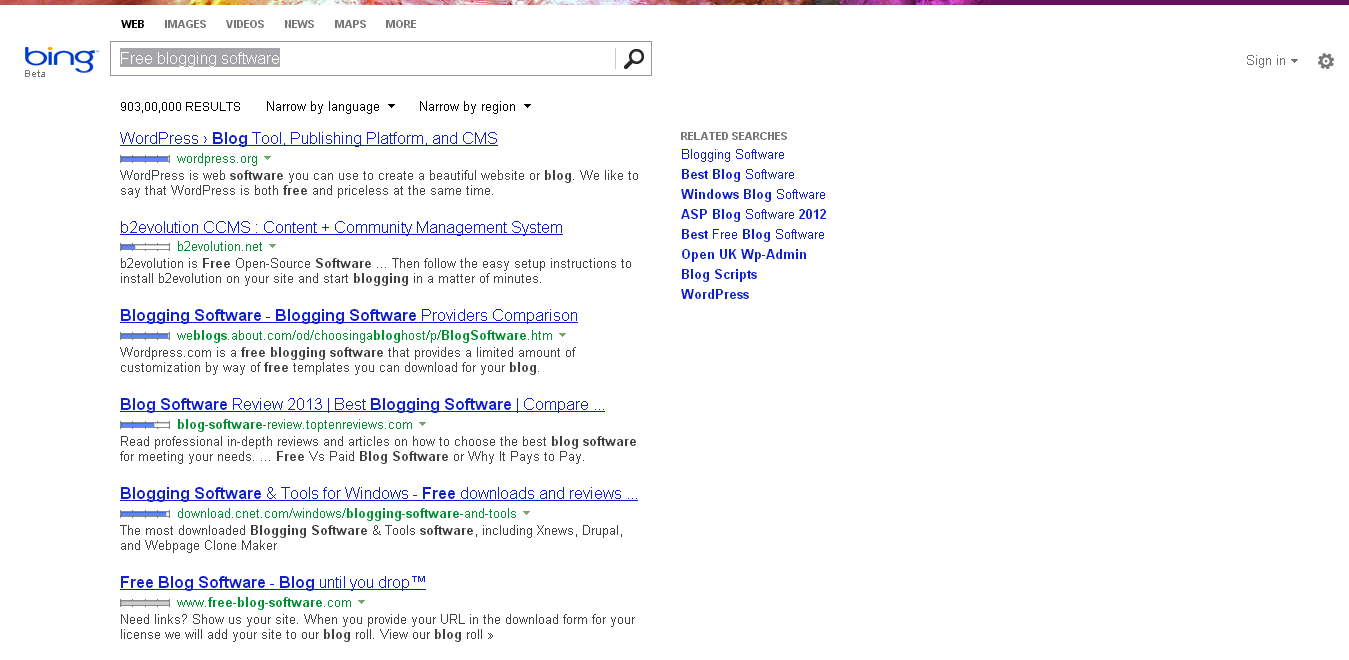
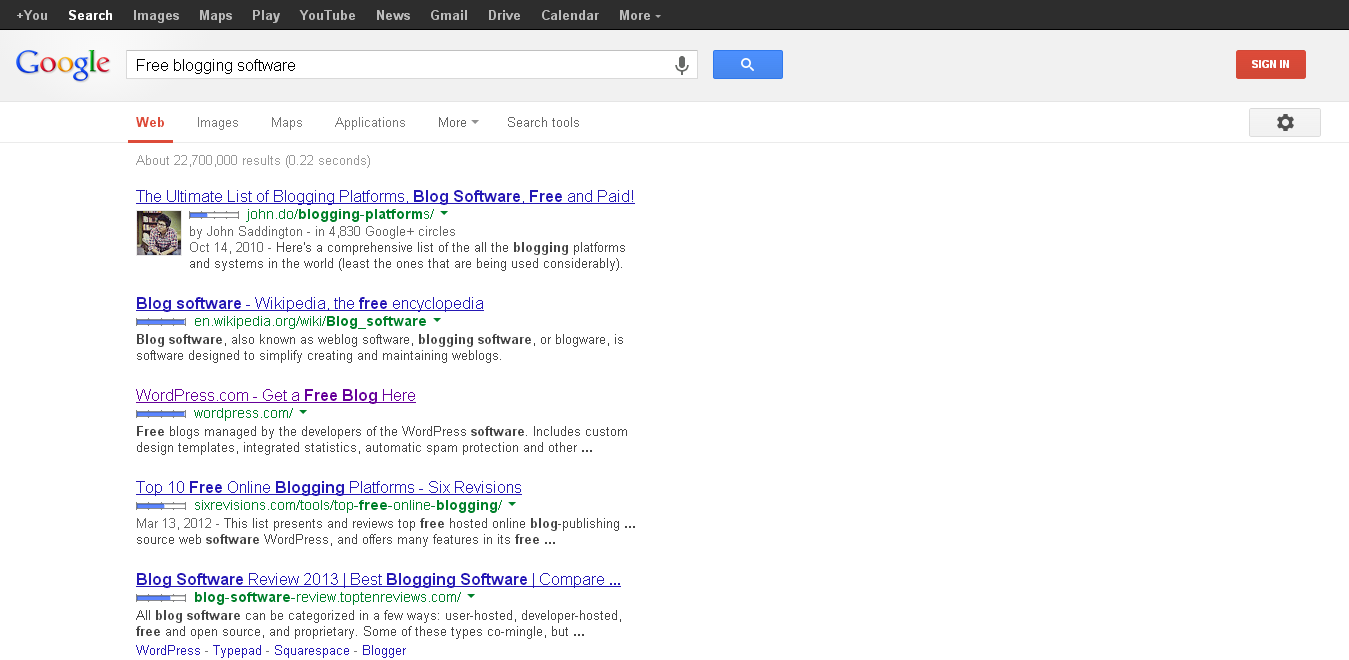
Bingo prefers to show the products as search term related but Google shows the authors.
Bing search is more user friendly than Google
As for example, I have searched “Free blogging software” and here Bing shows the result related to blogging software either CMS or any. But Google for the same keywords – check imageBing search is more user friendly than Google
Top ranked result goes to favour of author’s content which is will optimized for Google algorithm either it is user friendly or informative which are not factor for Google.

c. Local search effect:-

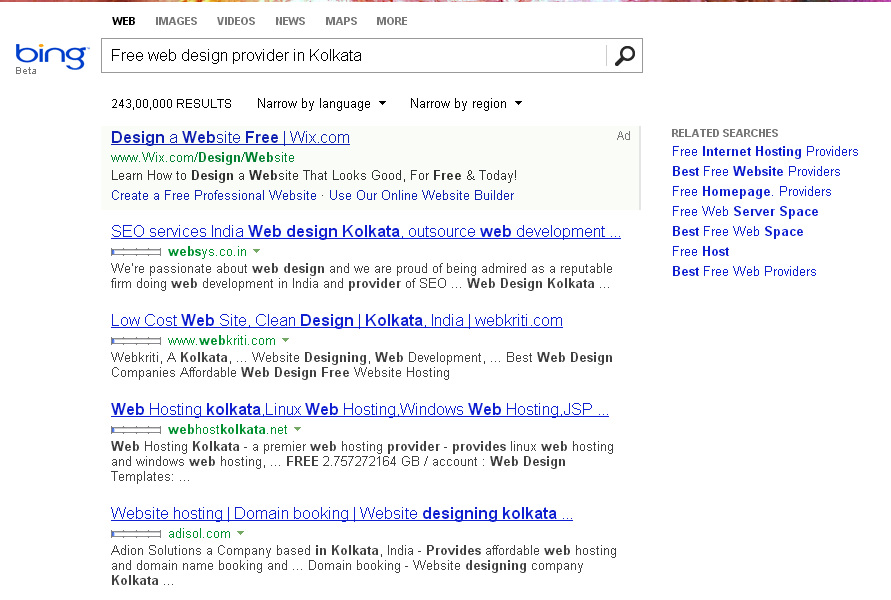
I have done local search for particular keywords in various places around the globe. As for example check the images.
Bing search is more user friendly than Google
Bing shows only 1 ad in search for particular keywords and lots of related keywords but Google shows more than 10 ads for a single search.
Bing search is more user friendly than Google
It is clear indication that Google prefer their business. As we know that ads clicks will bring more revenue to them, where it is sure user will not find accurate information for the search term.

d. Rest of Experiment

In thus way, I have done 100 searches with various keywords for various products on both search engines. Every search gives me more effective and informative for Bing. Another important factor is that Google prefer to show the result from Google plus profile for any search but Bing also has social media wing named as SO.CL but never give importance on it if there is nothing informative. Similarly Google Image search is influenced by Picasa web album where better image hosting sites are available but ranked low.  We know that Facebook has millions of users but there is no contribution of Google in Facebook as Facebook allows bing search automatically with in site or with in web. Recently Bing starts conversation search (beta version) which is more effective than Google’s activated conversional search.

SEO Experts talks on Bing:-

These comments are taken from Bing official forum and debate.org, so I am not responsible for any comments or view.
1. There is no doubt that Google is a globally famous search engine but Bing is going to more compatible and user friendly in many features in day by day with unique algorithm and technique. By Sara Smith
2. I have witnessed in this online search business from starting point which clearly depends on make more money than users’ satisfaction. Google has already taken the market but Bing is developing it’s features to over take Google. I am not sure they can over take in near future. Innovation is the only equal topic for both search engines. By Main Uddin
3. In my view, Bing homepage layout is more user friendly an aesthetically pleasing than Google search homepage. Site box and appearing is always smarter than Google. In near future Bing will be a strong rival of Google and if Google doesn’t take further advanced up. By Paul Werner
4. Bing carries AltaVista CSS files which are not updated in last 7 years but recently they have done some improvement on those files. Another good point on bingo is that they accept AJAX image search functioning to competitive market with others like Google. So, it is clear indication for search market that Bing will be a future rival of mighty Google search. ByHarleena Smith
5.  It is the big question for any search expert that Bing can really beat Google? But in my view, it is not possible for at this moment but recent updates from Bing are clearly show the message for future war between Bing and Google to gain top position. by Neil Meads
6. In my personal view, Bing is better than Google for any result either image or any. Normally, Google images never popping up fast but Bing always does it very fast. By ZhanToO
7. There are large number of indication have expressed that Bing is better than Google in search result such Bing’s results are exactly what  a user is looking for but Google shows bunch of links with similar results only. I don’t have to search for the results like I did on Google for years before switching to Bing. As Bing search convince my computer faster than Google. By Chris Crum.
8. I have raised this matter in an online community whether Bing is better than Google, most interestingly, I have found that maximum people hate Bing due to they never use Bing as their search engine. I am sure search result of Bing is more effective than Google. By John Tomeny

Conclusion of the author:-

This experiment says that Bing is not going to overtake Google in one day or 2 days but in near future, it will be a strong rival of Google search. I am sure their present changes have been caught the eyes of search engine experts. I can not count Bing is superior to Google search but their effective and user friendly result will make such situation in coming days. Don’t miss to put a few words about this experiment in comment box.

Article is contributed by Purbita Ditecha

Purbita is a trusted marketing and advertising professional who is also a well known freelancer. She is blogging about marketing, advertising, fashion and technology in Connect to World. Catch her on Twitter
Read More

10+ Evergreen Secrets of Popular Websites and Blogs

Leave a Comment
Creating a website or blog is not a big deal for now these days because it can be make free of cost or very little paid. But critical success factors are known by a few bloggers and website owners. It is true that every person’s visual tastes are different with their own various target orientation such as geo region, occupation etc. There is large number of evergreen principles; those have to follow to get success of a website or blog. I have told these factors in various articles previously but this post is specially written for deep concern about success secrets of blog or website which are really universal and evergreen.
10+ Evergreen Secrets of Popular Websites and Blogs 10+ Evergreen Secrets of Popular Websites and Blogs
Normally, we can say that traffic is the fuel of any successful blog or website. So, visitors are already become more matured and customized and they want full satisfaction on their target orientation or exception of information. Falling of the reputation on the base of satisfaction can dramatically increase the effectiveness of targeted website or blog. I have listed some critical success factors here-

10+ Evergreen Secrets of Popular Websites and Blogs

10+ Evergreen Secrets of Popular Websites and Blogs 10+ Evergreen Secrets of Popular Websites and Blogs

1. Real Time Quality Content:-

Content is always played great roles in success paths of any website either blog or portal. Normally people visit only targeted website to get proper information as their needs. Real time and quality content brings targeted traffic because vital role of search engine surely impact on worth reading. Good content creation is really time consuming but it adequate all the pains by bringing lost of traffic and it gives top ranking in SERPs.

2. Normal Usability:-

There are lots of failed websites , those had good contents along with other facilities but those site has no clear usability as user were in puzzle when they were wanted to use those sites. So, it needs to clarify the process, how to use the targeted website and where from it needs to start. Successful blogs or websites carry some tests (beta version) to get feedback from targeted audiences such it can be lunched with full satisfaction of audiences.

3. Easy Accessibility:-

There several ways are used by the people to access internet and the number of connections, browsers, devices are increasing day by day. So, it is need to confirm that the targeted website must comply with multi connections, multi browsers and multi devices any time and any where with out interruption. Successful websites always follow this secret rule.

4. Well Furnished Strategy:-

There are several strategies have taken under consideration for success of any website such content strategy, seo strategy, marketing strategy and many more. Successful website have pre planned all strategies before launching the website or blog. These strategies give full satisfaction of ROI (Return of investment).

5. Attractive Design:-

User Interface (UI) always affects on users because first impression is the best impression, so bloggers or website owners want to have the best looking site. If targeted owner is not designing expert then must hire some one who can do it with desirable manners. But it must keep in mind that successful website really looks fine easy and simple with the preference of target orientation on the basis of geo location, age bar, gender bar etc.

6. Pure Publicize and Marketing Strategy:-

Publicity and marketing are two pillars of successful websites. Expert says that simply having a website is no longer enough for success in online world such it needs to reach towards the targeted audience. There are only two simple ways to reach targeted audience such publicity and marketing. Social media websites are hot bed of publicity on the other various book marking and directories are the places of marketing (article).

 7. Loyalty to Readers Wishes:-

Loyalty factor plays vital roles in returning visitors but how it possible? Online community formation is the main tool to get returning visitors. Normally, website offers commenting system along with social media profiles, so visitors can submit their wishes or views on the spot or social media. Website owner or blogger has to give importance on their view or reply their queries and question regarding to the niche or any topic.

8. Continuous Updates:-

Regular update is another most important factor to get success with any website. Normally users want fresh and real time data about their search or asking. So, regular updates on targeted website make more efficient presence on the continuing trend towards social media and other publicizing platforms. It is also a proof of fresh and real time contents.

9. About us and Contact us pages:-

Reliability and trust worthy ness have great impact on visitors, so maximum successful website owners and bloggers provide ABOU US or Profile page and CONTACT US page. Such visitors can easily determine about the owner(s) and can contact them with out any puzzle for any issue or advice.

10. Monitoring with Proper Analytics:-

Monitoring is the measuring tool for any business either successful or failed. Successful blogs or websites have been installed various monitoring software for analysis the complete strategies. There are large number of free and premium tools are available online, such those give useful feedback for future plans or strategies. My recommendations are Google Analytics, Google Webmaster Tools, Bing-Yahoo Webmaster Tools etc. These Tools will say specific factors with particular period.

Final view of the Author:-

My 12 years of online longevity has given lots of up down along with success and failure. These are observed on my manual execution and dedication. If I have missed a secret points on success of website then don’t miss to write a few lines for future updates.
Read More
Next PostNewer Posts Previous PostOlder Posts Home