Meet The Author

Main Uddin is one of the pioneer blogger cum e-marketer from North East India(Assam).He is also a Skilled web Developer and regular columnist for various news portals around the globe.Read More

author

Latest Critical Factors of Blogging in 2019 for Experts Bloggers

1 comment
We’ve done the legwork for you, talking with the web’s blogging elite and garnering their best tips. Consider these 19 tips an all-inclusive handbook to blogging success, chock-full of guidance from a handful of virtual mentors. These expert bloggers will instruct you on the keys to blogging success: how to get the ball rolling, create quality content, and stay dedicated, even in an evolving blogging environment.


Yes, it's. Just a little change came from before. If you write a blog post on something, you can definitely get traffic from Google to your website.
Unless you write high quality and unique articles and do not give time and effort to apply these tips below.
  1. Don’t concentrate on quantity, focus on quality.
  2. Respond on comments.
  3. To encourage conversations.
  4. Convert visitors to customers.
  5. Collect leads or emails.
  6. Start push notifications in your blog.
You will do well with a combination of all those things. That will make your  blog in top. Is this sufficient for an expert bloggers then the reply is that No, these are not sufficient. 
Are you ready to be a better blogger in 2019? Read on!

1. It’s About Time

Before you even think of pursuing a blog — with the intent to make money or simply as a hobby — you have to be real with yourself. Know your capabilities, as far as time and availability go.
“Successful blogging requires time, dedication, and some strategic planning,” says Brittany Watson Jepsen of powerhouse DIY craft blog, The House That Lars Built. “I wouldn’t plan on doing it if you don’t have sufficient time to devote to it.”

According to a survey of more than a thousand bloggers, a typical blog post takes two and a half hours to create. The same study reveals that a large number of bloggers write outside of regular “work hours,” including on weekends and at night. Translation: bloggers are always on; blogging is their lifestyle, and it requires quality time to produce success.
And writing blog posts is just the beginning; in addition to creating content, bloggers must optimize for search engines, make time for social media, market their content, network, and engage with readers.
For design guru, Emily Henderson, running a blog isn’t a back-burner endeavor, either.
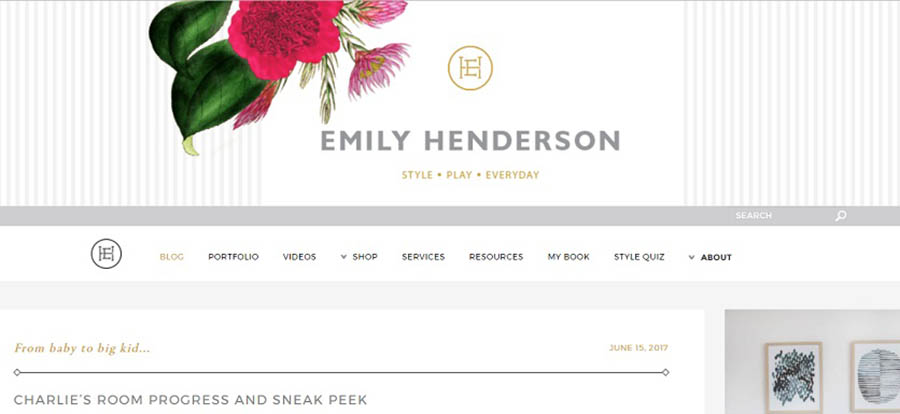
“I had to make it a major priority or else it won’t get done,” Henderson says. “Now I have a staff that helps keep it running on a daily basis, and we fill it with original content every single day.”
Not being fully committed is what separates amateur bloggers from the pros.
“I think the main mistake I see in new bloggers is not being totally committed to what they’re doing,” says Jill Nystul, creator of phenom blog One Good Thing by Jillee. “You can’t do anything halfway in the blogging industry and expect to be successful. I see a lot of people start blogs, post a few things over a couple of months, and then wonder why they’re aren’t getting any traffic. Commit to a topic and a posting schedule and show your readers that you are dedicated to providing great content consistently.”

2. Invest in Good Gear

When you decide to start a blog, use whatever tools you have to get the ball rolling. But when you are financially able, your blog will benefit from getting your hands on some professional equipment.
“The look of my blog definitely got a lot better when I invested in a real camera rather than using my phone which I totally did in the early days of my blog,” Nystul says. “And you don’t have to spend a fortune. We still use a Canon Rebel, and it works great.”
A few other popular blogging tools: WordPress software, the Adobe Suite, a web hosting package, email marketing software, and useful plugins. The more professional and put together your blog, the more trust you’ll earn from readers.

3. Your Mission (Should You Choose to Write It)

You’ve got a burning passion for blogging, yes? Well, first, take a breath.
It’s crucial that you figure out a few things first, like what your blog is all about and what you want to do with it. Having a kick-butt blog is a good goal, but let’s dig deeper.
Ever heard of a mission statement? It’s commonly used by businesses to identify values, goals, and purpose — typically in a few easy-to-remember sentences. And it’s critical to the success of your blog.
“I wish I would have found my mission sooner,” Jepsen says. “But I started it in a time when bloggers weren’t making money, and I didn’t know that was a trajectory I could take so I didn’t write it accordingly. If you’re looking to make money, you will write differently than someone who does it just for fun. Create a focused mission statement in order to know what your content should be and who your audience is.”
Let’s look at a few examples of mission statements.
  • Amazon: “Our vision is to be earth’s most customer-centric company; to build a place where people can come to find and discover anything they might want to buy online.”
  • IKEA: “Our vision is to create a better everyday life for the many people. Our business idea supports this vision by offering a wide range of well-designed, functional home furnishing products at prices so low that as many people as possible will be able to afford them.”
  • Nike: “To bring inspiration and innovation to every athlete* in the world.”
Can you see how these concise statements guide how each business operates, shepherding big decisions to even the tiniest ones? It works the same way with your blog.
Take creating content, for example.
“Before we write a single post, we ask ourselves, ‘Does this help our readers make or save money?’” says Kathleen Garvin, editor and marketing strategist for finance blog The Penny Hoarder. “That’s key for us. We’re content creators, but we only want to publish a story if we think it’s truly helpful or interesting for our readers.”
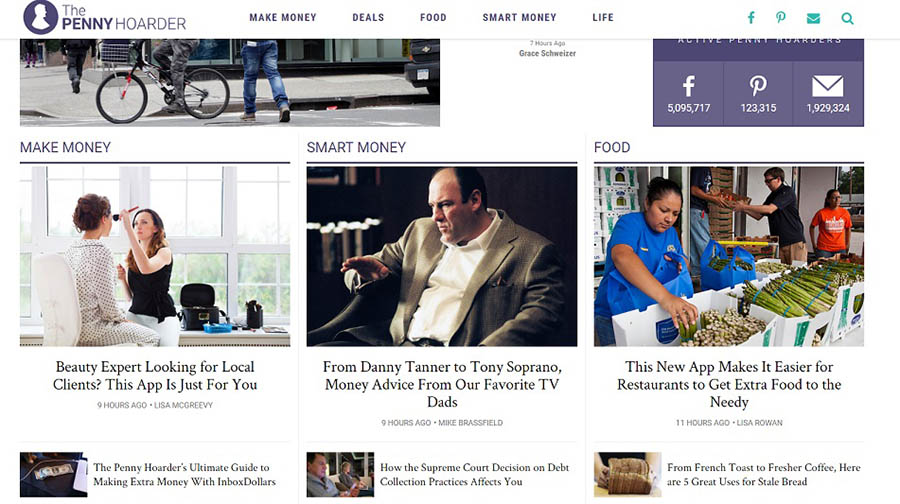
A well-crafted mission statement will, ideally, inspire and steer — but not confine — your choices and provide a roadmap for content, structure, and voice. A few minutes of work for a valuable return.
Great! Now. Where to start? Begin by pondering the following questions:
  • Why did you start blogging?
  • Who is your target audience?
  • What questions do you want to answer?
  • What are you passionate about?
  • In what way is your voice unique?
Next, try to organize these answers into a few short statements that summarize your goals. Try the Twitter approach — spelling out your purpose and goals in 280 characters or less. You could even try this fill-in-the-blank formula:
My mission is to _______ for _______ through _______.
Things to keep in mind: keep it short and sweet, grammar-and-spell-checked, specific but jargon-free, realistic, and focused. Then put it where you can see it — preferably in BIG, bold letters. Refer to it often and adjust as needed.

4. Just Get Started

Achieving top-tier blogging status can seem like a long shot. But every successful blogger started somewhere.
“Produce, produce, produce,” Henderson says. “Leave your perfectionism at the door and just put your work out there. Get feedback, adjust, move on. Without creating and putting your product or service out there, no one will find you and hire you. Just start.”
Begin with exercises to simply get you writing every day. This will help you form the habit that will make blogging easier.
For content ideas, try a brainstorming worksheet to collect ideas (you can do this on a device, too).
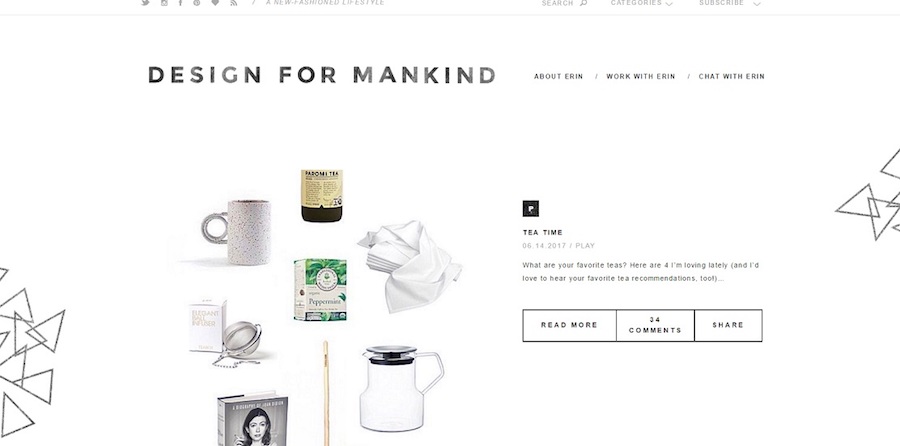
“Write as often as you possibly can,” says Erin Loechner, design and lifestyle blogger at Design for Mankind. “This does not mean publish as often as you possibly can. Get in the habit, work on your craft. Discover your voice. It takes great practice and great patience. Do it anyway. Sit down in your chair and type it out. Edit later. Publish later. For now, just write.”
5. You Get What You Go After

If you’ve been around the block, you know that blogging involves two very important Cs: content and consistency. These skills may be the most important keys to success. We already discussed the importance of creating. Now, let’s talk consistency.
It’s proven that the companies that blog twenty or more times a month see the most return in traffic and leads.
“A common mistake early bloggers make is not posting on a consistent schedule,” Garvin says. “Yes, it can be tough, especially in the beginning when you might not have much of a readership, but it’s important for SEO and to build a community. Producing quality content and consistently has been essential to our growth. Like they say, if content is king, consistency is queen!”
Brittany Watson Jepsen found consistency a key to achieving success when she created her blog.
“I think one of the best things you can do as a blogger is to keep your content constant and consistent,” Jepsen says. “Even when I started out nine years ago, I worked on my blog every single day. That consistency kept people coming back because they didn’t have to wonder if there was content. There was! The next best thing to focus on the main message I was trying to convey. It took my awhile to figure out the main thing I wanted to focus on, but once I did that’s when the traffic started to roll in. Once I focused on crafts and DIY making, I became known for that and people started to see me as a trusted voice.”
If you wanted to be the authority, the go-to on a certain topic, your readership needs to trust that your blog will have content they need. Your quality content, consistently posted, will draw a following. The two Cs really are inseparably connected.
“There are a lot of more detailed keys to blogging success like photography, SEO, social media tips and tricks, etc., but the number one thing I always tell bloggers is that content is king,” Nystul says. “That can mean different things depending on the topic of your blog, but readers will always respond to quality content. My team uses CoSchedule for our calendar, and we love it. It helps keep us super organized and on the same page even when we all work remotely. A couple of other things we love are Slack for messaging, and Wunderlist for making to-do lists.”
There a host of useful tools available online for planning posts and establishing a schedule.
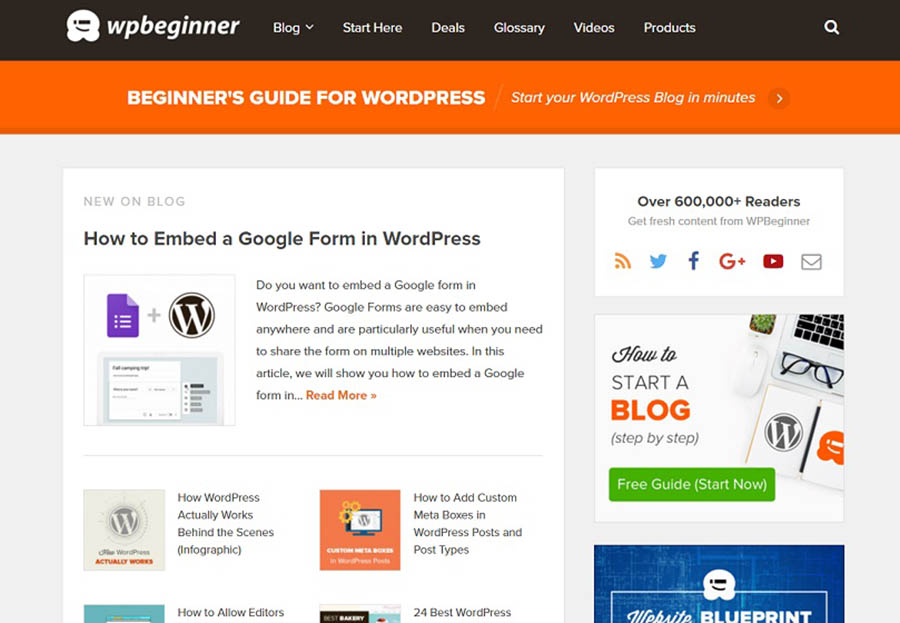
“An important key is to have a plan for what you are wanting to post rather than sitting down and writing every time,” says Syed Balkhi, founder of tech-help site WPBeginner. “Tools like Asana or the WordPress plugin Edit Flow are great for planning out blog posts in advance.”
To nail down a consistent blogging schedule, try an online calendar or one of a variety of templateworksheets available.

6. Be Your Own Reader

When you want to have a successful blog, you really should put yourself in a new pair of shoes — the shoes of your reader, that is.
While you are blogging to share a passion, you’ve got to stay focused on the visitors of your blog and how your content can appeal to their needs and questions.
The team at The Penny Hoarder made their content more functional to readers by breaking down complex and jargon-heavy financial information into useful, readable packages.
“When people think of personal finance, they usually expect the content to be dry or boring,” Garvin says. “So, we do our best to make it accessible and fun. We write in a friendly, conversational manner, and try to showcase that tone across all media. With that said, we take our readers’ trust seriously.”

The team at Emily Henderson takes a similar approach to considering their blog’s usability for readers.
“With every post, we want to be our own reader and ask ourselves, ‘Would I find this interesting, helpful, informative, and beautiful?’” Henderson says. “If not, then we come up with different content that we feel will better suit the audience.”
Sure, while you’re slaving away at your keyboard, it’s easy to forget that someone is on the other side. But remembering your reader as you produce will help you to create attractive, useful content that draws a crowd.

7. Think (Twice) Before You Hit Publish

As tempting as it may be, resist the urge to hastily click “Submit” the instant you finish a blog post.
“Once the blog posts are planned out,” Balkhi of WP Beginner says, “a common mistake is not going back through to take a look at some of the finer points of the blog post to ensure it reads well for your visitors as well as search engines.”
Prep your post for publishing by working through a checklist (or a WP plugin) to help you optimize the content — a tool like Naytev works well — and make it appealing to search engines (48 percent of consumers start mobile research with a search engine) and readers.
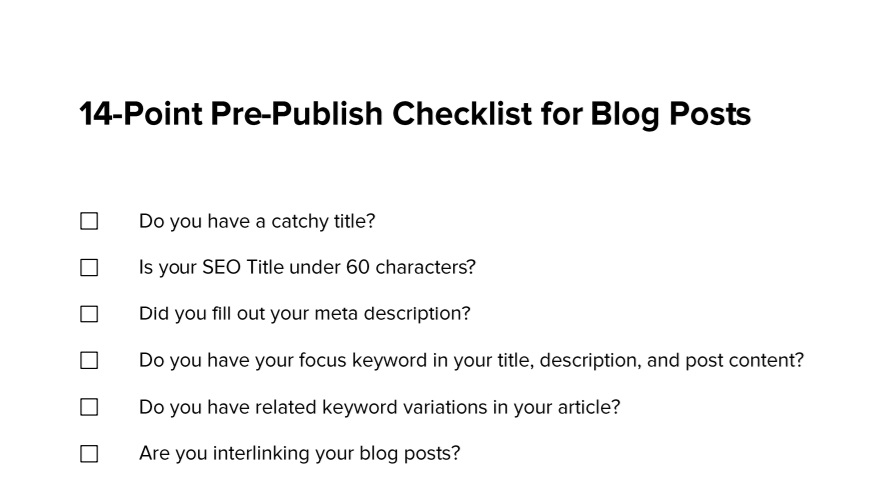
Take time to make sure you’re citing sources correctly and that you haven’t overlooked glaring grammar mistakes (don’t make the off-putting their/they’re/there error). This extra time is a worthwhile investment.

Related: 10 Legal Questions About Your Online Content, Answered

8. Talk About Yourself

It may seem like a silly thing, but talking about yourself on your blog is important. And by this, we mean: don’t neglect your blog’s About Me page.
This page is crucial for helping readers to get to know you, your purpose, and what they can expect to find on your site.
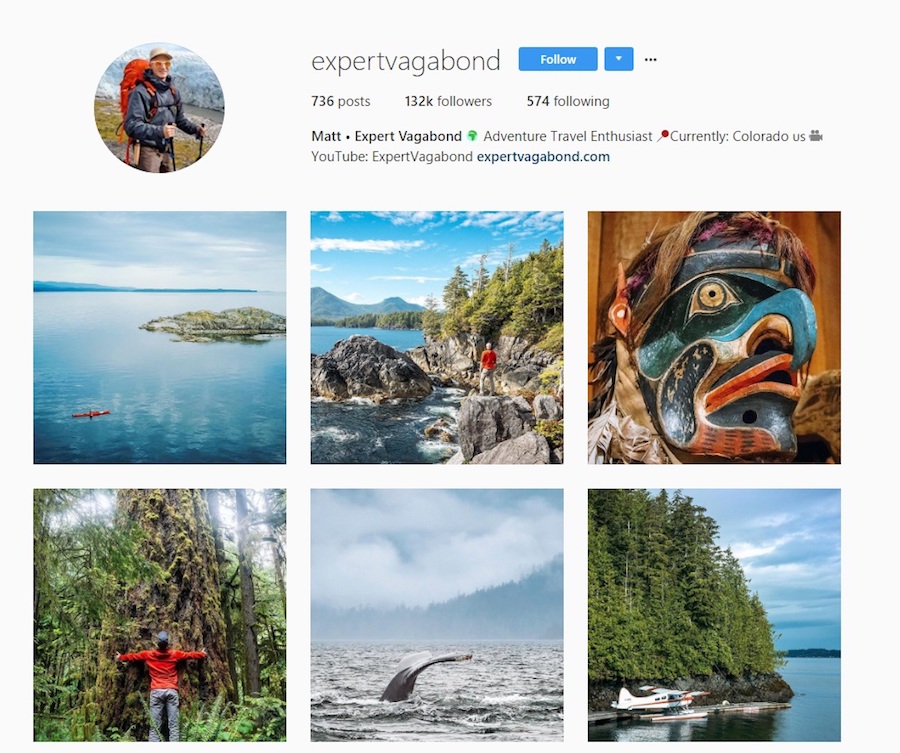
“This is one of the most highly trafficked pages on any blog, because it tells people who you are, gives your background, and explains why someone should follow you,” writes Matthew Karsten, travel blogger at The Expert Vagabond. “Keep it fun and personable. Let your readers know who you are!”
Instead of listing random facts about yourself, have a purposeful statement that answers the following questions.

1. Who Is Your Audience?

Let’s look at Karsten’s blog, Expert Vagabond. On his “About Me” page, he writes:
“It’s a place for people like you who are looking for daily inspiration and motivation to live a life full of adventure.”

For whom? Check. Karsten clearly identifies the intended audience of his blog.

2. What Value Are You Offering to Readers?

Look at The Penny Hoarder’s manifesto:
“We help millions of readers worldwide earn and save money by sharing unique job opportunities, personal stories, freebies and more.”
Bam. Garvin and her team have readily identified what they’re offering to those who visit the site.

3. What Credibility Does Your Blog Have?

You could share sites your blog has been featured on, like done on WPBeginner’s About Me page or reader testimonials. Share why your content can be trusted.
4. Why Are You Passionate About What You Do?

While it’s better not to be haphazard about the info you share, you should let readers connect with you by offering a snapshot of yourself and specifically, how your blog grew out of your passion. After all, your readers’ connection to you is what will likely draw them back for more.
Take Jepsen’s About Me for example. A little of her bio:
“Brittany Watson Jepsen here. I grew up teething on the seaweed of Southern California though I preferred reading and creating in the great indoors. My mom’s favorite quote was ‘a creative mess is better than tidy idleness’ and so my childhood was spent creating artwork, music, and yes, lots of messes.”
See? Well-written, purposeful statements connect Jepsen to her readers, and them to the purpose of the blog.

5. What Is Your Call to Action?

Don’t let your readers browse your About Me page and click away with an “Oh, that’s nice.” Encourage them to visit other pages of your blog by providing links to more content, whether that be additional blog posts or social media handles. After all, more clicks equal more traffic.
And if it wasn’t already obvious, make sure your About Me page is accessible and easy to navigate.

9. Give Your Blog a Facelift

Ever happened upon a website that seems like it never left the dial-up, over-animated era of the early internet? Well, we have.
Shudder.

Even if your site isn’t outfitted with rainbow colors and crowded layouts, its design could be unintentionally frustrating readers. A smart design sets your reader up for a good experience that will entice them to visit again. Never neglect a user-friendly design.
“A good site design is like settling in to write at a clean, beautiful-to-you desk,” Loechner says. “It is surprisingly important, for you and for those who might be visiting such desk. Pay attention to it; design needn’t be complicated.”
Be flexible and willing to alter your blog design based on what works best for your readers.
“Keep learning and always be willing to adapt,” Garvin says. “For instance, we recently got rid of display ads on our site because it negatively affected our user experience. It can be scary to remove a revenue source and pivot, but it’s necessary for continued growth. Don’t be afraid of change, but do find out what works best for you and your readers.”
Have a friend or outsider look at your blog and consider a few questions:
  • Is it dated, confusing, or “broken” or attractive, functional, and engaging?
  • Is there clutter?
  • Does the site load quickly?
  • Would a first-time visitor immediately know what it is about and how to navigate it?
Utilize themes on WordPress for tried-and-true designs, consult experts, or outsource to a designer (we can help with that!) to ensure your design is aesthetically pleasing. Trust us — no one wants spinning graphics or animated mouse icons. No one.

10. Think Mobile

It’s a pretty startling statistic: 80 percent of internet users own a smartphone.
Chances are good that readers are accessing your blog on a mobile device, likely while they’re commuting to work, sitting in a waiting room, or logging miles on the treadmill. So along with establishing a good-looking design, you’ve also got to optimize for mobile users.

“Blogs are widely read on the go, so consider a simple and minimal design that looks just as great on your phone as it does in the cubicle,” Loechner says.
Often, this means choosing a responsive template, but you can also utilize plugins to optimize a WordPress theme. In addition, you should consider the following:
  • If using a pop-up opt-in form or ad, are mobile users able to navigate around it?
  • Are outbound links mobile friendly?
  • Do your social media buttons work properly?
  • If using video, does the player work? Some mobile devices don’t allow Flash.
  • Is your comment platform still mobile friendly?
  • Are slideshows functional?
  • Can users read infographics?
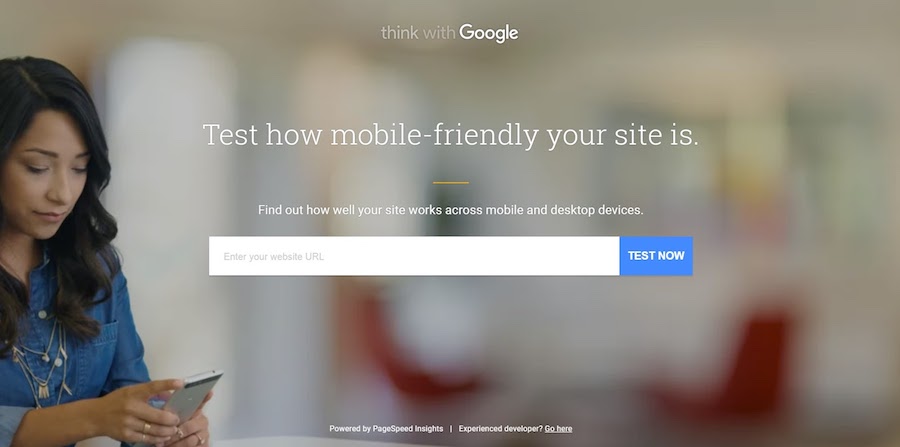
And really, the only sure way you have to analyze your site for effectiveness across devices is to test it. Use this handy Google tool.
11. You’ve Got Mail

You’re probably used to sending most of your inbox to the trash bin, so you might not think that email plays a big role in blogging success. Think again.
“One mistake we’ve talked about is neglecting our email list,” says Garvin. “In the beginning of The Penny Hoarder, Kyle used to write a regular, personal email to readers; it was one of his best traffic sources, and he had an open rate of over 50 percent! However, as the site started taking off and he was pulled in different directions as CEO, we dropped the personalization in favor of a simpler format. We turned things around this year: We’ve started offering a ‘weekender’ roundup email, a daily newsletter, and several other targeted ones. So start an email list early, and keep working to improve it for your readers.”
Think about this: a survey reported that most of us spend four hours checking our email each day. FOUR! Why not capitalize on the habit? It’s easy to monitor your success with email marketing, and it can help you establish a lasting relationship with readers.

12. Accept the Daily Grind

You’ve heard that the biggest part of success comes from showing up, right? Ask anyone at the top of their field — Michael Jordan, Martha Stewart, or Yo-Yo Ma — and we’re pretty sure they’d be the first to say that their success amounts to hours, days, and years of putting in hard work.
Well, that’s true in blogging too.
“Determination is an essential quality to have as a blogger,” Balkhi says. “There are no overnight successes with blogs, but when you write about what you are passionate about they can be great successes.”

Remember Malcolm Gladwell’s 10,000 hours principle? Just like playing the piano, painting, or running sprints, honing your blogging skills requires lots of work.
“Our keys to blogging success are practice, practice, practice,” say Ryan and Sam Looney of travel blog Our Travel Passport. “Seriously, it’s just about putting in the time to learn your skill and becoming an expert at what you do. We think it’s important to remember that the industry is always changing and content is king. Be original and adaptable and authentic. Don’t use bots. Focus on what makes you unique and tell your story in a way that people can relate to what you have to say.”
Try a goal chart to keep you motivated when the going gets rough (blogger’s block is real). And of course, keep your mission statement close by. Sometimes all it takes is to remember why you started in the first place.
“I think the main quality that is essential for bloggers is passion,” Nystul says. “Blogging is not an easy business, and when the going gets tough passion is the thing that keeps you motivated and working hard.”

13. Have a Strategy

Say you’ve got great content and a snazzy site. How do you get people to see it? If you have social media platforms, then you have multiple channels to market your content.
“Our social media, video, and PR teams work to amplify our content, engage our readers, and raise our profile,” Garvin says. “All of these things contribute significantly when growing our community.”
The Penny Hoarder team is right. According to consumers, the three characteristics of an effective social media strategy are:
  1. The brand shares new content.
  2. The brand’s content is relevant.
  3. The brand engages with followers.
In addition, social media is the most effective digital marketing tactic for customer retention after email; it’s essential to choose the right social platforms to get your content in front of readers.
If you intend to manage your social media marketing on your own, then utilize tools like HootSuite or NUVI to manage and monitor on one dashboard. And there’s no shame in admitting that assembling a social team or hiring an agency to help distribute the content online could be best for your blog. You can only bootstrap so much, right?

14. Engage With Others

In the blogging game, it’s not you against the world. In other words, it’s not you against every other food/travel/tech blog in your field. Running a successful blog can be a collaborative, community effort that’s personally validating (as opposed to competitive). Go, team!
Good engagement starts with your content. (Need a refresher? Return to tips No. 4 and 5.)
The Looneys recommend staying engaged by posting regularly. “Whether that means posting blog posts once a week or on Instagram every day, it’s important to keep your community involved in what’s going on and what you have to share.”

But connecting with others goes beyond your own site, the duo says.
“Respond to all of the messages, emails, comments, etc. that you receive. And engage with other people in the community as well. Comment on their pictures, send them emails or messages about how much you love their work, and find ways to collaborate together.”
Say it with us: one, two, three — go team!

15. Go Easy with Analytics

Numbers say a lot. For instance, a game score tells us who’s on the winning side — and who’s not. The nutritional information in a meal tells us whether or not we can justify dessert.
Numbers are important. But they aren’t everything.
We know it’s tempting, but clicking the refresh button every ten seconds on your website’s analytics page fuels an unhealthy obsession that won’t help your success as a blogger (or your blood pressure). Instead, focus on your content, prepare for fluctuations in the stats, and breathe.
“Forget stats,” Loechner says. “People are not numbers. Readers are not stats. They are humans in all of their lovely complexities. Do not fret yourself over bounce rates and conversion metrics. There are plenty of other things to fret over, after all.”
Keep an eye on a few metrics for goal purposes, but don’t obsess — numbers change.

16. Understand Revenue Sources

The ideal for most people is that their blog becomes a valid source of income. Now, this won’t happen right away, so don’t panic (see No. 11). But you should understand the different ways that you can make money online, so you can decide how — and if — you want to incorporate those methods into your blog.
Consider using affiliate programs to earn a kickback for the products you promote on your site or running display ads with Google’s AdSense. These revenue streams increase as traffic increases. So if you want to make money from your blog, your first priority should be getting eyes on your content.
“The more traffic your blog receives, the more money you can make with it,” Karsten says. “But it takes time to build an audience and grow traffic. Don’t focus on making money right away. Focus on building your audience.”

17. Combat Internet Trolls

It seems like anyone who dares to send their work out into the web is, sadly, bound to face the ceaseless negativity of cyber bullies.
You don’t have to grin and bear it, though. Be intentional about combating the mean-spiritedness you might encounter (no boxing gloves required).
“For better or worse, I can be really emotionally affected by how people perceive or respond to my blog,” says Lindsay Ostrom, creator of viral food blog Pinch of Yum. “I wish I had that toughness factor, but what I have is more like Sensitivity with a capital S. So I set rules for myself when it comes to reading and processing my social media content and blog comments. Bottom line: be selective about what voices you let speak into your life.”
Whether you decide to refrain from reading blog comments before noon or you post a motivational message above your computer as a reminder of your potential, know that it’s your blog. Take control and set your own rules.

18. Don’t Be a Copycat

Imitation may be the highest form of flattery, but in the blogosphere, it’s just plain ol’ copying. And it’s not going to do anything for your online rep — readers can see right through it. With the inundation of blogs and content creators out there, it can be H-A-R-D to produce content that’s new, fresh, and original. But for a quality blog, a loyal following, and a distinguished brand, it’s more than essential to think outside the box.
“It’s important to remember that you need to create your own original content,” the Looneys say. “A lot of people go to the same places and pose in the exact same way as big travel bloggers. That’s not creative or original. That’s copying someone else’s work, which doesn’t tell anything about you or your story.”
Build a blog that allows people to get to know you — and what you’re passionate about, not just simply posting a CTRL + C reproduction of similar work produced in your field or industry. Be aware of the exhausted been-there-done-that content and remember: followers will reward the extra effort you take to put your own touch on what you produce.

19.Find A Cheerleader

With all the hard work, long days, and (probably) blood, sweat, and tears that go into creating a successful blog, you really need someone in your corner — an encouraging mentor who will wave that foam finger when the going gets rough.

“Having a single person — literally just one, although more friends equal more party — to talk with when things are spinning into that downward spiral is so important to your ability to bounce back,” Ostrom says. “I guess that’s just true in life, right? And it’s especially true for me in blogging. Find someone who really understands and can relate in some tiny way or another why it’s frustrating when people scrape your content, or what it feels like to deal with that rude comment, or how challenging Facebook’s news feed changes have been lately. It is one thing to talk about this stuff, but it’s another thing to talk about it with someone who really understands blogging.”
Who is this person for you? A spouse, a friend, a coworker? Finding that supportive someone will help you to overcome the difficult days and celebrate your blogging successes.
Because, after all, success is just around the corner. 2019 is your year!

Share Your Blogging Know-How

We want your input! Have you tried out any of these tips? What are your best words of wisdom for creating amazing content, an appealing blog design, or dealing with internet trolls? Share with us on social media — we’d love to hear from you. 
Read More

Corporate Background Can Help to Get a Startup Blogging Job

Leave a Comment
For many, leaving the world of cubicles and bureaucracy to join a startup is alluring. The chance to be part of something huge and world-changing! The flat organizational structures! The unlimited vacation time!


But figuring out how to make that move isn’t always easy. You’ve most likely spent years focusing on one particular set of skills and working with a team of people who all focus on the same thing—pretty much the opposite of how scrappy startups function. So, how does your corporate experience translate into a world without traditional career ladders, job descriptions, or even defined roles?
Turns out, better than you might think—you just need to know how to tell your story in a way that makes sense. Here are five things you’ve picked up at your corporate gig that startups will definitely value (and how to talk about them at your next interview).

1. You’re a Team Player

Most likely, you’re not doing your corporate job in a silo—you’re on a team or in a department of people who are all working toward accomplishing the same goal.
In a startup, though you may be the only person doing, say, marketing or business development or sales, this team mentality is more important than ever. “The team-player attitude is everything for the startups we work with,” says Startup Institute co-founder and New York director Shaun Johnson. Elise James-Decruise, senior director and head of global training at MediaMath, agrees. “The ability to ‘lean in’ and collaborate with another department or client to accomplish a common goal is just as or equally important as accomplishing it on their own.”
So, look for ways to show hiring managers just that. Think about times you partnered with another person or department—not necessarily when you led the team, but when you were part of one that achieved great things. While traditional resume and interview wisdom is that you should emphasize your personal accomplishments, startups want to know that you’re interested in the success of the group as a whole.

2. You Know Processes That Work

In a corporate job, almost everything you do has a process—from tracking customer feedback to requesting vacation time.
All of this might seem totally irrelevant in a startup environment, where you’re creating things from scratch and doing a lot of flying by the seat of your pants, but remember that startups that grow will eventually need to put in systems and processes for everything from sales lead tracking to payroll management. And if you have knowledge of efficient ways to do those things, it can be very helpful. “Our project manager came from Popular Science, and not only came with an understanding of how to roll out a project from start to finish, but also how to take a concept and create a system for rolling it out,” says Alex Wolf, CEO and founder of na2ure. “It was very helpful to us, as a startup, to find someone who could take ideas and turn them into action items.”
So, don’t be afraid to talk about your experience and the types of processes you could bring to the table as the startup grows. Just be mindful of how you position it. “Experience creating new teams, making process, and workflow can be very useful when you are at a growth-stage startup,” says Mariko Kosaka, an internal tools engineer at Percolate, Inc. “Just don’t get too caught up in ‘This is how I used to do at [name of company]—be adaptive to your environment.”

3. You Love to Learn and Grow

It was pretty much unanimous among the companies we talked to that to join a startup, you’ve got to be obsessed with learning, growing, and evolving. As Ethan Austin, president and co-founder of GiveForward, puts it: “We’re always looking for learners and people who are curious about the world. Skill sets are irrelevant because things change so quickly at a startup. You could be working on customer service one day, SEO the next, and product management the day after. We like people who are constantly looking to learn new skills and take on new responsibilities.”
Instead of just giving the highlight reel of what you’ve done and achieved, think about times when you’ve taken on something totally new—especially when it’s something you pursued on your own. Did you learn to code when your department website needed some updates? Jumped in to help with SEO when the data analyst was out on leave? These are great ways to show that you’d be willing to tackle responsibilities outside of your job description. “Nothing’s more important than finding people who will do whatever it takes to learn,” says Jay Neely, digital community manager at Boston Globe Media, which has been in operation for over 100 years and is finding that integrating a more startup-like culture is essential to building a future for journalism. “Demonstrated passion for building your skills is more important than a college degree or X years of experience.”

4. You Know How to Communicate

If you worked for a big company, you had to be a master of communication: keeping your boss updated on what you were working on, sending detailed reports to clients, translating your needs and priorities to other departments—you get the picture.
This is actually something that startups really value. “Someone who is confident, has business savvy, and can communicate their ideas clearly and effectively to internal and external audience are all at the top of my list for new hires,” says James-Decruise. Why? It goes back to the team mentality—you’ll be working closely with people from all different backgrounds to achieve the same goal, and being able to effectively share your ideas, views, and feedback is crucial. Plus, as you’re figuring out how to launch your startup into the world, you’ll be interacting with and listening to customers and users more than ever before. And finally, startups (successful ones, anyway) grow quickly, with new people being added to the team all the time.
The best way to let startups know that you’re a great communicator is, of course, to show them. Have a story—and know how to tell it—about the skills and experience you bring to the table. And most importantly, talk openly and excitedly about why…

5. You’re Excited to Ditch the Corporate World

Frankly, there’s a reason you’re considering leaving your corporate job for a startup. You want to be part of building something world-changing, to have a real say in company decisions, and to take on more responsibilities than you currently have.
Well, this right here might just be your biggest asset.
Hands down, the #1 thing that startups look for in their employees is passion for helping the product and company succeed. “People I've hired from corporate backgrounds all cite the same reason for leaving their jobs when we interview them—they want to be at a place where they can meaningfully contribute to the growth of the company,” says Deepti Sharma Kapur, founder of FoodtoEat. “They are dedicated to building the company from the ground up and are passionate about achieving their goals.”
The lesson: Think deeply about what it is you really want out of joining a startup and—more importantly—the types of companies and products you want to work on. Then, share this passion in everything you do—from networking with employees to discussing what you could do for the company in your interview.
The good news? A corporate job provides tons of experience you can use to get a gig at a startup—you just need to know how to shape it. And that’s probably the best piece of advice we can give: Know when your corporate experience is an asset, but be able to show and explain how you’ll succeed in a totally different environment. The best hires, explains Marc Ioli, business development manager at Appboy, “know when to tap on their corporate experience but don’t let it define them.”
Read More

Blogging Was Hobby but Now, It Is A Profession

Leave a Comment
Do you blog? Maybe you chronicle your travels, report on the issues in your industry, or share your latest fashion finds with the world. Blogging can be a hobby, a way to build your brand, or a line on your resume that can help you land a job.


But did you know that it can be a job, too? While the majority of blogs are personal platforms, Technorati estimates that up to 39% of bloggers do it for money. Plus, Hubspot reports that companies are increasingly shifting marketing dollars to blogging and social media, creating more opportunities for contractors, freelancers, or full-time employees to blog for a paycheck.
So how do you go from blogger-on-the-side to blogging for someone else? Building and showing your skills through a personal blog is a great place to start. And from there, here are the five key things you’ll need to turn your hobby into a job.

1. Know Your Blog

If you haven’t already, take inventory of your own blog. What is your niche and demographic? What types of strategies have you used to get your blog noticed? How do you plan and organize your content? Keeping a record of your own successes as a blogger will help you identify what you can bring to a company’s strategy and how to craft your resume. Similarly, noting the areas where you can grow will show you where to focus as you’re improving your blogging skills.

2. Get Noticed

As you know, blogging isn’t just about writing, it’s also about getting others to read your writing. Standing out in the blogosphere takes effort—but it’s a key skill employers will be looking for. So focus on getting your personal blog out there: Network with other bloggers, participate in social networks, and attend industry or blogger events. Even if your blog is in the handmade goat cheese mini-niche, if you’re getting noticed, you’re doing something right, and that’s a great story to tell in a job interview.

3. Write

In addition to writing (regularly) for your own blog, establish outside credibility by contributing to other blogs and publications, too. This will not only enhance your writing skills, it’ll get your name in the blogosphere and help you make new contacts. A lot of blogs take contributors or guest posts, so start with what you know and branch out. If you write a food blog, see if you can guest post for other food bloggers, then try pitching a kid-friendly recipe to a family blog.

4. Diversify Your Skills

The best blogs have more than just words. They include high-quality visuals, an appealing layout, creative content, and interactive features. So think about the other skills you can bring to the table aside from writing—such as photography, design, or technical capabilities. And if you don’t have any yet? Pick one and use your own blog to develop it. Try taking your own photos instead of using Creative Commons-licensed images, or try your hand at customizing a header. Developing skills from coding to graphic design to video production can give you a big boost over other blogging candidates.

5. Apply

Once you’ve beefed up your blogging resume, the process of finding a corporate blogging position isn't too different from finding any other new job, with a couple of exceptions. First, keep in mind that “blogger” may not always be in the position title, so make sure to check out communications, marketing, and other related keywords. (A lot of blogging jobs get posted on specialized or writing-oriented sites, so start with ProBloggerMedia Bistro, and Freelance Writing Jobs.)
Next, consider part-time blogging positions. Not all companies have the dollars to dedicate a person to a full-time blogger, but that’s OK, especially when you’re starting out. Consider getting your feet wet and some experience through a part-time or freelance position.
Finally, make sure your blog is in order (the first thing an employer will do is click that link) and that your cover letter demonstrates your creativity, passion, and writing prowess. After all, that’s exactly what your future employer is after.

Want more?

Hear first-hand from a woman whose job involves running a blog for a startup! connect with us. 
Read More

Blogging Secretes for Beginners for 2019

Leave a Comment
In 2019, it’s easier than ever before for anyone to start a blog and make it profitable.


This is true even if you aren’t tech savvy, don’t know how to code, or understand the first thing about web design.
With a little bit of guidance and a few basic resources, you can have your very own personal or professional blog up and running less than 30-minutes after you finish this article (but there’s no need to rush it).
I’ll hold you by the hand and walk you through every part of the process while helping you avoid the common mistakes that stop most new bloggers dead in their tracks.
Sound good?
Then let’s dive in and get started.
P.S.  If you’re curious about how much it will cost to start and maintain your blog, the simple answer is $0 to $60/year. I highly recommend that you opt for paid domains and hosting, but you have the option to start for free to test the waters. 

Why Start a Blog? What’s In It For You?

When I first started this blog, my aims were simple.
I wanted to teach people how to navigate the tricky (and often less-than-ethical) world of blogging and web development.
With time, my site began to pickup steam, eventually attracting new clients for my company and giving me the opportunity to quit my day job and pursue blogging full time.
However, there are a myriad of different reasons that you might decide to start a blog beyond merely making enough money to hand in your two week’s notice.
For example:
  • A consistent blogging habit will make you a better writer
  • If you find the right niche you can make a full time passive income
  • A high-traffic blog makes an excellent addition to your resume
  • You have an opportunity to share you knowledge and expertise
  • You can make important connections and grow your network
  • And it’s FUN!
I could drone on and on about the benefits of blogging until the sun sets and the moon rises, but I think you get the idea.
The bottom line?
Blogging is awesome and it has the power to change your life.
Assuming you want to take the plunge and start your blog today, here are the exact step you need to take to get started. 

Step 1: Decide – Create Free Blog or Self-Hosted Blog?

Blogging platformsAs I mentioned in the introduction, starting and maintaining an average sized blog will cost between $0 and $60 a year.
So yes, you can start your blog for absolutely nothing, however–as with most things in life–just because you can doesn’t mean that you should.
Let me explain…
Yes, you can create a blog for free on many different platforms, such as:
  • tumblr.com
  • blogger.com
  • wordpress.com
  • ghost.io
  • etc…
But before you go smashing the above links and clicking “sign up”, read the rest of this section! 
Sure, these platforms are great for testing the waters and solidifying some of the ideas you might have regarding content and design.
However, if you are serious about starting a profitable and successful blog, you should avoid these platforms at all costs.
Here’s why:
These “free” blogging platforms have crippling limitations and totalitarian authority over your content.
They are, first and foremost, businesses. And their
main only purpose is to turn a profit by using your website to sell ad space and placing enough limitations on your account that you are eventually forced into a “premium” or “unlimited” blog plan.
Plans that are, more often than not, wildly overpriced and woefully under-equipped.
Without their expensive upsells, your account will be limited to a paltry few–and very generic–number of designs from which to choose, a “maximum” number of daily visits, limited storage, and all but nonexistent customer service.
And let’s not forget that these platforms have total control over your content.
So if you post something that one of your friendly neighborhood website moderators doesn’t like, your entire site (and all of your data) can be deleted in an instant.
Just think about that for a second…
You spend months hustling and grinding to grow your blog. Slowly but surely you acquire a decent number of loyal visitors and subscribers. Then, the money starts to roll in, from sponsored posts, paid ads, or your own products.
Things are going great. 
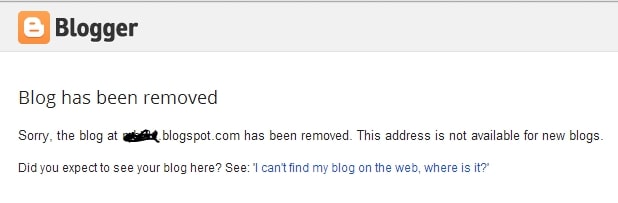
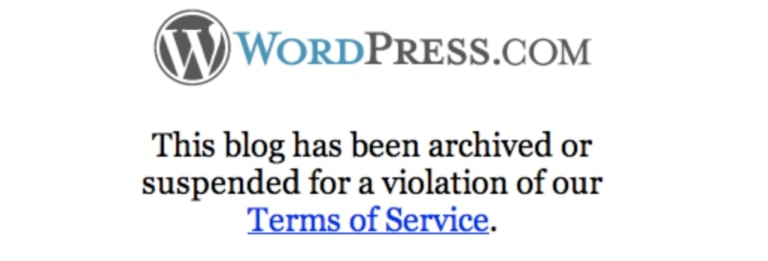
And then you accidentally violate your free web provider’s Terms of Service (see all limitations for Blogger.com and WordPress.com) and your entire online business is irrevocably lost to the trash bin of the interwebs.
Blogger the blog has been removed
Or
WordPress.com blog has been removed
Do you really want to deal with this?
I hope not.
This is why all of the most successful bloggers started their own self-hosted blog. 
It’s cheap, grants you access to your own personal domain name (e.g. myepicsite.com vs. myepicsite.blogging-platform.com), and you’ll have no limitations.
Oh, and you’ll also have access to premium website templates and design plugins to ensure that your new site looks like something created by a pro.
The bottom line?
Bite the bullet and fork over a little cash to get your blog started the right way.
A few months from now, you’ll be glad that you did.

Step 2: Get a Domain Name, Web Hosting & Setup Your Blog

Alright, with all of the anti-free-blog preamble out of the way, it’s time to get down to the good stuff and go through the exact steps that you need to follow to build and launch your self-hosted blog today. 
To get started, you’ll only need two things:
  1. A Domain name – The web address of your blog (mine is www.websitesetup.org)
  2. Web hosting – A server to store your blog files and keep it online for others to browse and read at all times.
And with a few quick clicks you can purchase and setup both of these things as easy as 1… 2… 3…

1. Sign up with Web Hosting

Full disclosure: To keep my site up and running I use affiliate links for some of the products mentioned in this guide. This means that I earn a small commission (at no extra expense to you) anytime that you make a purchase using one of my links. Thank you for your continued support! 
Of the countless web hosts on the market, only a small handful are even worth considering.
Of those, only 3-4 offer truly exceptional services for the price.
And of those, Bluehost is the only hosting service that I recommend to first-time bloggers.
The reason is simple.
Bluehost is cheap, fast, reliable, and armed to the teeth with a slew of free goodies that will streamline your blogging experience and make your life infinitely easier.
Not only do they power more than 2,000,000 websites worldwide, but all of their packages come with a 30-day money back guarantee, exceptional 24/7 live support, and a free SSL certificate (a $60+ bonus).
Oh, and they also offer one click installs, making it dead simple to get your blog launched in a matter of minutes.
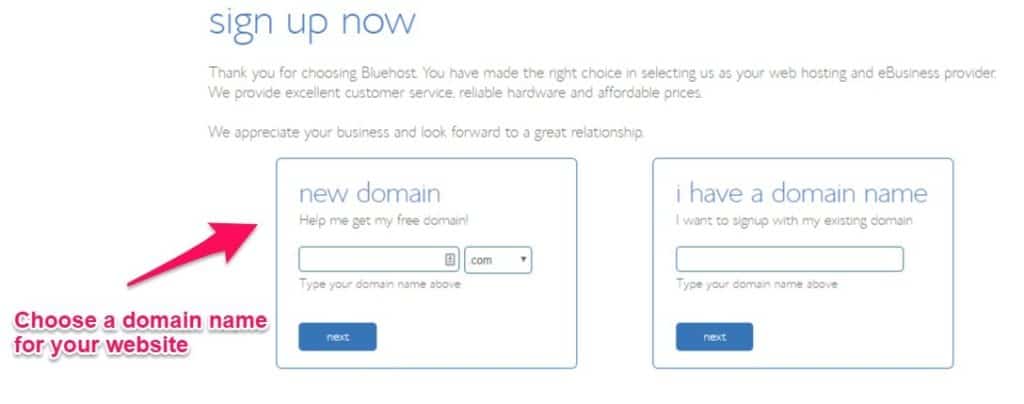
Simply click on the “Get Started Now” button and choose a domain name.

2. Choose a Domain Name

Unlike many of the more profit-centric web hosts that will charge you upwards of $14.99/year for a new domain, BlueHost gives new customers a free domain name for the entire first year of their web hosting service.
choose a domain name
If you’re serious about building a strong online presence and visitors from all over the world you’ll want to get a domain name with a .com, .net, or .org, extension .
For those of you who are unable to claim your first choice of domain name, spend a few hours brainstorming ideas with friends and family. Think out loud and experiment with different words and variations to find the most brandable domain name for your new site.

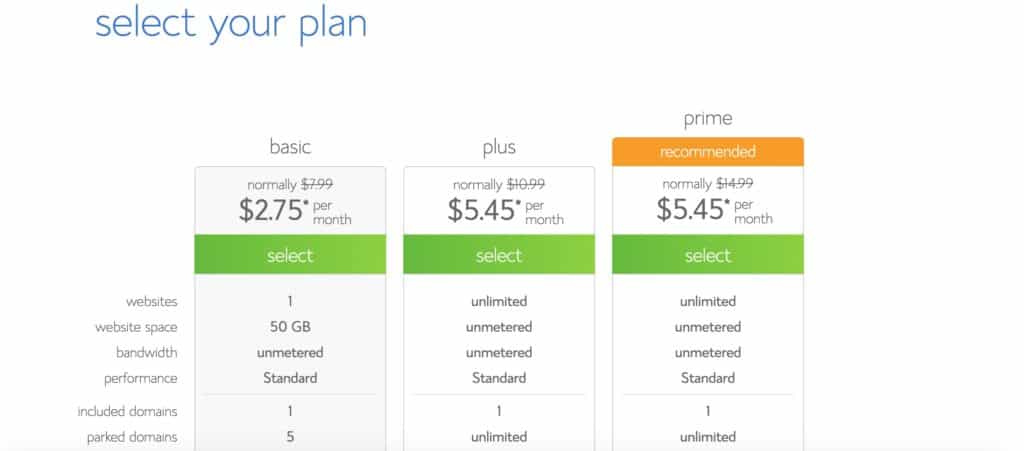
3. Choose Web Hosting Plan and Finish Your Registration

Now that you’ve decided on your domain name, it’s time to select your web hosting plan, finish your registration, and begin your forays into the wonderful world of blogging.
As a general rule of thumb, I recommend that opt for BlueHosts’ ‘Prime’ plan since it comes with a free SSL certificate from “Lets Encrypt”.
This will keep your visitor’s information secure, improve your engagement (no one wants to spend time on a website plagued by a giant “Not Secure” warning), and earn you a few extra brownie points with Google.
Choose your web hosting plan
Since the renewal prices for BlueHost’s Prime plan are a bit pricier than their introductory rate, I recommend that you purchase as long of a subscription as possible to make your budget go as far as possible.
Once you’ve chosen the plan that best suits your needs you can finish off your registration and checkout using a credit card or PayPal.
And there you have it! You are now ready to launch your blog instantly (instead of waiting 2-3 days for activation like you would with many of their competitor’s).

4. Setup and Launch Your Blog

Once you’ve completed the registration process, it’s time to setup an admin panel (or cPanel) password–make sure it’s as strong as possible to keep hackers at bay–and login to your Bluehost admin panel via my.bluehost.com.
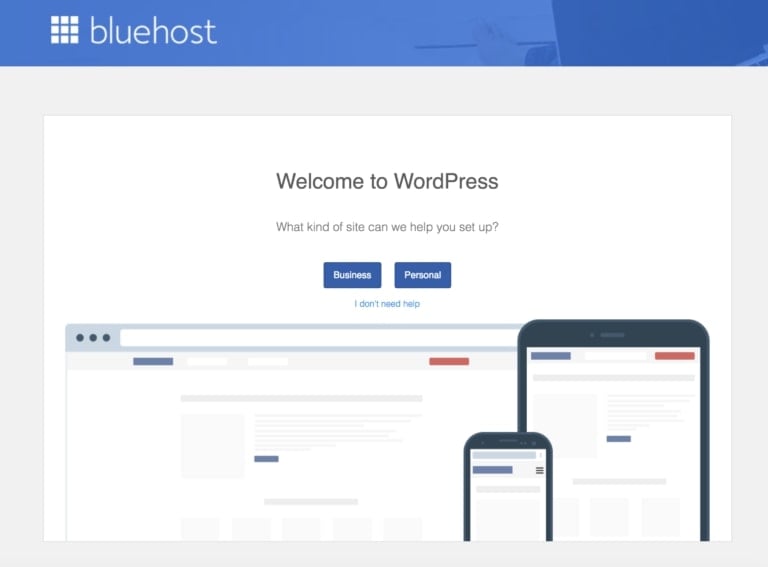
Once you are there, you should be able to see this screen:
Bluehost welcome to WordPress
Congratulations! If you see this, it means that your blog is already setup.
However, there are a few things that I’d recommend you do to ensure that it’s visible as soon as possible…
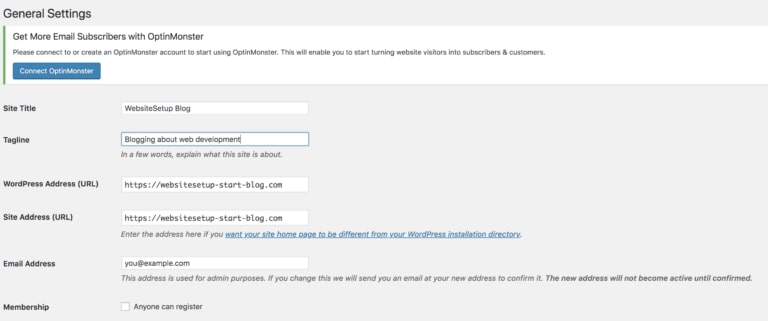
  1. Go to Settings > General (left sidebar)
  2. Add Site Title and Tagline (your blog name and tagline)
  3. Change your site address to your domain name. In my case, I’m using websitesetup-start-blog.com
  4. Add your email address (so you can reset your password later)
WordPress General settings
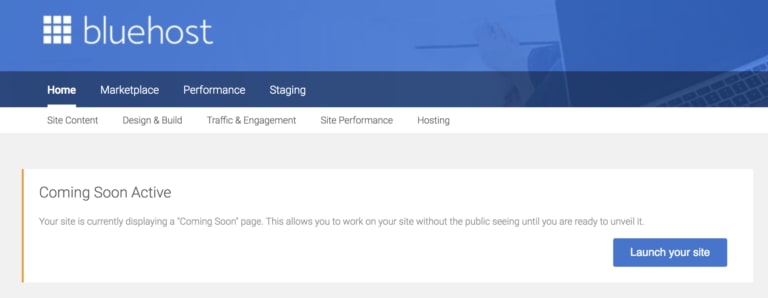
Once you’ve completed this, launch your blog by clicking “Coming Soon Active” at the top of WordPress dashboard and then “Launch Your Site”:
Bluehost launch your blog
Now that you’ve launched your blog, you’ll be able to see–what can only be described as–a skeleton of a website.
And this is where it gets fun.
With your domain name, web hosting, and blog setup, it’s time to get down and dirty and start customizing the aesthetic of your website.

Step 3: Design Your Blog – Make it Look Awesome!

The fastest and easiest way to customize your blog and make it look absolutely awesome is to use the free themes provided by WordPress’ theme library.

1. Choose a Theme and Layout You Like

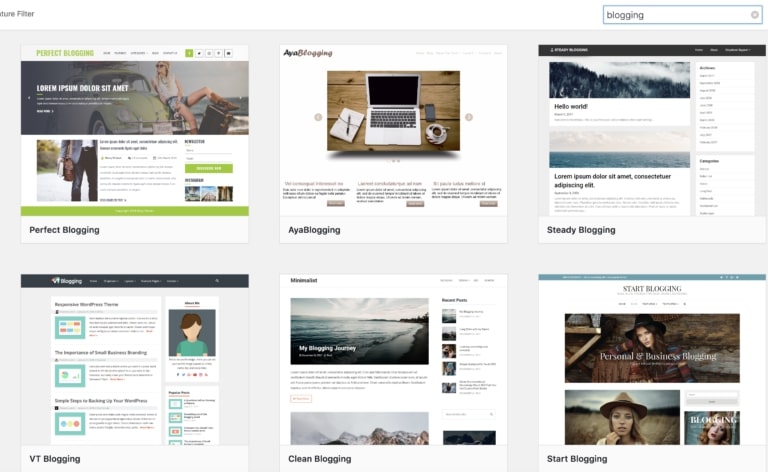
To install a new theme, go to your website’s dashboard, then go to Appearance > Themes, then click Add New from the top.
theme selection
From the search results you can test out each theme to see how you like it by clicking on “Live Preview”.
Once you find the perfect theme for your new blog, you can activate it from either the Live Preview (just click “Activate the Theme) or from the main search area by clicking the “Activate” button.
As soon as the theme is activated, it will be installed on your site and you’re now ready to start posting viral content and generating raving fans.
P.S. If you don’t know which theme to choose, I’ve compiled a list of most popular WordPress themes.

2. Manage Your Blog’s Content (Blog Posts & Pages)

When you’re first getting started your site will be adorned with little more than the default “Hello World” post.
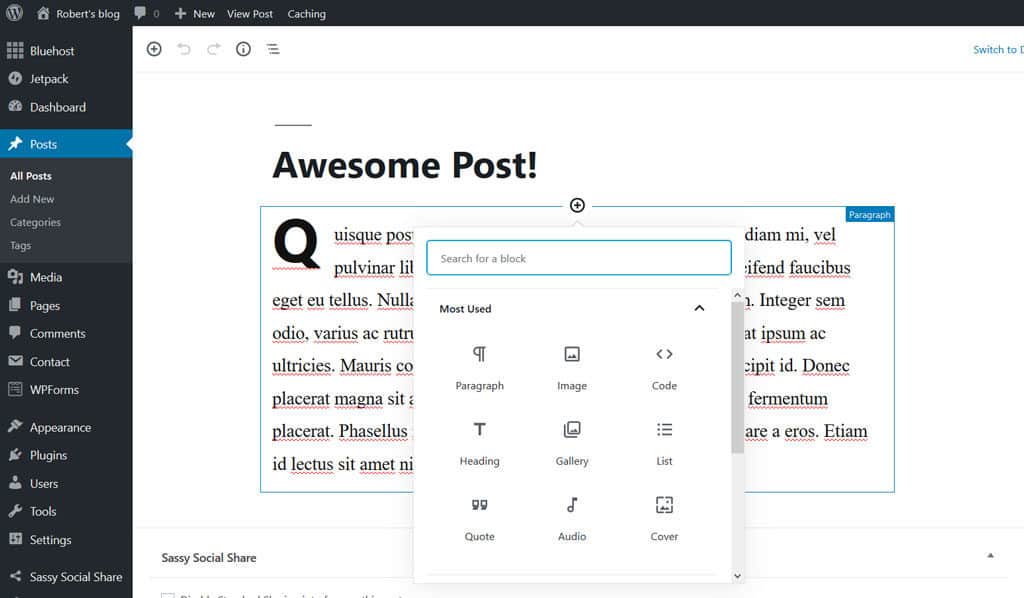
To add your first post navigate to Dashboard > Posts > Add New.
From here, you can add the title and start writing amazing content for your new blog.
WordPress add new post
With the new Gutenberg editor, you can add different types of content blocks into the editor by clicking on the “Add Block” icon.
Since I don’t have the time to cover every type of block included in the new editor (there are quite a few of them), I implore you to try it for yourself as most–if not all–of them are self explanatory.
Next, you’ll want to add a featured image to spruce up your post and add some visual flair for your readers. To do this, simply click the “Featured Image” box on the right hand side of your screen, upload your image, and click “Save”.
Once you’re satisfied with the quality and layout of your post, hit the publish button, sit back, and prepare to take the blogging world by swarm.
You have officially published your first post!
If you want to add a welcome page on the homepage of your site instead of a list of recent blog posts,all you need to do is go to Pages > Add New and then add the title and content.
Then rinse and repeat this process to create another page for your blog list, choose an appropriate title (like “blog” for example), and then hit publish.
With both pages created, go to Dashboard > Settings > Reading, then in the “Your Homepage Displays” option, check “A static page”, select your welcome page in the “Homepage” setting and your blog page in the “Posts page” setting, then hit save.
Your welcome page will now be published and ready to greet your new visitors as they arrive.

3. Create a Menu

One of the most important aspects of good user experience on any new blog is navigability, a.k.a. the ease with which your new viewers can find the content for which they’re searching.
And the most important part of navigability is a well designed and up to date menu.
Luckily, creating a menu inside of WordPress is pretty straightforward.
To get started, simply go to Dashboard > Appearance > Menu.
From here, create and add a new title for your main menu and then–in the left pane of the menu editor–check the pages you want to appear on your new menu and click “Add Menu”.
The checked pages should appear on the right pane of the editor and you can now rearrange their order by dragging the labels up and down.
WebsiteSetup menu
Once you’re happy with your menu’s structure, you can display it on your website’s main header by checking the “Primary” location checkbox (the name depends on the theme you previously selected) in the menu settings and hit save.

4. Install Plugins (They’re Free)

Plugins are one of the simplest (and cheapest) ways to extend your website’s functionality and increase the traffic and profits you generate each month.
Luckily, there are (quite literally) thousands of free plugins and libraries inside of WordPress and countless more on other external sites.
Let me give you a quick example with one of the most important plugins that you can download for your new site… A contact form.
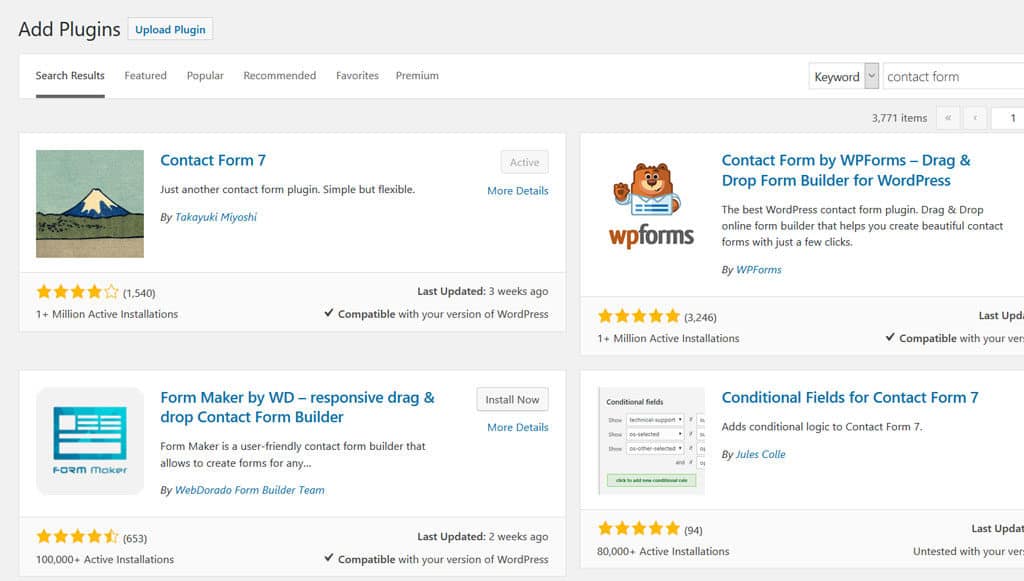
First, you’re going to go to Dashboard > Plugins > Add new and search for “Contact Form 7.” Then, click “Install” and activate the plugin from the search results.
WordPress plugins
Once the new plugin is activated, it will create a new menu called “Contact” in the dashboard. Click it to access the contact forms generated by the plugin and then click “Contact Form 1” from the list to edit the new form.
At this point, the contact form is effectively up and running, however, you’ll want to make sure that the mail template is properly functioning so that you actually receive emails sent from the form.
To do this, go to the “Mail” tab and change the “To” value to the address where the email should be sent.
Next, you’ll need to copy the “shortcode” found just under the contact form’s name… It should look something like [contactform-7 id=”25″ title=”Contact form 1″].
After you have copied the shortcode, create a new page called “Contact Us,” and simply paste the shortcode in the content.
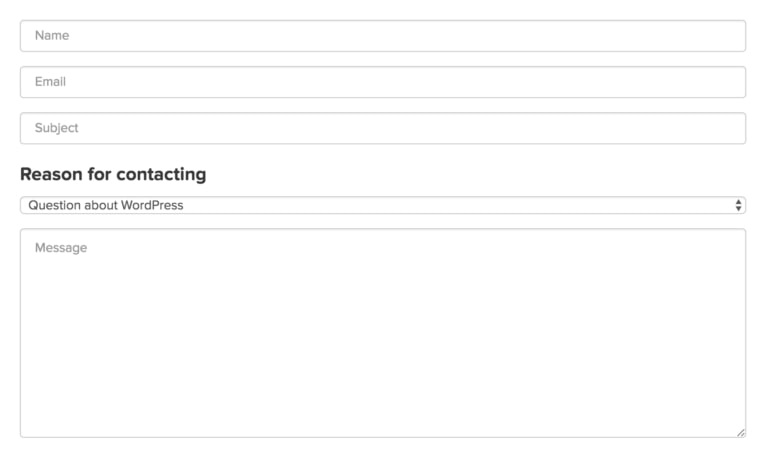
Then click “Publish”, sit back, relax, and check out your new content form in all of its glory:   
Contact form
If you are looking for more plugins that will improve the use and functionality of your blog, here’s a list of best plugins.

5. Customize Your Blog

To really add another level of flair and personalization, you’ll want to download another plugin that will allow you to change your website’s fonts.
Repeat the same steps listed above for the plugin “Easy Google Fonts” and then go to the theme customizer.
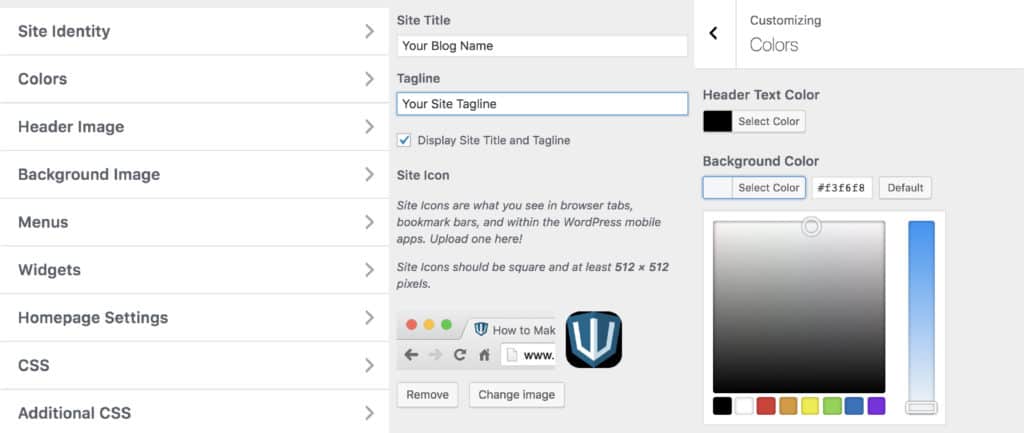
The customizer gives you the ability–much as the name would suggest–to customize your theme and preview it in real time.
Whether you want to change your site identity, colors, menus, widgets, homepage settings, or additional CSS, the customizer gives you almost total control over your website’s design.
With Easy Google Fonts installed, you’ll notice that there is a new option in the Customizer: Typography.
This setting allows you to change the fonts on your site to your liking and grants you a greater level of authority over your site’s aesthetic.
I encourage you to spend some time playing around with the Customizer until you have a strong grasp of the options available to you. Then, once you’re happy with the new look of your site, click “Publish” (as always) and double check the changes in a new tab.
WordPress site customizer
To make it easier for your readers to share your articles on their favorite social media channels, you’ll also want to install a social sharing plugin that will allow your viewers to seamlessly promote your new content from your posts and pages.
Just do a quick search in the plugins page with the keyword “social share” and you’ll be presented with hundreds of results. Install any plugin that strikes your fancy and set it up by going to its settings in your dashboard.
If you want to further customize your blog, read this WordPress Customization Guide.

6. Create a Personal Email Account

Having a domain-based email account like yourname@yourdomain.com boosts the professionalism of your website and increases the authority with which your correspondents will view you.
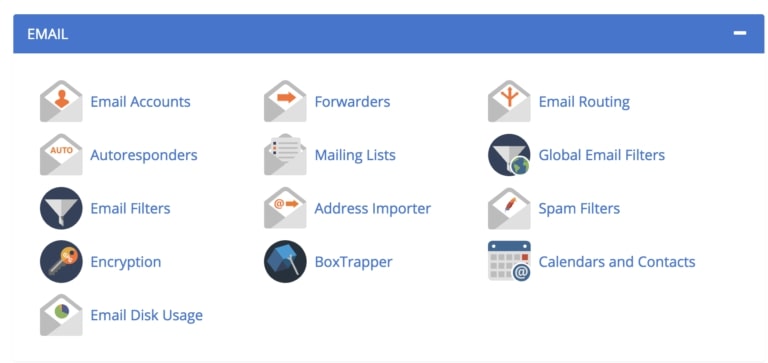
Luckily, BlueHost includes the ability to create a custom email account from your domain as a part of your web host account.
To access this feature, simply login to your BlueHost portal, click “Email & Office” in the left menu, scroll down and find “Basic Email”, and then click “See Options”.
From here, you can create your custom account in a matter of seconds.
Bluehost e-mail
Once your email account is created, click Email Accounts > Access Webmail to access the webmail application.
After confirming your credentials, you’ll be off to the races and you can now manage, send, and receive emails from your new domain-based account.
I’d encourage you to create an “About” page and add your new contact information so that all emails sent on your new site will be sent to the account you just created.
If you get stuck, here’s a guide for creating a custom email address for your blog.

Congratulations, You’ve Made It

Phew!
That wasn’t so difficult, was it?
At this point, you should have your very own fully functioning blog up and running.
But this is just the beginning.
Use the other content on my website to take your new blog to the next level and be sure to take few days to learn all the ins and outs of your new WordPress blog.
Read More
Next PostNewer Posts Previous PostOlder Posts Home